The Best Home-Theater Projectors, According to Experts
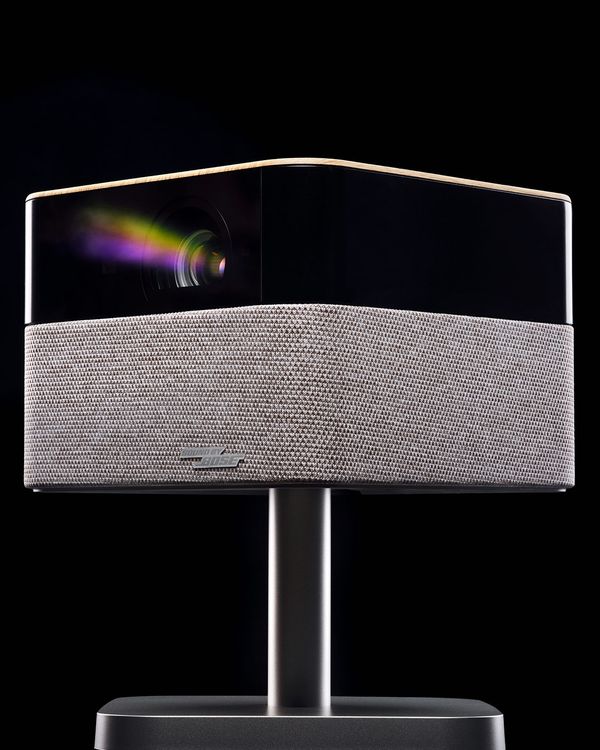
Up until recently, the main benefit to buying a projector over a TV was that it gave you the biggest possible image for the lowest cost. But with the recent downward price trajectory of ultralarge-screen TVs, that situation has changed. You can now buy a 98-inch TV for under $1,500 and even get a really good-quality one for less than $2,800.
In this article
Of course, not everyone wants (or has the space) to mount a giant television on the wall — and beyond that, says John Sciacca, a custom-installation professional and AV reviewer for Residential Systems, there are benefits to choosing a projector over a TV, even if it comes at a price premium. “There’s just something more cinematic to the image being reflected off the screen like at a movie theater. I’m currently on the fourth projector in my home theater, and it is still a thrill every time my family fires it up for movie night. It is an investment that never disappoints.”
There are many factors to consider when you’re picking a projector — everything from room lighting to the seating distance from the projection screen — before settling on a specific model. Choosing a projector is a job best done in consultation with experts, but if you’re not up for calling a custom installer yourself, I contacted four top editors and reviewers covering the category to get their take on what features to consider in a projector, how to plan your installation, and the models that suit your needs, whether you just want something you can set up for movie night or you’re building a full-fledged home theater.
NBA championships have you hooked on outdoor watch parties? Read our guide to the best portable projectors for models you can set up anywhere.
Our top picks
How to choose the best home-theater projector
The most important questions to address before choosing a projector involve the room you plan to install it in. Are you dedicating a room to home-theater use, with a projector mounted to the ceiling and a screen mounted on the wall? Or are you looking for something you can use in a multipurpose space and hide away when you’re not watching or gaming? How much wall space do you have for a projection screen — an add-on item that all of our experts recommend — and how far do you plan to sit from that screen? And either way, do you want to be able to have some degree of room lighting when viewing, or are you fine with going completely dark, as in a movie theater? Once you’ve answered those questions, you’ll be able to narrow down the projector type and tech that are most suitable for your room, the features and specifications to look for, and the best screen to match with your new projector.
Type: Long-throw, short-throw, or ultra-short-throw?
There are three main projector types, each providing an optimal fit for a different viewing situation. Long-throw projectors (the kind that may come to mind when you think “home theater”) get mounted on the ceiling at the back of a room and are meant to beam images to a screen located on the opposite wall, as in a movie theater. Jeremy Glowacki, editor-in-chief of ProjectorCentral, a website known for its authoritative, in-depth projector reviews, is a long-throw fan: “For the most cinematic experience, I would opt for a projector that could be mounted to the ceiling at the back of the room. This application requires a more expensive long-throw lens and typically a darker room.”
Good long-throw projectors aren’t cheap. Glowacki points out that the lens used by long-throw projectors contributes to their higher cost, but it also provides greater installation flexibility via features like optical zoom, manual focus, and horizontal and vertical lens shift. Such controls allow for finer adjustment of the projected image, which impacts picture resolution and clarity from the center to the edges of the screen and gets you closest to a real cinematic experience at home.
Short-throw projectors, a category that includes portable models, have less flexible lens capabilities and are typically set up close to the screen — on a table between the room’s seating area and screen or wall. These models cost less than long-throw projectors, and typically use digital processing for automatic focus and screen alignment. The easy, automated setup features make short-throw models a good option for temporary installations, where the projector will be put away immediately after use. Not everyone wants to have a permanent home-theater setup with a projector mounted to the ceiling and a screen mounted on the wall. (While you can use an empty white wall to project on, you can also find retractable screens that will provide better picture quality when viewing and can disappear back into their cases after the credits roll.)
Ultra-short-throw projectors are designed for even closer installations at the room’s front wall, directly below the screen. From a design standpoint, UST models are the least intrusive projector choice, a factor that makes them a compelling option for smaller spaces or multipurpose rooms. As Strategist contributor and audio/video reviewer Mark Knapp says, “UST projectors are the best option if you’d rather tuck the projector into a credenza right below a retractable projection screen for a nearly invisible installation.”
UST projectors are also a popular option for viewing in rooms with ambient lighting, but getting the best performance in such cases requires a special “ceiling light rejecting” screen that filters out light coming from sources other than the projector to ensure contrast is retained and that the picture doesn’t appear dim or washed out.
The downside is that UST projectors can have picture-quality shortcomings compared to long-throw models, especially if you want to project a large image. “There are issues with image clarity at the perimeter of the image, particularly when screen sizes are larger than 100 inches diagonal,” says Michael Hamilton, an ISF-certified professional video calibrator and a reviewer for ProjectorCentral. “UST projectors can also suffer from light fall off from the middle out to the sides and top on larger screens,” Hamilton adds.
4K resolution or “4K ready”?
Much of the video content you’ll want to watch these days is available in 4K resolution (four times the pixels of an HD image), and most projectors in the $1,000-and-above price range are billed as providing “4K resolution.” But with under-$1,000 projectors, you need to be more careful about reading specifications. “Some cheap projectors will list things like “4K support” or “4K ready,” but they might not actually project at that resolution,” says TechRadar’s Knapp. “Instead, they’re indicating that they can receive video at that resolution, and then will downscale to their lower-resolution display.”
Display type: D-ILA, SXRD, 3LCD, and DLP
The chipset used in the projector — like the panel used in a TV set — is what creates the image. Higher-end (and higher priced) long-throw projectors from JVC and Sony use LCoS (liquid crystal on silicon) display chips with 3,840 by 2,160 (4,096 by 2,160 on some models) pixels. LCoS chips provide “native” (actual) 4K resolution, along with strong contrast and deep blacks. To get the full benefit of their improved contrast, you’ll want to watch an LCoS projector in a dark room (or at least one with dimmed lighting), so they’re well suited for a dedicated home theater.
3LCD is a technology used in Epson projectors that uses separate LCD display chips for the red, green, and blue color components of images. Light passing through each chip simultaneously is combined using a prism to create a full-color image that passes through the projector’s lens. Since the native resolution of 3LCD display chips is 1,920 by 1,080 (HD), a process called pixel-shifting is used to quadruple the number of pixels appearing on the screen to create a higher-resolution 4K image. 3LCD projectors can also deliver high-contrast images, and they are another popular option for home-theater viewing.
In a DLP (digital light processing) projector, white light is passed through a color-filter wheel and split into red, green, and blue components. These components are reflected on a DMD (digital micromirror device) consisting of tiny mirrors, with each mirror forming a single pixel, and then projected sequentially at a fast enough rate that the eye sees a full-color image. As with 3LCD chips, the DMD used in DLP projectors is in HD resolution, with pixel-shifting used to display a 4K-resolution image. DLP is used in a wide range of projectors, from portable to long-throw, and it is the most common tech found in UST models.
Brightness and contrast
“If you are going to be using a projector in a room that has a lot of ambient lighting, like to watch with the lights on,” says Sciacca, “or tend to watch content that is typically bright, like sports, then the most important spec for you to look at will be the lumens. This is a standardized unit of measurement for projector brightness, and it’s the most reliable metric for how bright the image will appear on the screen.”
As with 4K resolution, brightness is another specification that can get muddied by the way projector manufacturers advertise. “The way some projectors advertise their brightness levels can lead you astray,” says Knapp. When you’re looking at specs, he says, “be on the lookout for ISO lumens or ANSI lumens, as this tells you the projector’s brightness was measured in a standardized way, allowing for direct comparison against other models.” You can expect to see brightness levels in the 500 to 3,200 lumens range for short-throw and portable projectors; 2,500 to 4,000 lumens for ultra-short-throw models; and 2,000 to 3,300 lumens for long-throw projectors. More is better here, all else being equal.
Beyond brightness, however, contrast is key, especially if you plan to watch in a dark, theaterlike environment. “If you can get your room really dark and like to watch movies, which usually feature a lot darker content, then a projector’s contrast measurement will be even more important than its brightness,” says Sciacca. “Contrast is a measurement of the ratio between the luminance of the projector’s brightest output (white) and lowest output (black), and is reflected as a number such as [for a unit with very good contrast] 40,000:1, meaning the brightest part of the image is 40,000 times brighter than the darkest part.” Better contrast means you’ll see a real difference between shadowy elements of a scene and bright ones — the kind of experience you get at a movie theater.
Once again, the devil here is in the details: “It’s important to look at the rating for the projector’s native contrast, not its dynamic contrast,” adds Sciacca. “Modern laser projectors can completely shut off the laser light source to produce a completely black image, resulting in an infinite contrast rating. However, this only works when the screen is completely black, and it’s not an accurate rating for real-world content.”
Color considerations
Most projectors designed for home use can’t hit the high brightness levels TVs are capable of, but they can match or even exceed TVs when it comes to reproducing color in movies that have high dynamic range (HDR). Why? RGB backlighting is just beginning to make it into TVs this season — most sets still use white backlighting, while it’s becoming a common feature in UST and also some short-throw DLP projectors. These use an RGB laser light source, combining separate red, green, and blue lasers to create a full-color image. Projectors with this feature can capture the full HDR color range, often with striking results. “One feature I absolutely love to see, literally, is an RGB laser light source,” says Mark Knapp. “On every projector I’ve tested with this feature, the color is simply gobsmacking. It doesn’t guarantee a perfect picture, as there’s a lot more involved there, but it can make for really stunning visuals.”
As with other projector specifications, color space coverage is subject to exaggeration by manufacturers, so it’s useful to read projector reviews that use measurements to verify specs. “Nowadays, an often-misleading specification is the percentage of a color space that a projector can display,” says Michael Hamilton.” Projector manufacturers of all types are in a color space specification race to say their models eclipse the capabilities of ITU-R BT.2020 (the color space foundation for HDR video). Often when tested, none of these models making such claims can do so. In fact, they largely fail by a wide margin.”
Along with HDR support and extended color, some projectors now feature a “filmmaker mode” picture preset. This feature eliminates the “motion smoothing” processing (that setting you have to turn off on a hotel TV or at your parents’ place) that alters the original frame rate and can make images look wobbly and sped-up.
Game on
With a 100-inch or larger image expanding your field of view, gaming with a projector can be an incredibly immersive experience. Some new models provide gaming-related features such as high refresh rate support (primarily 4K/120Hz and 1080p/240Hz) for console and PC gaming, along with special picture modes to reduce input lag when playing first-person shooter games.
If you plan to use a short-throw portable projector for gaming, however, you may get a less-than-optimal experience because of how they depend on software correction to produce a big image at such close range. “Short-throw projectors rely on effective, but limiting, auto setup features, says Michael Hamilton. “These projectors seldom have adjustable lenses, but rather use digital manipulation as a substitute,” Hamilton says. “If you intend to use the projector for gaming, all the image correction facilities are disengaged as their memory usage causes undesirable lag.” While this won’t affect gameplay, you’ll be left looking at an image that won’t look great and will be misaligned with your screen. So if you don’t have a lot of space to set up a projector, look for a model with manual picture adjustments like the BenQ TK710STi or one that offers image modes designed specifically for gaming like the Hisense PX3-Pro.
Smart TV platforms, audio, and connectivity
Few long-throw projectors provide built-in video streaming and audio capabilities — they are instead designed for use with a separate video source and full home-theater audio-playback system, with a single cable making a video connection between the system and the projector. Most short-throw, portable, and UST projectors, on the other hand, include a smart TV interface with streaming apps. Knapp finds these to be a “nice perk,” and Android TV and Google TV are “pretty serviceable” smart TV platforms. “But not every projector runs them smoothly,” he adds, “even some pricey projectors.”
While most short-throw, and even some long-throw, projectors provide some kind of built-in speakers for audio, the sound quality of these can be characterized as weak at best. If you want the option of adding better audio, it’s important to look for features such as an HDMI eARC port for connecting to external speakers or soundbar, or a Bluetooth output for wirelessly streaming audio to the same. For audio quality, the one projector exception would be UST models, some of which have surprisingly powerful built-in speakers that deliver clear sound.
The best portable projector for a home theater
New! You can now save this product for later.
Projector type: short-throw/portable; Display type: 3LCD; Light source: LED; Brightness (specified): 1,000 ISO lumens; HDR formats: HDR10, HLG; Connections: HDMI 2.0, USB type-A (x2), 3.5-mm. audio output, Wi-Fi, Bluetooth; Smart platform: Google TV
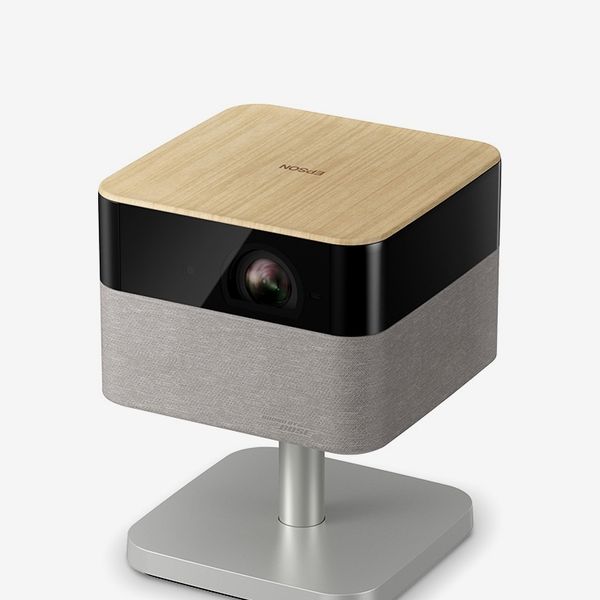
Want a short-throw portable projector that’s a solid choice for your home theater and might take care of all your home-entertainment needs? ProjectorCentral’s Jeremy Glowacki recommends the stylish Epson Lifestudio Flex Plus. A key reason for the recommendation, he says, is that Epson is a projector brand that can be counted on to “live up to the brightness claims on their spec sheets,” something that can’t be said for all makers of under-$1,000 portable projectors.
As the top 4K-resolution model in Epson’s lifestyle projector range, the Lifestudio Flex Plus offers a generous 1,000 ISO lumens brightness and Google TV support for streaming. Setup is fully automatic and a swivel stand provides 90 degrees horizontal plus 90 degrees vertical tilt adjustment so you can even project images on the ceiling. An ambient light feature on the Lifestudio Flex Plus lets it do double-duty as a lamp when not in use, and its built-in Sound by Bose audio system can also be used as a Bluetooth speaker for music listening.
A portable projector with even better picture quality
New! You can now save this product for later.
Projector type: short-throw/portable; Display type: DLP; Light source: RGB laser; Brightness (specified): 1,300 ANSI lumens; HDR formats: Dolby Vision, HDR10, HLG; Connections: HDMI 2.1, USB type-A, Wi-Fi, Bluetooth; Smart platform: VIDAA OS
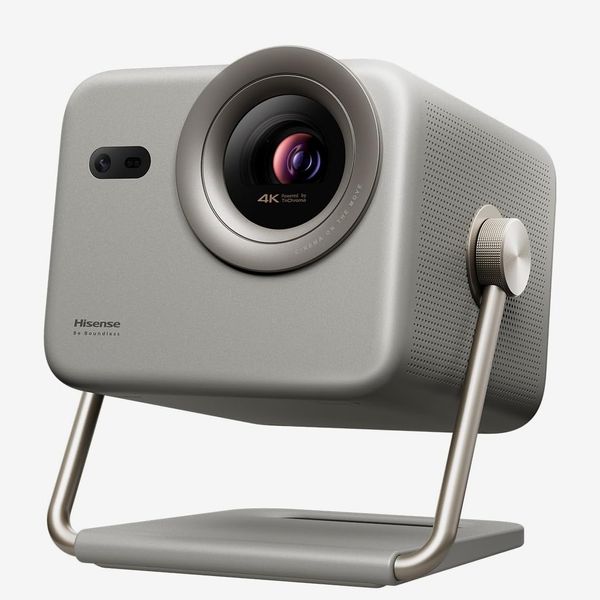
Want an even better image but still want to be able to hide away your projector when movie night is over? Glowacki also endorses the Hisense MP2 Pro, which takes short-throw/portable projector picture quality to the next level with 4K resolution, 1,300 ANSI Lumens brightness, and an RGB laser light source for enhanced color.
I’ve personally been using the MP2 Pro for the past few months, and I’ve been impressed with its installation flexibility (with 360-degree horizontal swivel and 180-degree vertical-tilt adjustment, you can pivot the projector on its gimbal stand to literally project a picture anywhere), easy automatic setup, and good picture quality for a portable model. From streaming video via Hisense’s own VIDAA OS smart TV platform to displaying presentations wirelessly via Miracast, the MP2 Pro stands above its compact portable projector competition.
The MP2 Pro’s features include Dolby Vision HDR and 3D video support, a Filmmaker Mode picture preset, a 1-1.3:1 optical zoom (a rare feature for a portable projector), and 240Hz refresh rate and ALLM (automatic low latency mode) support for gaming. An HDMI 2.1 connection with HDMI eARC is provided to output sound to external speakers, but its built-in 20-watt stereo speakers are good enough that in most instances you won’t have to bother.
The best less-expensive projector for gaming
New! You can now save this product for later.
BenQ TK710STi 4K Home Entertainment Projector
Projector type: short-throw/portable; Display type: DLP; Light source: laser; Brightness (specified): 3,200 ANSI lumens; HDR formats: HDR10, HLG; Connections: HDMI 2.0 (x2, 1 w/eARC), 3.5-mm. analog audio out, USB type-A, RS-232, Wi-Fi; Smart platform: Android TV
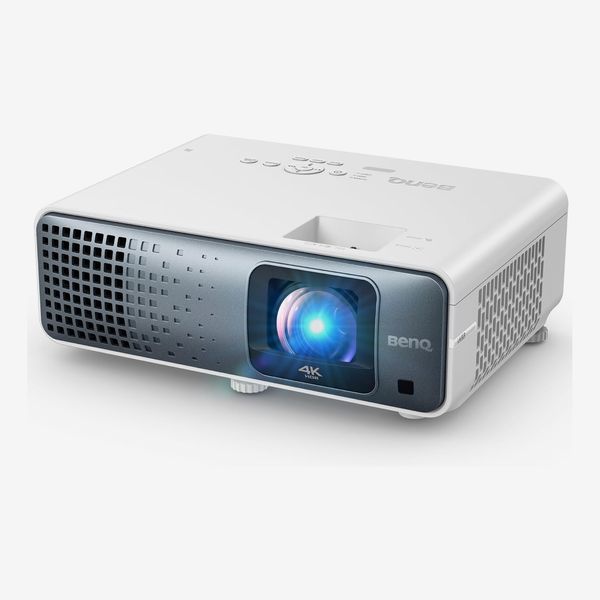
If you’re looking for an affordable short-throw/portable projector for gaming, they don’t get much better than the BenQ TK710STi. This projector’s high 3,200 ANSI lumens brightness lets you game even in bright rooms, and its 0.69-0.83 throw ratio means you can beam a 100-inch image with the projector placed just five or six feet from the screen. Unlike many short-throw/portable projectors, which have automatic digital setup, the TK710STi has manual 1.2x zoom and focus controls, so you don’t have to worry about losing picture settings when switching to game mode.
BenQ specifies the TK710STi’s input lag for 4K/120Hz gaming at under five milliseconds, which is extremely low for a projector. The TK710STi uses the Android TV platform for streaming, and its dual HDMI inputs feature eARC for connection to external speakers or a soundbar.
The best ultra-short-throw projector
New! You can now save this product for later.
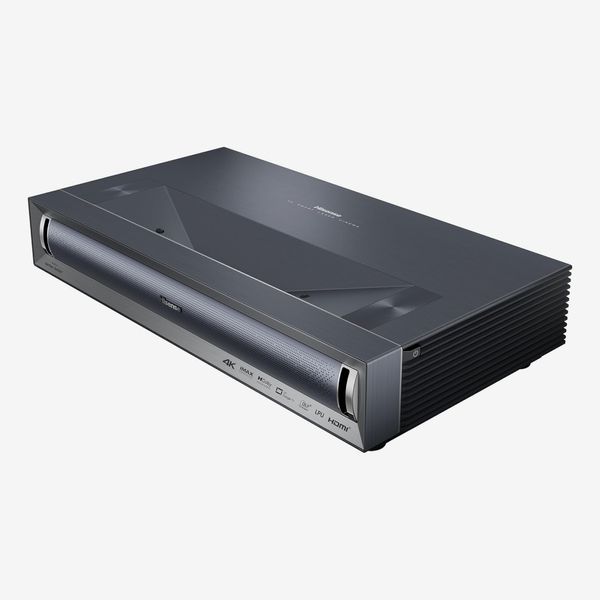
Projector type: ultra-short-throw; Display type: DLP; Light source: RGB laser; Brightness (specified): 3,000 ANSI lumens; HDR formats: Dolby Vision, HDR10+, HDR10, HLG; Connections: HDMI 2.1 (x2), HDMI 2.0 (with eARC), 3.5-mm. analog audio out, USB type-A (x2), Ethernet, Wi-Fi; Smart platform: Google TV
Video-calibration professional Michael Hamilton recommends the Hisense PX-3 Pro, a UST projector that he found to have “exceptional clarity while calibrating quite well” when he evaluated it. With an RGB laser light source and 3,000 ANSI lumens brightness, the PX3-Pro delivers impressive picture quality, and its built-in 50-watt Harman Kardon Dolby Atmos speaker system provides substantial home-theater sound.
As one of the first “Designed for Xbox” projectors, the PX-3 Pro is also a great choice for gaming, and its HDMI 2.1 ports can accept a 4K/120Hz input from gaming consoles. HDR support covers the Dolby Vision, HDR10+, HDR10, and HLG formats and Google TV (with Google Voice assistant) is used for streaming. Hisense recently announced the PX4-Pro, an upgrade on the PX3-Pro with higher brightness and enhanced gaming features that’s due out this summer, so the PX3-Pro should be available at a good discount in this year’s sales events.
A less expensive ultra-short-throw projector
New! You can now save this product for later.
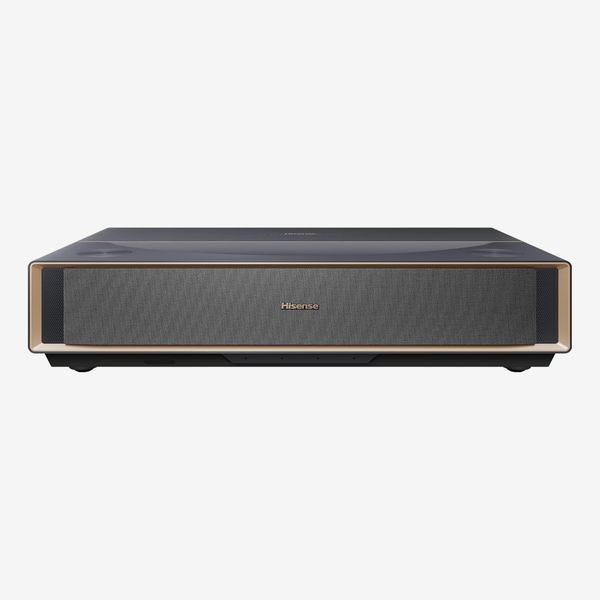
Projector type: ultra-short-throw; Display type: DLP; Light source: RGB laser; Brightness (specified): 2,500 ANSI lumens; HDR formats: Dolby Vision, HDR10+, HDR10, HLG; Connections: HDMI 2.1 (x2), HDMI 2.0 (with eARC), 3.5-mm. analog audio out, USB type-A (x2), Ethernet, Wi-Fi; Smart platform: Google TV
The Hisense PT1 offers many of the same features that makes the Hisense PX3-Pro great but sells for a lower price. The PT1 also has an RGB laser light engine, comprehensive HDR format support, and powerful built-in sound. It also uses the Google TV platform for streaming and has Google Voice assistant for voice control.
The key difference between the PT1 and the PX3-Pro is the PT1’s lower, 2,500 ANSI lumens brightness, which makes it better suited for smaller screen sizes and rooms where you can dim the lights. It also lacks the PX3-Pro’s advanced gaming features, though gaming is still a good experience on the PT1.
The best home-theater projector for movies
New! You can now save this product for later.
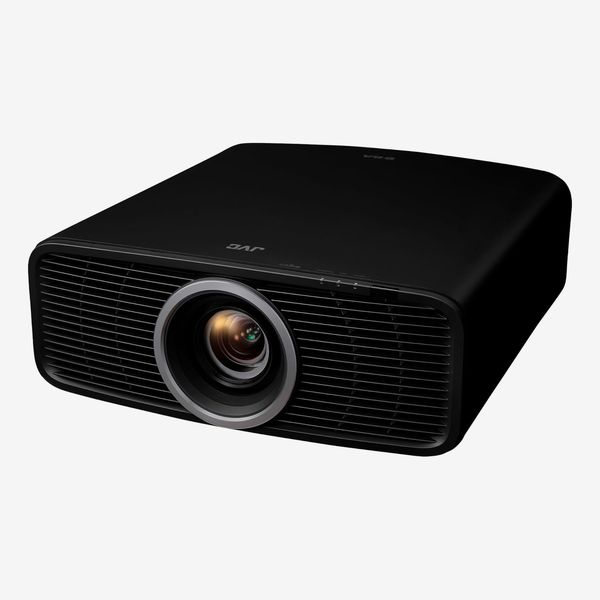
Projector type: long-throw; Display type: LCoS; Light source: Laser; Brightness (specified): 2,000 ANSI lumens; HDR formats: HDR10+, HDR10, HLG; Connections: HDMI 2.1 (x2),USB type-A, Ethernet; Smart platform: NA
Asked about his choice of a projector for watching movies, John Sciacca recommends JVC’s DLA-NZ500. “This is a true native 4K projector. JVC is known for its amazing black levels, and the NZ500 boasts a 40,000:1 native contrast that produces inky blacks onscreen.”
A key feature contributing to the NZ500’s powerful contrast is its dynamic tone mapping, which optimizes the contrast of movies with HDR on a scene-by-scene basis. The NZ500 also supports HDR10+ to enhance the look of the growing number of movies streamed in that format. At a rated 2,000 ANSI lumens, the NZ500 has lower brightness than some of its competition, making it a better choice for fully dark viewing environments. But then again, watching in the dark is what movies are all about, and that’s where this projector delivers.
A less-expensive home-theater projector for movie buffs
New! You can now save this product for later.
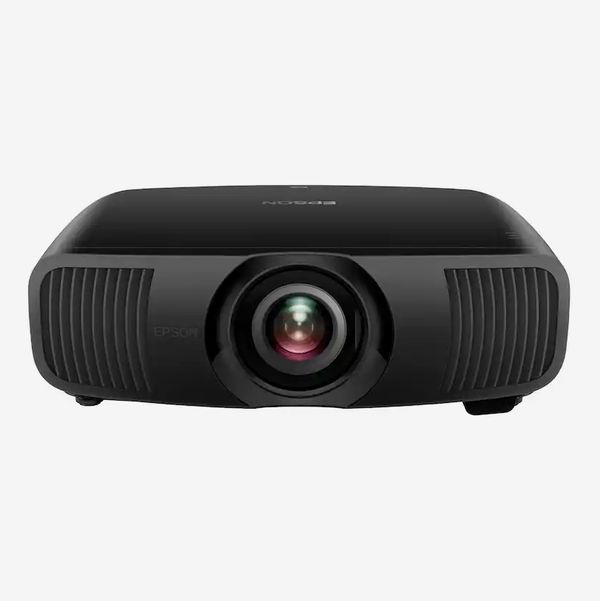
Projector type: long-throw; Display type: 3LCD; Light source: laser; Brightness (specified): 2,200 ISO lumens; HDR formats: HDR10+, HDR10, HLG; Connections: HDMI 2.1 (x2, 1 with eARC),USB type-A (x2), RS-232, Ethernet; Smart platform: NA
The LS9000 is the least expensive 4K projector in Epson’s Pro Cinema lineup. Pro Cinema models step things up with enhanced brightness and contrast plus a laser-based light source and support for HDR10+ high dynamic range. The LS9000 also has a powerful 2.1x zoom lens with motorized focus and lens shift, a feature that makes installation a snap.
While the LS9000 is a great all-around projector for movies, something I can state from experience, having seen it demonstrated multiple times, it also stands out as a gaming projector. Dual HDMI 2.1 ports support 4K/120Hz signals from gaming consoles, and input latency is impressively low for a projector. At just under $4,000, the LS9000 offers a lot for the price and is one of the best long-throw projector values out there.
The best premium projector for sports and gaming
New! You can now save this product for later.
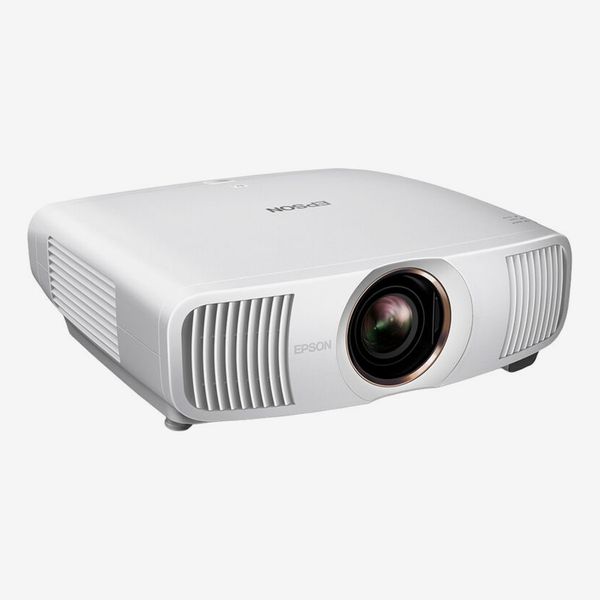
Projector type: long-throw; Display type: 3LCD; Light source: laser; Brightness (specified): 3,300 ISO lumens; HDR formats: HDR10+, HDR10, HLG; Connections: HDMI 2.1 (x2, 1 with eARC),USB type-A (x2), RS-232, Ethernet; Smart platform: N/A
Sciacca and Hamilton both recommend this Epson projector, which provides sufficient brightness to work in multiuse rooms where you don’t necessarily want to draw the curtains and shut the lights off. “The Epson QB1000 is a fantastic choice for bright rooms, putting out a massive 3,300 lumens,” says Sciacca. “It also features a motorized lens with really generous adjustment that will let you place it in nearly any room.” Hamilton finds that the QB1000’s “bright images with penetrating colors make sports more engaging.” He also adds that “with judicious screen pairing, dynamic range can be enhanced, giving deep blacks a welcome nudge.”
Along with the high brightness and rich color that make it a great option for watching sports, the QB1000’s dynamic tone mapping, a feature not found on the lower-cost Epson LS9000, makes it a strong projector for movies. And with 4K/120Hz support on its dual HDMI 2.1 inputs, ALLM, and a low input lag level that matches the LS9000, it’s also a powerhouse option for gaming.
Our experts
• Jeremy Glowacki, editor-in-chief, ProjectorCentral
• John Sciacca, TV and AV reviewer for Residential Systems
• Michael Hamilton, ISF video calibration professional and reviewer for ProjectorCentral
• Mark Knapp, Strategist contributor and projector reviewer for TechRadar
The Strategist is designed to surface the most useful, expert recommendations for things to buy across the vast e-commerce landscape. Some of our latest conquests include the best women’s jeans, rolling luggage, pillows for side sleepers, ultraflattering pants, and bath towels. We update links when possible, but note that deals can expire and all prices are subject to change.
Every editorial product is independently selected. If you buy something through our links, New York may earn an affiliate commission.