My Week With the TikTok-Famous Rolling LG TV

I usually only have one TV in my house. It makes my viewing more intentional: I have to choose to enter that room, sit down, and devote my attention to watching something. It’s helped me ditch my distracting habit of having TV on in the background while I work, but it means if I want to watch something elsewhere, I have to use my iPad. That’s fine, but its screen is too small for me to see from far away — tough if I’m using it while cooking and I’m moving around a lot — and it’s hard to see details from a further distance if I’m watching it with someone else.
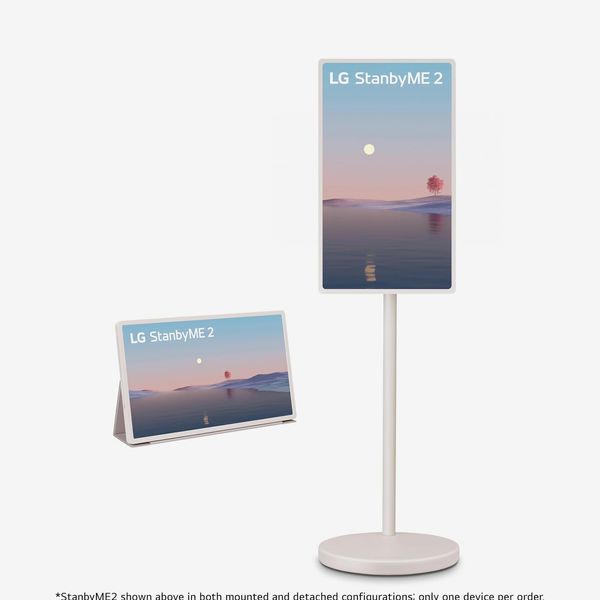
I’ve seen LG’s popular rolling TV, the StanByMe 2, several times on my “For You” page. It’s been praised for its sleek design, ease of use, and — most importantly — the fact that you can wheel it around, giving you a TV in every room of your home without needing to plop one on every surface. You can even take the screen off its stand and use it like a large tablet (with limited apps). But all that functionality requires some sacrifices.
New! You can now save this product for later.
Rolling TVs are surprisingly fun and useful
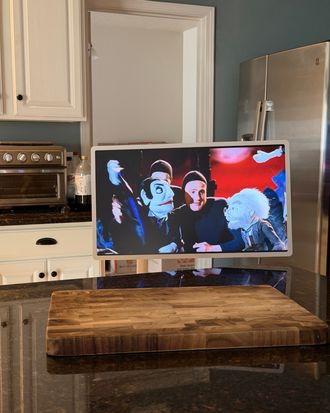
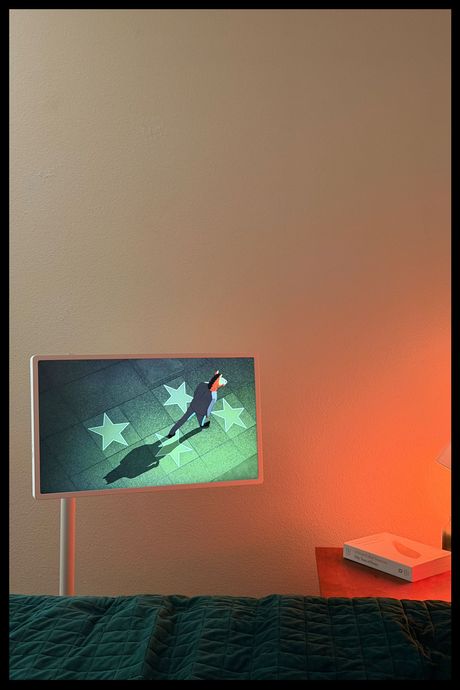
The StanByMe 2 doesn’t need a surface to rest on. Instead, it lives on a rolling stand, so you can move it from room to room without needing to rearrange your furniture. It’s big enough to watch comfortably from a distance, but not huge by any means: The TV is 24 inches wide, with a 22-inch screen. I can wheel it into my bedroom to watch some YouTube videos or play half an hour of Pokémon Pokopia on my Switch 2 before bed. Then in the morning, I can steer it over to my office, park it next to my desk, and use it as a second monitor. If I bring it downstairs — I remove the display from the stand for this, so it requires two trips — I can place it next to my kitchen countertop and follow a recipe while I cook. I do like that the stand’s power cord is removable, so it doesn’t drag while I’m carrying the stand.
Once you have the LG in place, you can swivel, rotate, and adjust the height of the screen to suit your needs. The tension-based stand is quite sturdy (I haven’t noticed any wobbling, thanks) with enough give to be easily repositioned while staying in place the rest of the time. This all just works; you don’t need to tighten or loosen any screws to get things positioned perfectly. I wish that the screen could be raised just a tad higher than its highest setting (about 50 inches) for better visibility, but it’s good enough for most situations.
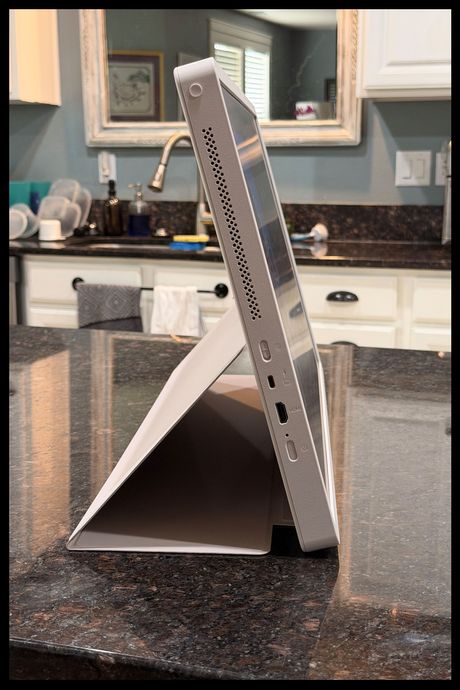
The StanByMe’s flexibility goes beyond simply being able to adjust its height and angle. Perhaps one room has more space on the floor for the LG’s stand, while another has more room on a counter or table for just the display. For those instances, there’s tablet mode — it has a battery that can last for up to four hours on a single charge. Even in this mode, you can connect devices via HDMI or USB-C. To switch to using the TV as a tablet, you place a kickstand module onto the back of the screen, and place the tip of the included screen cover underneath the kickstand module. If you’ve ever used an iPad’s Smart Cover in kickstand mode, it’s sort of like that.
Nice as the inclusion is, it’s clunky to set up and you can only use it at one viewing angle, making it far less flexible than when it’s attached to the stand. The kickstand module and screen cover are also additional components that you need to carry around or store in a drawer, which makes them easy to misplace.
It’s more than just a TV
In addition to its many physical use cases, the StanByMe 2 is packed with useful software. You can install touch-friendly games like Pac-Man and chess, as well as countless others. It’s a nice inclusion for parents who aren’t keen on giving their kids tablets but still want them to have some access to games. It’s even capable of streaming games from cloud services like Xbox Cloud Gaming. For those instances, you can pair a wireless control for a true gaming experience.
You can also install apps for your go-to streaming services right on the TV; there’s no need to plug in a streaming device. I even found the app for Jellyfin, which lets me stream movies and TV shows from the local server I’ve set up to store my personal archive. LG also has dedicated sports and fitness apps, plus a built-in web browser if you’d like to check the news or look something up without reaching for your phone.
The StanByMe 2 also supports AirPlay 2, which allows you to cast video from your iPhone, tablet, or laptop without any cables. You can even use it to mirror your device’s screen and use it sort of like a larger monitor for your laptop (which I sometimes do during my workday) or a way to watch TikToks on a big screen.
To ensure this TV’s longevity, LG has promised at least five years of software updates. Given that it’s best used without any additional hardware for streaming video, it’s a nice addition that’ll make the StanByMe’s high price easier to stomach.
The picture quality could be better
Strategist senior writer Lauren Ro recently purchased another rollable LG television, the Smart Monitor Swing. Its screen isn’t removable like the StanByMe’s, but it has a notably higher 4K resolution; its 27-inch screen (the full frame is 28 inches) is also five inches smaller than the Smart Monitor Swing’s. When watching Kubo and the Two Strings on the StanByMe, its 2,560 x 1,440 resolution produced decent images, but nowhere near as crisp or vibrant as on a 4K screen. That may not be an issue if you’re using it as a secondary TV for rooms without a larger screen, but if you’re planning on using it as your home’s sole television, I’d recommend getting the Smart Monitor Swing.
I do like, however, that the StanByMe 2’s screen is matte, rather than glossy, making it easier to see in brightly lit environments like a kitchen with lots of windows. Images won’t be as eye-catching as a glossy display, but it’s good enough and I like the added visibility.
Portability comes at a cost
After spending a week using the StanByMe 2 as my sole television, I understand the appeal. I can have a TV in every room without needing to create enough surface space in each room for a large display. That said, the ability to use it as a tablet, free from the stand, requires some sacrifices. Its resolution is notably lower than similarly priced televisions — even LG’s other rolling TV — which makes it less appealing as a standalone TV. If you prefer a portable TV to a more eye-catching one, that’s a fair trade-off, but I’ll be holding out for a model that can be both.
More From The Strategist
- Hark, the Advent Calendars Arrived (Very) Early This Year
- The Best Things Strategist Editors Have Bought This Year (So Far)
- 63 Things You Should Never Buy Full Price
- The Strategist Fall 100
The Strategist is designed to surface useful, expert recommendations for things to buy across the vast e-commerce landscape. Every product is independently selected by our team of editors, whom you can read about here. We update links when possible, but note that deals can expire and all prices are subject to change.