The Meta Ray-Ban Smart Glasses Were Much Better Than I Expected

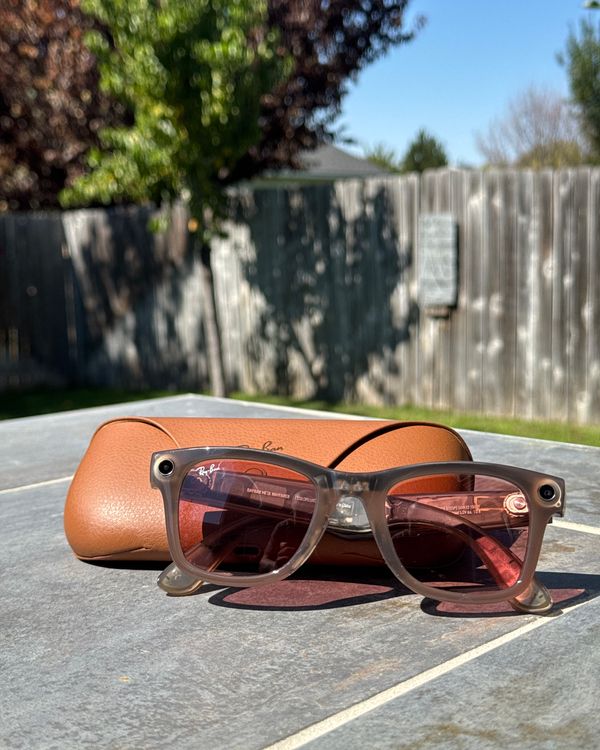
My iPhone has been my go-to camera since 2019 when I started opting for the Pro models with their improved cameras. That usage has only increased since I became the annoying uncle who’s obsessed with documenting his niece’s and nephew’s every move and word. Since I started wearing Meta’s Ray-Ban smart glasses a few months ago, though, I’ve been using my phone’s camera a bit less.
New! You can now save this product for later.
The technology is much better than I expected
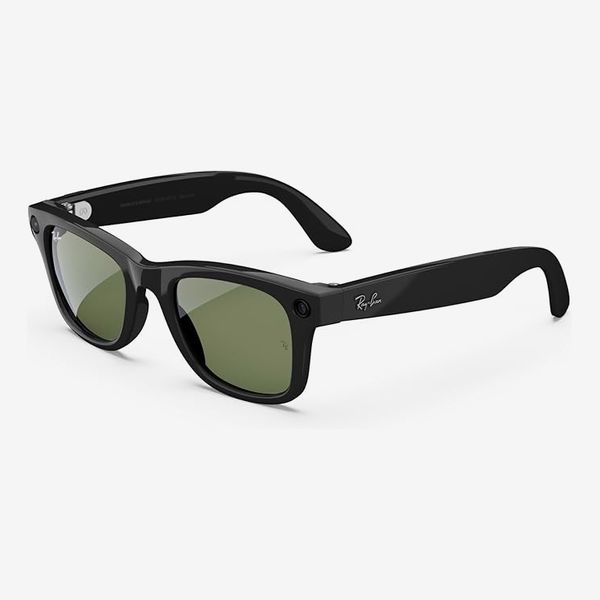
On first glance, these glasses don’t look too different from standard Ray-Bans. But that’s to their benefit; they’re classic for a reason and look great on just about anyone. They come in two different frames: the classic Wayfarers and the rounder Skyler. I got a pair of the Wayfarers with clear transition lenses, but you can also get polarized, colored, or prescription ones.
That’s where the similarities with standard Ray-Bans end. These glasses have a 12 megapixel camera that can shoot 1080p video and upload it right to your Instagram Stories without you having to even remove them from your head, plus ambient speakers that let you hear your tunes or podcasts without blocking the noise of your surroundings. The right side of the frames has a touch panel you use to control audio playback, phone calls, and voice commands, plus a shutter button to take pictures and videos with a single tap. The touch gestures are similar to what you’d find on a pair of wireless earbuds: tap to play/pause, double tap to skip forward, triple tap to skip back. The glasses come in a faux-leather charging case, and in my week of usage, I only had to charge the case once. The glasses themselves last about four hours on a single charge.
Meta’s voice assistant is impressive; I nearly stopped using Siri while testing the Ray-Bans. To trigger it, you say “Hey, Meta,” and you can then control your music on Spotify, capture a picture or video, send messages and make calls, ask the assistant questions, or have it assess what you’re looking at and do things like translate text in other languages. Its responses are quick — even web queries only took a few seconds — which was a welcome change compared to Siri’s responses, which often take so long I’ve already moved on. I do have some issues with how the headphones handle notifications. I’m a devout user of Do Not Disturb, but while I wore these headphones, all my text messages were announced by Meta’s voice assistant.
Everything else about these glasses’ audio is great. They have speakers on both sides, and audio is played near, rather than in, your ears. The effect is similar to listening with earbuds on transparency mode, but because your ears are completely unblocked, this method is better for actually hearing your surroundings. Despite that, the audio is still loud and clear, though not bass-y enough to be a go-to music-listening device. And unless you have them at full volume, there’s hardly any noise bleed, so it won’t disturb people around you.
And the camera is almost as good as your phone’s, too …
For all that, though, you could get a good pair of earbuds with transparency mode and talk to your phone’s smart assistant. These glasses truly started to shine when I took them with me on a trip around the Pacific Northwest and surrounding areas. I used them alongside my iPhone’s camera to capture shots of my trip, and the pictures were surprisingly close to what I took on my phone. The pictures I took in Yellowstone National Park came out vibrant and clear and made me pause to make sure they came from the glasses. They weren’t quite as detailed as the ones I took on my phone, but they were perfectly fine for posting on social media.
Transferring a few photos from the glasses to your phone only takes a few seconds, but large batches may take a minute or two. When you want to send the pictures to your phone, the glasses create a unique Wi-Fi network for your phone to connect to until the pictures are done transferring. It sounds clunky, but it all happens within Meta’s app; you just have to keep the app open on your phone while your media transfers.

… But it’s awkward having a camera on your face
The problem with using glasses as your camera is that your body is effectively the tripod. As I tried to snap shots of Yellowstone’s gorgeous landscapes, I found myself having to tilt my head, take a few steps in one direction or another, and stand on the tips of my toes a few times to get the right shot. You can also remove the glasses and take a picture with them off your head, but because they’re meant to capture close to what your eyes are seeing, you won’t really know what you’re capturing until you check your phone. Additionally, if you’re wearing a hat, there’s a good chance the edge of it might show up in the corner of your photos. Meta’s Smart Crop feature did a good job of automatically removing it, but that only worked in about half the shots where my hat was present.
Physics aside, my biggest concern with Meta’s glasses is that it’s hard not to feel slightly voyeuristic while wearing them. The glasses have a bright white LED light on the front that illuminates whenever they’re recording, but even when you’re not actively capturing anything, you’re still walking around with a camera pointed at everyone else.
This didn’t cause any problems while my friend and I hiked through the parks, and my sister had no objections to me snapping a million photos of my niece and nephew, but I felt an immediate knot in my stomach when I walked into a restroom at a Yellowstone lodge and forgot to take my glasses off. There’s an easy-enough fix: Make sure you take the glasses off anywhere you shouldn’t be recording. Although the glasses have a more spylike feel than walking around with your phone’s camera out in front of you, nobody’s going to notice there’s a camera on your glasses unless the light’s flashing. Still, if you’re in a gathering where you can let people know that you’re wearing camera-clad glasses, it might help put them at ease.

The convenience alone might make them worth it
Up until testing these glasses, I had been skeptical of smart glasses altogether. The nature of the always-present camera felt invasive, and I wasn’t convinced the lower quality of the images would be worth that trade-off. After my road trip, I’m a bit more convinced of the utility of smart glasses. Snapping pictures with them is easier than having to reach into your pocket, grab your phone, and open your camera app; and the pictures look quite good. The audio isn’t quite as good as you’d get with dedicated earbuds, but it’s good enough for accompanying you on walks or commutes. And, refreshingly, it’s given me another reason to spend less time looking at my phone. I can start my favorite playlist, send a quick text, and take a picture of my pups all straight from my glasses, without having to lift a finger. None of that matters if you can’t get past the privacy issues these glasses present. But if you can use them mindfully, it’s hard to beat the convenience of a totally hands-free camera.
More From The Strategist
- Hark, the Advent Calendars Arrived (Very) Early This Year
- The Best Things Strategist Editors Have Bought This Year (So Far)
- 63 Things You Should Never Buy Full Price
- The Strategist Fall 100
The Strategist is designed to surface useful, expert recommendations for things to buy across the vast e-commerce landscape. Every product is independently selected by our team of editors, whom you can read about here. We update links when possible, but note that deals can expire and all prices are subject to change.