Finally, a Pocket-Size Digital Notebook That Feels Like Writing on Paper

I’ve had the same note-taking system for nearly ten years. Whenever an idea comes to me, or someone suggests something for me to read or watch, it goes immediately into the Notes app on my phone. Because ADHD makes so many of my thoughts vanish before I can let them stew, having a single place to drop everything makes it easy to search for things I wish my brain could hold onto. That works for when I don’t have a pen and paper nearby, but repeatedly tapping on glass isn’t as satisfying nor is it as good for committing ideas to memory.
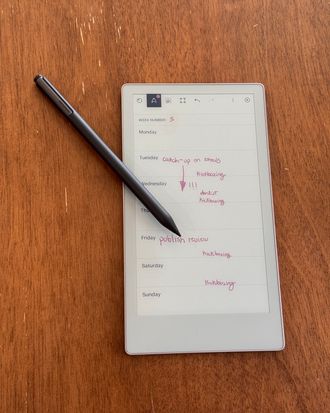
In the past few months, I’ve been trying something new and turning to the reMarkable Paper Pro Move for taking more of my notes. I’ve written about how much I like reMarkable’s larger tablets, and I was excited when the company came out with a pocket-size version last year. Because it’s as portable as a notebook, I can carry it everywhere, which has gotten me into the habit of committing to writing by hand. As a result, I’m retaining a lot more than I did when I typed all my notes, and the Paper Pro Move’s paperlike feel makes me forget I’m using a tablet (which for me is a good thing).
New! You can now save this product for later.
It’s more notebook than tablet
Like reMarkable’s larger Paper Pro, the Paper Pro Move uses a color e-ink screen that’s both easy on the eyes and visible even in direct sunlight. It has a matte finish that’s more textured than the glass display of an iPad, and I’ve found that it feels like writing on a notebook with a decent ballpoint pen (not quite as enjoyable as writing with a fountain pen, though). The Move’s 7.3-inch screen has just enough space to write an outline for a draft or jot down quotes from a book I’m reading.
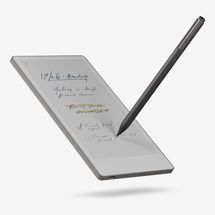
reMarkable’s stylus — called the Marker — feels more like a nice pen than an Apple Pencil. It has a grippy finish that makes it easy to hold on to and has both pressure and tilt sensitivity so it’s almost as responsive as an actual pencil on paper. When not in use, the Marker magnetically snaps to the side of the Paper Pro Move; this is also how you charge the stylus. The standard Marker is included with the reMarkable, but you can also get the Marker Plus if you want your stylus to have an eraser built in. If you’d rather save the $50, it’s pretty easy to toggle between pen and eraser mode using the tablet’s toolbar.
The Paper Pro Move’s notebooklike feel goes beyond its matte display. Because it’s so small — it fits in my jacket pocket — I can carry it in one hand and write while I’m walking around. Even with small tablets like an iPad Mini, doing so is a lot more cumbersome. And although you don’t get the tactile satisfaction of getting to flip through pages, I do like that the sides of the reMarkable are ridged, so it sort of feels like you’re touching the edge of a notebook.
You get unlimited, customizable notebooks
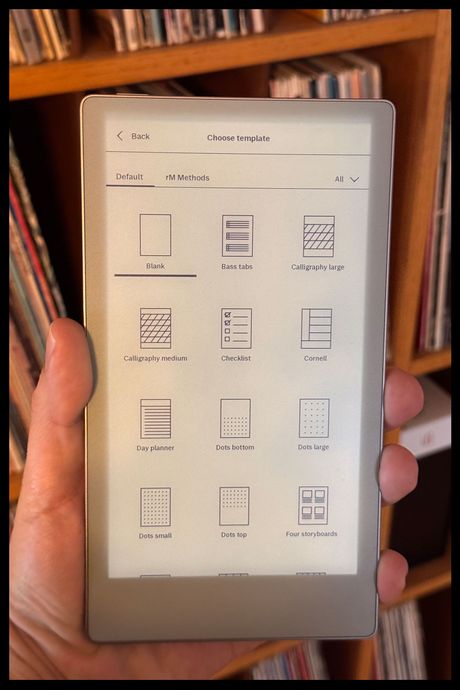
Because it has the benefit of digital storage — 64 GB onboard — the Paper Pro Move can create an almost unlimited number of notebooks for a variety of topics and projects. If that storage isn’t enough, reMarkable’s $3 per month Connect service has unlimited cloud storage. I have a notebook for brainstorming, one to outline essays for my newsletter, another for writing down quotes and interesting bits of information, and one for doing light sketchwork. You can change the format of each notebook, so one can have pages with a dotted grid while another can have college-ruled lines, a structured planner template, grids at the top and blank space at the bottom, or even music sheets for chords and tabs — there are nearly 50 preinstalled templates in total. reMarkable’s tablets also support PDF viewing and editing, so you can purchase third-party templates designed specifically for the Paper Pro Move from Etsy.
The pen has fewer options: There’s a ballpoint or fountain pen, a standard or mechanical pencil, a paintbrush, plus a few others. Additionally, the Paper Pro Move’s color screen, which looks less washed out than the color screens on the Kobo Libra Colour and Boox Palma 2 Pro, allows you to color-code your notes with nine different colors. I use the colors to label everything in my brain-dump notebook: Red for tasks, black for ideas, yellow for recommendations.
If you’re using this as a replacement for your notebooks, you’ll want this to be able to go without needing a charge for as long as possible. reMarkable claims the tablet can get up to two weeks out of a single charge, and that tracks based on the few months I’ve been using it. If I spend all day taking notes, either while I’m testing products or taking reading notes, it’s probably closer to a week and some change. Even so, that’s plenty to replicate the always available nature of a paper notebook. I do wish, however, that the Paper Pro Move were waterproof or at least resistant; it’s not, so be careful where you decide to do your scribbling.
Its limitations can be frustrating or empowering
reMarkable’s Paper Pro Move is laser focused on giving you one thing: a paperless way to take endless notes without losing the benefits — and for some people, like me, joy — of writing by hand.
That narrow focus does, however, mean that you can’t get as much function out of this tablet as you could an iPad or even other e-ink note-taking devices like the Kobo Libra Colour. For instance, the reMarkable’s software technically allows you to read e-books on it, but it doesn’t have nearly as many features as a dedicated e-reader. You can’t highlight text, there aren’t as many options for customizing text, and there’s no integrated e-book store so you have to side-load all your content. You may not notice this if you prefer paper books or don’t need to fine-tune everything about your reading experience, but because the Paper Pro Move has such a nice display, I can’t help but wish it could be my primary e-reader, too.
Additionally, some functions are only available if you subscribe to reMarkable’s Connect service. With it, you get access to exclusive templates, unlimited cloud storage, and access to proprietary apps for editing your notes. Most important, though, it’s the only way to search the text of your handwritten notes. For those who like to automate the digitization of their writing, this will probably be a noticeable omission. I don’t need another subscription, so instead I decided to schedule a weekly review of my notes, wherein I go over everything I’ve written down and decide what’s worth typing into my Notes app, what I need to take action on, and what I don’t need to store long-term. That has allowed me to be more intentional with my thoughts and gives me another chance to commit the important ones to memory, but it does mean I have to set aside more time to manage my notes.
It’s the best digital notebook you can take on the go
At $449, the Paper Pro Move is far from an impulse buy. You can get a notebook and pen for a fraction of the price and all you’d be missing is the front light that makes the reMarkable easier to use in more settings than actual paper, plus the ability to create near infinite notebooks. But those two things matter a lot. The Paper Pro Move’s commitment to being a space for all of your handwritten notes and thoughts, all the time, is a welcome respite from the loud, distracting apps on phones and tablets. I never leave the house without mine.
More From The Strategist
- Hark, the Advent Calendars Arrived (Very) Early This Year
- The Best Things Strategist Editors Have Bought This Year (So Far)
- 63 Things You Should Never Buy Full Price
- The Strategist Fall 100
The Strategist is designed to surface useful, expert recommendations for things to buy across the vast e-commerce landscape. Every product is independently selected by our team of editors, whom you can read about here. We update links when possible, but note that deals can expire and all prices are subject to change.