The 7 Very Best e-Readers

In this article
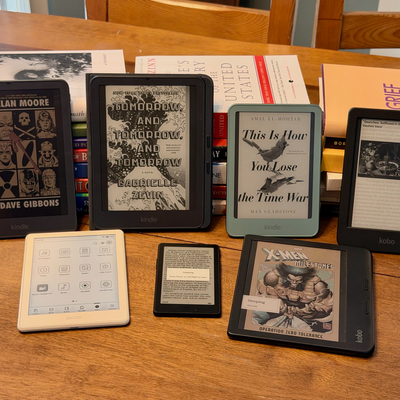
While the primary function of any e-reader is to let you carry your library of e-books (and audiobooks) with you in your bag or pocket, these devices with paperlike screens have evolved in many directions. While most out there are black-and-white e-ink devices sized between a smartphone and an iPad, you’ll also find tablet-size models that support stylus input for taking notes, and others so small you could drop them in a wallet. Color readers let you enjoy comics and graphic novels.
Some manufacturers concentrate on their own proprietary bookstores (Amazon’s Kindles work great for any books you buy through the Kindle store but can be a hassle with books bought elsewhere), while others let you build your library from multiple sources (Kobo readers, for example, let you load non-Kobo books). Boox has gone a different route: Its e-readers are basically stripped-down Android tablets, allowing you to install third-party apps and build your dream reading device (though it requires some work).
Despite their differences, at a base level, a good e-reader must meet a few requirements. It should have weeks-long battery life, a crisp e-ink screen that makes text clear and easy to read, and a form factor that’s comfortable enough to hold for long reading sessions. Lots of e-readers fit that bill, but it’s the small features that make some stand out.
I’ve been using e-readers since Kindles had keyboards back in the mid- to late-2000s. In that time, I’ve learned what makes an e-reader truly stand out and how each one can suit different folks’ needs. These are the best e-readers for every type of book lover.
Updated on June 17, 2026
Kobo’s Clara BW is our new best e-reader overall. We’ve also named the new aluminum version of the six-inch Kindle as the best Kindle, the Kindle Paperwhite Signature Edition as our best upgrade Kindle, the Kindle Colorsoft as the best color e-reader, the Kobo Libra Colour as the best e-reader for taking notes, the Boox Go 6 as the best Android-based e-reader, and the XTeink X4 Pro as the best ultracompact e-reader.
Our top picks
What we’re looking for
Screen size and density
E-reader screens come in a variety of sizes. A smaller-screened device is more portable and can still deliver the full e-reader experience, while a larger display can show more text, even with large fonts, and in some cases supports stylus input for highlighting or annotating. Six inches seems to be the sweet spot, as it’s enough space to show a page’s worth of text while still managing to fit in most pockets and small bags.
An e-reader’s screen should have a high pixel density (measured in pixels per inch, or PPI) to make sure text is easy to read without any blur. Most of the e-ink displays on the readers we recommend offer pixel densities of 300 PPI in black-and-white mode. This is ideal for a device held at arm’s length or closer, enough to keep text looking close to actual paper even on larger screens.
For comparison, the Retina display on an iPad mini has 326 PPI, while larger iPads have 264 PPI (a device with a larger screen meant to be looked at from farther away needs less density to look sharp). Those high pixel densities are meant to be so dense you can’t see any individual pixels. Anything below 200 risks the text looking fuzzy and forcing you to squint a bit, but even on devices with around 220 PPI, text can look fine, just not quite as crisp.
Most manufacturers also make color e-readers now. They’re better for reading graphic novels and comic books and allow for more detailed highlights and notes, but that comes at the expense of some screen sharpness, since color e-ink works by adding an additional layer of “ink” atop the black-and-white layer, and the farther the black-and-white layer is from the surface, the less crisp text looks. If you plan on reading mostly plain text, stick to black-and-white models.
Light
Most readers use a technique called frontlighting that evenly illuminates the whole display. Unlike backlighting, this method doesn’t result in lights being pointed directly at your eyeballs, so it won’t feel as harsh on your eyes. Some e-reader displays also allow you to adjust the color temperature of the screen, so you can set it to a warmer tone when you’re reading in bed at night. While the jury’s still out on how much blue light affects our sleep patterns, having a screen with a more gentle glow certainly can’t hurt.
Battery life
Unlike with smartphones, the battery life of an e-reader can be measured in weeks, or sometimes months. In general, it’s best to get a reader that’ll last for several weeks on a single charge. The frequency with which you’ll have to charge your device will depend on how often you’re using it, your preferred lighting settings, and how long you typically use it for, but I’ve never had a problem getting through at least a couple weeks with any e-reader.
File support
E-books primarily come in MOBI, KFX, and EPUB formats. MOBI, supported by nearly every model on this list, and KFX, supported exclusively by Kindles, are usually protected by some form of digital rights management that limits what or how many devices can access the file’s contents. In fact, Amazon’s restrictions have become so tight that the company no longer lets you download copies of your e-books for archiving.
The more open file format, EPUB, is easier to use for managing your own library if you get your books from outside the Kindle store, but it’s more difficult to get onto a Kindle than MOBI or KFX. If you do want to put EPUB files (which you can get from third-party bookstores or indie publishers) on your Kindle, you’ll have to use third-party software like Calibre to convert to one of the Kindle-friendly formats or transfer them over email, and even then, the cover art may not transfer without a lot of fiddling in Calibre. If you just plan on buying directly from the bookstore that’s baked into your e-reader (Amazon and Kobo both have their own), don’t worry about this too much.
Storage
Most models come with either 8, 16, or 32 GB, and some even have microSD card slots for expandable storage. 8 GB should be fine for most people who plan on only using their e-reader for reading text, though, as that will store about 6,000 books. If you want to use your e-reader to listen to audiobooks or read comics, you’ll probably want 32 GB.
Audiobook playback
Some e-readers have the added capability of playing audiobooks. You’ll need a pair of Bluetooth earbuds or headphones to do so, as most don’t have audio jacks or speakers. Amazon also has a nifty service that’ll sync your progress between an audiobook and its e-book counterpart if you’ve purchased both.
Water resistance
Many people like reading by the pool. In the past, few e-readers were natively waterproof, so that meant risking a disaster if someone splashed water on it or you accidentally dropped it in the water. Nowadays, plenty of e-readers come with waterproofing. This specification is given as part of the device’s IP rating: The higher the second number in the rating is, the more likely your e-reader will be to survive a splash (numbers up to six signify splashproofing) or dip in the pool (ratings of seven or eight meant the device is protected against immersion). Ideally, you won’t ever have to find out for yourself just how waterproof your e-reader is, but it’s nice to have the protection even just for the peace of mind.
Best e-reader overall
New! You can now save this product for later.
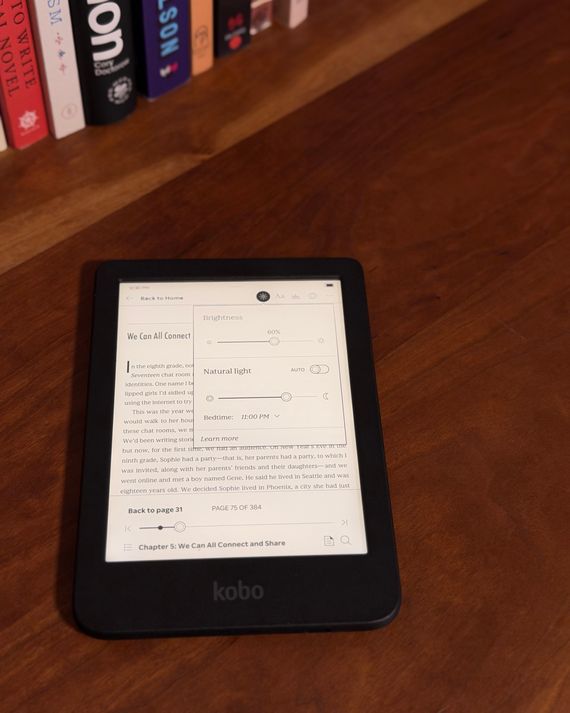
Kobo Clara BW
Screen size and density: 6” black-and-white e-ink screen; 300 PPI | Light: Yes, color-temperature adjustable | Battery life: Up to several weeks | File support: EPUB, MOBI, PDF | Storage: 16 GB | Audiobook playback: Yes | Water resistance: IPX8
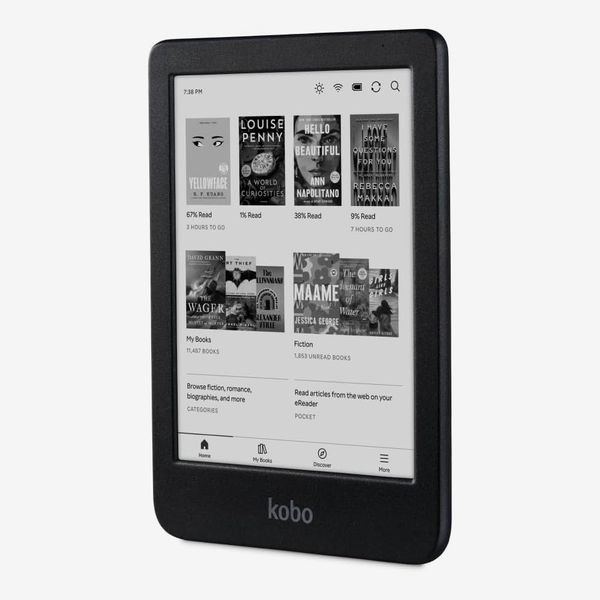
Kobo’s Clara BW embodies everything that makes a great e-reader. Its compact form factor and ample storage ensure you can take a whole library of books with you everywhere, and its crisp, front-lit display makes text look nearly as good as on paper. Beyond that, its software feels tailored for passionate readers, with integrations to services like Libby and Instapaper that give you access to more content than just what’s within Kobo’s store.
Despite being Kobo’s entry-level e-reader, the Clara BW is packed with features that other companies reserve for more expensive models. For instance, you can adjust the color temperature of its six-inch display’s front light, while Amazon omitted that from the similarly sized (and priced) standard Kindle. Also, the Clara BW is IPX8 waterproof, while Amazon’s cheapest Kindle isn’t — and we like that you don’t have to splurge to get a pool-safe e-reader. Its display is recessed — meaning it sits below the device’s bezels — which isn’t as nice to look at as the latest Kindles, but it performs just as well.
On top of offering a few more features at a lower price than Amazon’s Kindles, the Kobo’s software feels nicer overall. Ads take up less of the home screen than on ad-supported Kindles, leaving more room for books from your actual library. When you long-press on a book in your library — from the Kobo store or elsewhere — you can mark a book as finished or unfinished, as well as add it to a collection, view all your highlights and annotations, and view all the book’s details. I’ve found that last one especially handy, as I sometimes forget what the premise of a particular novel I bought might be (I buy a lot of books to read later), and like to review it before choosing what to read next. Finally, when reading a book, you can simply slide your finger up or down the left side of the display to adjust the screen’s brightness without having to jump into the “quick settings” menu.
What’s really nice is that Kobo’s integrations with third-party stores and services let you enjoy a more varied library with less effort than the Kindle requires. First, you can sign into your Overdrive/Libby account right on the device and check out books from your local library. Kindles support Libby, but you have to use the app on your phone and send books to your device. Additionally, you can log in to your Instapaper account to read any articles you’ve saved from the web — there’s no way to do that natively on a Kindle. I do wish that you could highlight and annotate text within articles the way you can with e-books, but it’s still nice that the feature is included at all.
Using third-party software like Calibre, you can sync e-books acquired directly from publishers, or those you’ve gotten elsewhere, and the Kobo will treat them the same as any other book. As long as the e-book file has a cover, the Kobo’s lock screen will switch to the cover of whatever book you last opened. Kindles can display the covers of third-party purchases, but only on ad-free models, which cost a little more, and only if you take an extra step and convert them to a proprietary format first.
Kobo also sells a color version of this e-reader called the Clara Colour. Its specs are nearly identical to the Clara BW’s, but its display isn’t quite as crisp, as the color layer removes a bit of clarity. If you like to read the occasional graphic novel or comic book, this model may be a better fit, but if you primarily read color media, either the Kindle Colorsoft or Kobo Libra Colour would better suit your needs.
Best Kindle e-reader
New! You can now save this product for later.
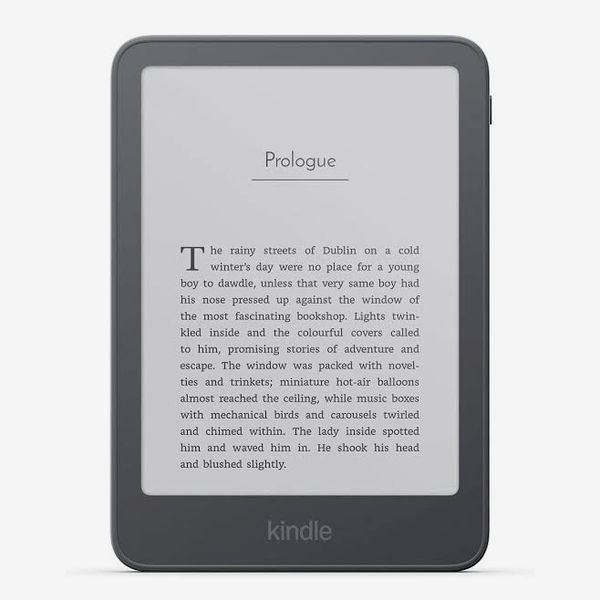
Screen size and density: 6” black-and-white e-ink screen; 300 ppi | Light: Yes, not color-temperature adjustable | Battery life: Up to six weeks | File support: MOBI, KFX, EPUB (through email), PDF | Storage: 32 GB | Audiobook playback: Yes | Water resistance: None
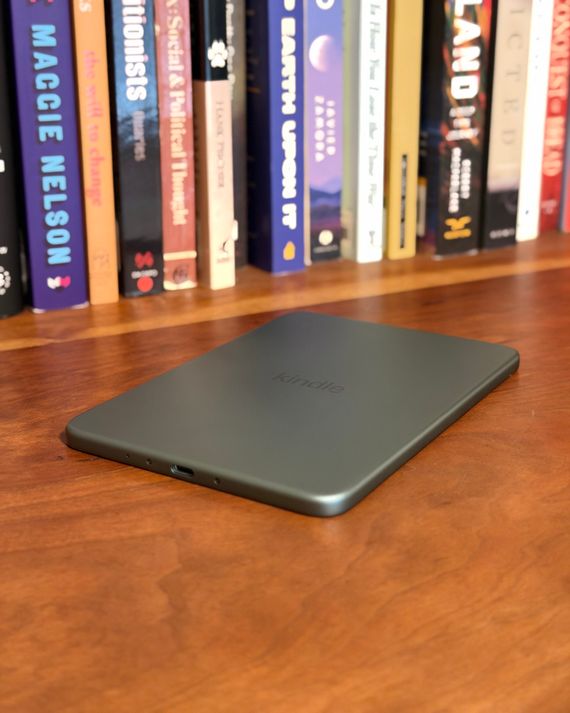
For those who (mostly) get their e-books from Amazon’s Kindle store, the aluminum version of Amazon’s latest six-inch Kindle has the nicest hardware of any e-reader I’ve ever tested. It’s remarkably thin and easy and comfortable to hold, and it has an eye-catching design that makes the device look and feel more luxurious than most e-readers. If this Kindle, like the Clara BW, were waterproof and let you adjust its display’s color temperature, it would be my favorite e-reader.
Amazon sells a plastic version of the base Kindle that’s $40 cheaper and has half the storage, but in my testing, the front of the display began to pull away from the back when I tried removing the Kindle from Amazon’s case. That’s not an issue with the aluminum version, which uses magnets on the back for attaching a cover, rather than a plastic shell. And even after an accidental drop, the display on my aluminum review unit remained in place. That peace of mind, plus the additional capacity and more premium feel, are well worth the extra $40.
Because it’s made mostly of aluminum instead of plastic, this Kindle feels more like an iPad Mini than it does a traditional e-reader. Thanks to its thinness and overall lightweight design, it sits comfortably in one hand while reading, though it’s large enough to hold with two hands without your hands cramping. And this year’s standard Kindles (both the plastic and metal versions) are the first to have displays that sit flush with the rest of the device’s front — a feature previously reserved for the more expensive Paperwhite and Colorsoft and one that makes it feel more like you’re reading text on paper, since the display seems closer to the actual surface. It also means there’s one less place for things like dirt, dust, and hair to get caught between, as recessed screens usually have a small gap between the display and the bezel.
Despite getting that feature from its more expensive siblings, this Kindle still lacks some things that both the Paperwhite and Colorsoft have. Most importantly, it’s not waterproof, so I wouldn’t recommend taking this e-reader poolside. Also, the color temperature isn’t adjustable — the screen only has a blue/white light, though the white light on this Kindle isn’t so harsh as to make that a deal-breaker. That said, the Clara BW, which is the same price as the plastic version of the base-level Kindle, both is waterproof and has adjustable color temperature.
It’s also worth noting that although Kindles do work with more open file formats such as EPUB, not everything works seamlessly. For instance, side-loaded EPUB book covers won’t show up on your lock screen, so you’ll need to convert them to the more Kindle-friendly KFX format first. After you do that, the lock screen changes to that book’s cover just as it would with a book from the Kindle store. You will, however, miss out on some Amazon-specific features like Whispersync, which allows you to sync the progress of a book between its e-book and audiobook formats — that only works with books you’ve purchased through Amazon.
Best upgrade Kindle e-reader
New! You can now save this product for later.
Screen size and density: 7” black-and-white e-ink screen; 300 ppi | Light: Yes, color-temperature adjustable | Battery life: Up to 12 weeks | File support: MOBI, KFX, EPUB (through email), PDF | Storage: 32 GB | Audiobook playback: Yes | Water resistance: IPX8
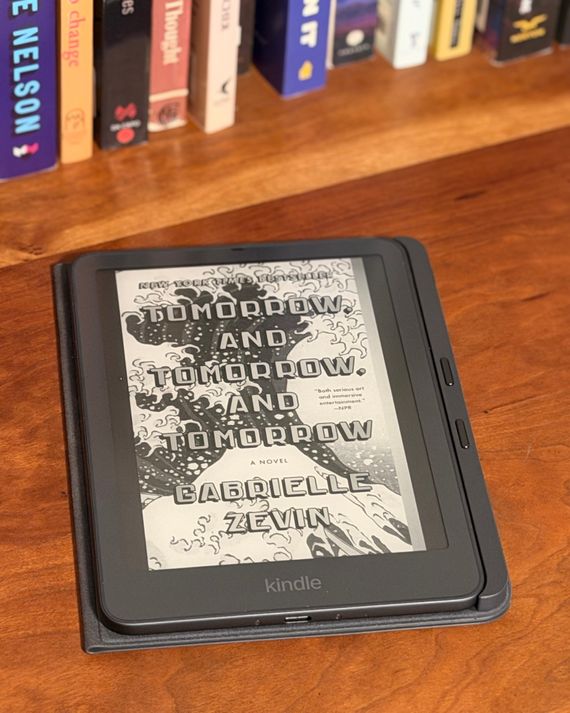
While the aluminum version of the base Kindle should cover most people’s needs, the larger-screened Kindle Paperwhite Signature Edition provides enough additional features to make it worthwhile for passionate readers. It can display more text at a given time than the smaller Kindle, resulting in less frequent page turns, and its waterproof design makes it easier to trust that it can withstand trips outside the home. Additionally, the Signature Edition comes with support for a new case that adds page-turn buttons to the Kindle — marking the return of a beloved feature from the now-discontinued Kindle Oasis (albeit at an additional cost).
The Paperwhite’s screen isn’t just bigger than the regular Kindle’s, it’s also nicer to look at thanks to its adjustable front light. Like the Clara BW, you can adjust the color temperature of the screen from totally white to a softer orange that’s more comfortable to read in dark environments. But while the Clara’s color temperature must be manually adjusted, the Signature Edition of the Paperwhite has a front sensor that will automatically tweak the brightness and color of the screen based on your surroundings, just like your phone can do.
Although it’s an excellent device on its own, the Signature Edition’s best feature is one of its accessories. On the back are four dots that allow the device to magnetically attach to either a wireless charging stand or that new case with physical page-turn buttons. The former works just as you’d expect, while the latter gives you a more satisfying way to interact with the device as you read. There are two buttons on the case, to the right of the Paperwhite’s screen. By default, the top button moves you forward a page and the bottom button takes you back a page, but you can swap that in settings. It’s not quite as satisfying as actually flipping a page, but it’s as close as a gadget can get.
Best color e-reader
New! You can now save this product for later.
Screen size and density: 7” color e-ink screen; 300 in PPI black-and-white, 150 PPI in color | Light: Yes, color-temperature adjustable | Battery life: Up to eight weeks | File support: MOBI, KFX, EPUB (through email), PDF | Storage: 32 GB | Audiobook playback: Yes | Water resistance: IPX8
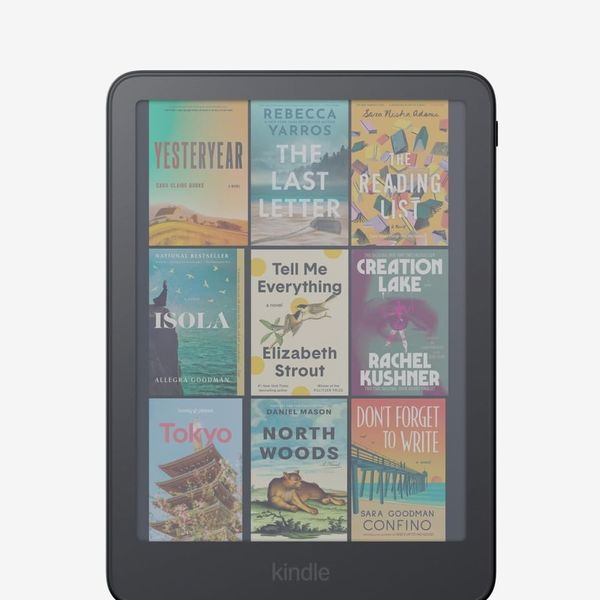
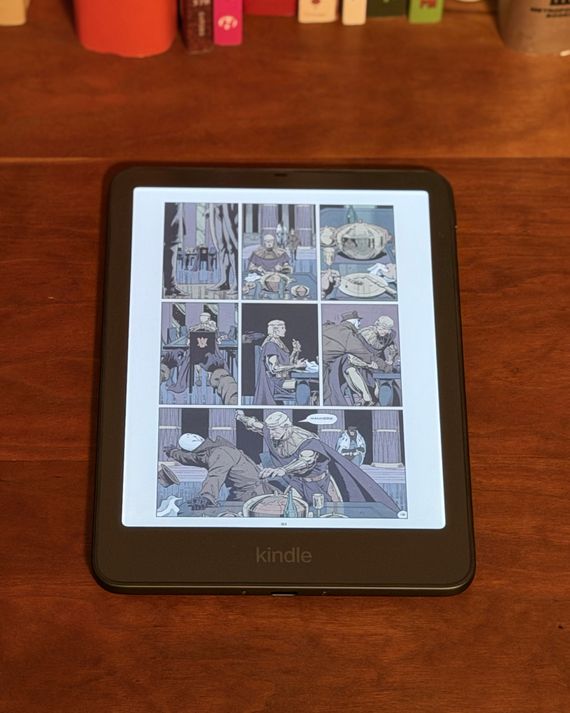
The Kindle Colorsoft is basically a Paperwhite with a color e-ink screen. Thanks to that, it’s better for viewing graphic novels and comic books, and it makes your lock screen more fun, as all the book covers show up in color. When reading Watchmen, colors were vibrant with plenty of contrast — sort of like the Sunday comics in a newspaper — and text was crisp and easy to read. And even if you don’t routinely read comics, the color display comes in handy for avid highlighters, as you can highlight text in five colors, rather than just one on a black-and-white display.
Although the Signature Edition of the Colorsoft is quite pricey, it’s worth the splurge for the additional 16 GB of storage, as graphic novels and comic books take up more space than regular e-books. That will prevent you from having to manually delete old comic issues or books you’ve already read to make room for new ones. I do wish that, like the similarly sized Libra Colour, the Colorsoft offered stylus support, as there’s plenty of room to do some doodling, but the Kindle’s nicer display gives you a better overall reading experience.
Best e-reader for taking notes
New! You can now save this product for later.
Kobo Libra Colour
Screen size and density: 7” color e-ink screen; 300 ppi in black-and-white, 150 ppi in color | Light: Yes, color-temperature adjustable | Battery life: Up to several weeks | File support: EPUB, MOBI, PDF | Storage: 32 GB | Audiobook playback: Yes | Water resistance: IPX8
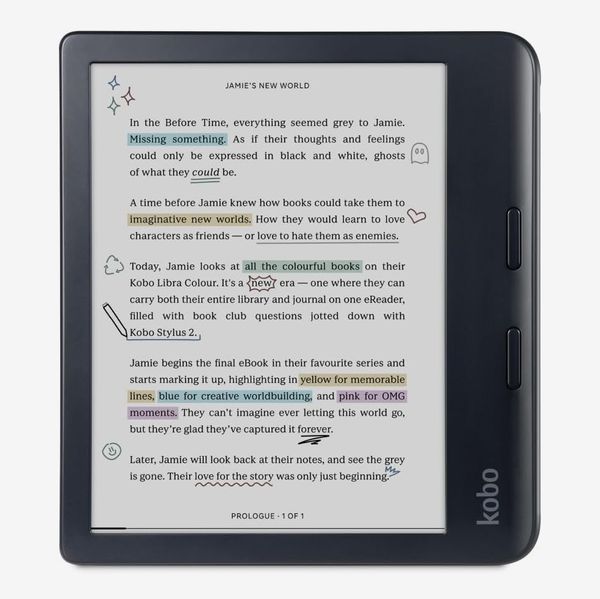
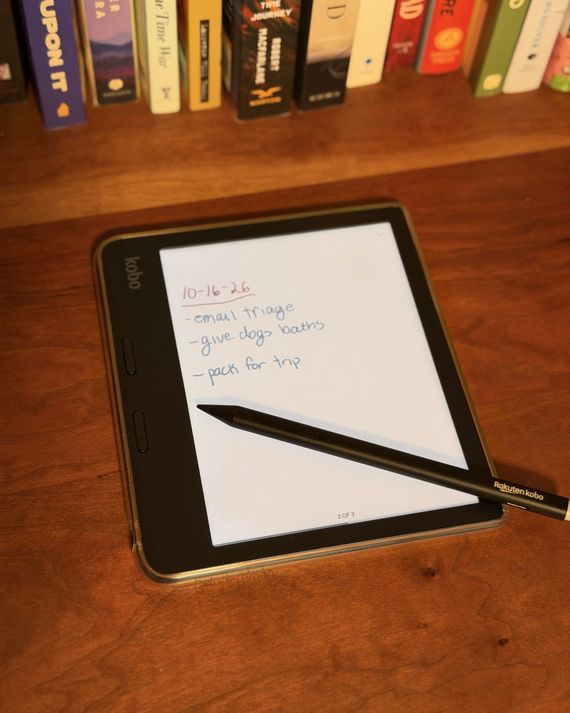
The Libra Colour is nearly as good for reading graphic novels and comics as the Colorsoft, though its screen is slightly more grainy and makes text look a tad more dull. Even so, the Libra has one key feature that I wish Amazon had included on the Colorsoft: support for stylus input. With that, you can scribble notes in the margins of your e-books — questions or observations you may have while reading — which makes it feel a bit more like you’re reading an actual book. You can also create notebooks using any of nearly 40 templates, including various gridded and lined formats, as well as planners and even guitar tabs.
Since the Libra has a color e-ink display, you can take quite detailed notes. It supports ten colors in total, so you can color-code everything as if you had a bag full of pens and highlighters with you. You can also change between a ballpoint, fountain, or calligraphy pen, as well as a brush or highlighter, so it truly does feel like a full-blown digital notebook that you can fit in a fanny pack.
Most flexible e-reader
New! You can now save this product for later.
Boox Go 6 (Gen II)
Screen size and density: 6” black-and-white e-ink display; 300 PPI | Light: Yes, color-temperature adjustable | Battery life: Multiple days | File support: PDF, CBR, CBZ, EPUB, MOBI, DOC, DOCX, TXT | Storage: 32 GB | Audiobook playback: Yes | Water resistance: None
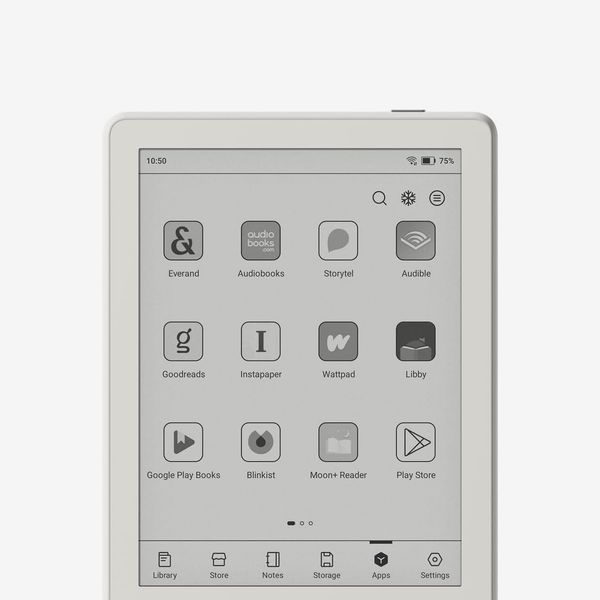
While the Kobo and Kindle give you everything you need to read e-books and listen to audiobooks and not much more, an Android-based e-reader provides the flexibility to create a reading experience tailored specifically to your preferences. Boox makes a bunch of e-readers in different shapes and sizes, and they’re all great, but if you’re looking for something that feels like a Kindle but can run all your favorite apps, get the Boox Go 6. It’s roughly the same size as the Clara BW and standard Kindle, but it has access to the Google Play Store, so you can install nearly any app you want on it.
Because the Go 6 has an e-ink display, not every app will look good on its screen, but anything text-based looks fantastic. I’ve installed the app Moon+ Reader Pro, which allows you to access all your e-book files from a single app and customize nearly every aspect of the reading experience. And for reading articles I’ve saved from the web, as well as all my newsletters, I’ve installed Readwise Reader. You may not use or want those specific apps, but having the ability to install any text-friendly app gives you more wiggle room with what you read. For example, if you buy your books from multiple digital stores, you could have each installed on the Go 6 rather than being locked to one store or having to convert all your files. Using Boox’s preinstalled browser (or any one you install from the Play store), you can read articles straight from your favorite websites, or use an RSS reader to stay up to date on the news without needing to check your phone.
Just like the Clara BW, the Go 6 has a color-temperature-adjustable display that’s as nice to look at in direct sun as it is from underneath a blanket. The screen sits flush with the rest of the device’s front, just as with the latest Kindle. I do wish, however, that the Go felt as nice to handle as either the Kindle or Kobo, both of which have a little more heft.
Unique among the six-inch tablets we recommend, the Go 6 supports a stylus (Boox’s InkSense Plus), so you can take notes right on this e-reader. I think the display is a bit small for any serious note-taking — don’t take this one to class with you — but it works in a pinch for writing down a quick list or a few stray thoughts.
Running Android is an overall positive for those who like to fiddle with settings, but it also does present some hurdles worth considering. Primarily, the fairly new Go 6 runs the already outdated Android 11 — and Boox rarely issues major updates to newer versions, though the company does release firmware updates with its own new features from time to time.
Because it’s an e-reader and not a work device, you don’t necessarily need the latest version with all the new features, but you do need to be sure your apps will continue running as time goes on. The older a version of Android gets, the less likely it will be to support the latest version of a given app. The exact cutoff will depend on how long a developer wants to support older versions of Android, but until then, you’re still getting more functionality than you could get out of a Kindle or Kobo.
Best ultracompact e-reader
New! You can now save this product for later.
XTEink X4 Pro
Screen size and density: 4.3” black-and-white e-ink display; 219 PPI | Light: Yes, color-temperature adjustable | Battery life: Up to several weeks | File support: EPUB and TXT | Storage: 16 GB | Audiobook playback: No | Water resistance: None
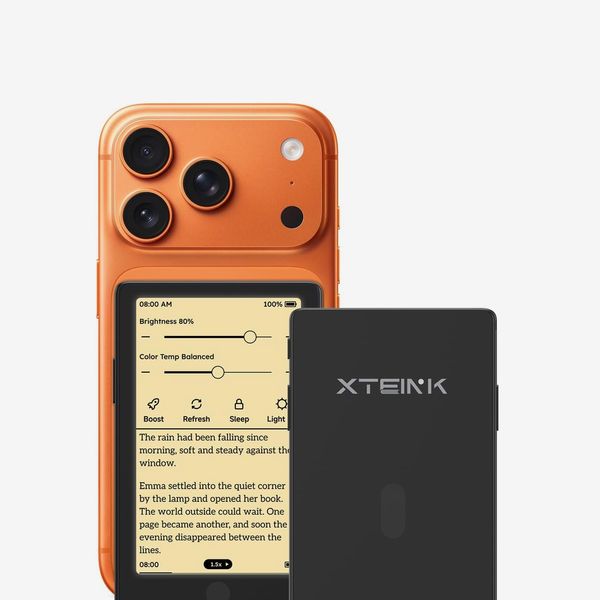
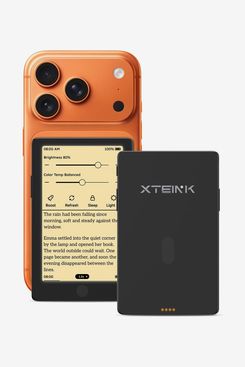
If a six-inch e-reader seems too large for your tastes, the XTeink X4 Pro offers all the convenience in a design you can fit in the same pocket as your wallet. Its proprietary operating system isn’t as feature-packed as that of a Kobo or Kindle, but it provides everything you need to read e-books.
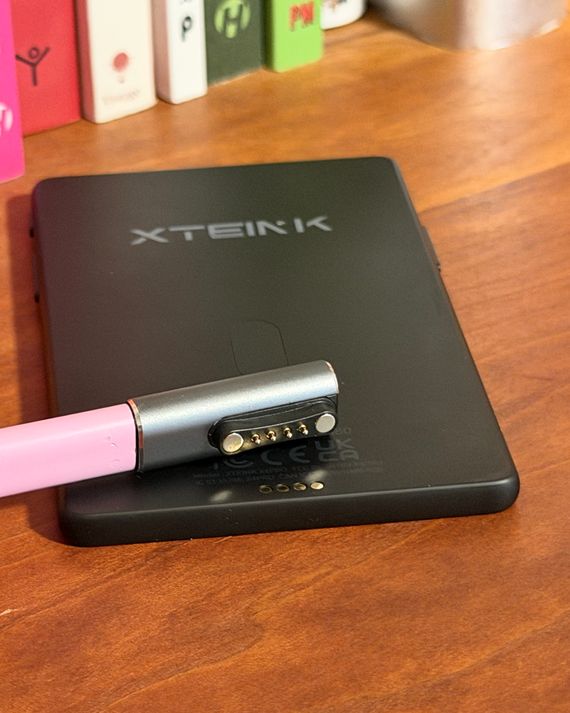
Where you can start reading with a Kobo and Kindle right out of the box, getting started with the X4 Pro requires more work. For instance, there’s no XTeink e-books store, so you have to acquire your books elsewhere, and since there’s no USB-C port (it’s just too thin to house one), you have to use a dongle to connect a USB-C cable to the X4’s miniature magnetic pogo pin connector (similar to that of a Garmin or other fitness tracker) and sync those files from your computer. That’s relatively simple, as XTeink includes an adapter in the box, but it’s an extra hurdle that neither the Kindles nor Kobos we recommend require.
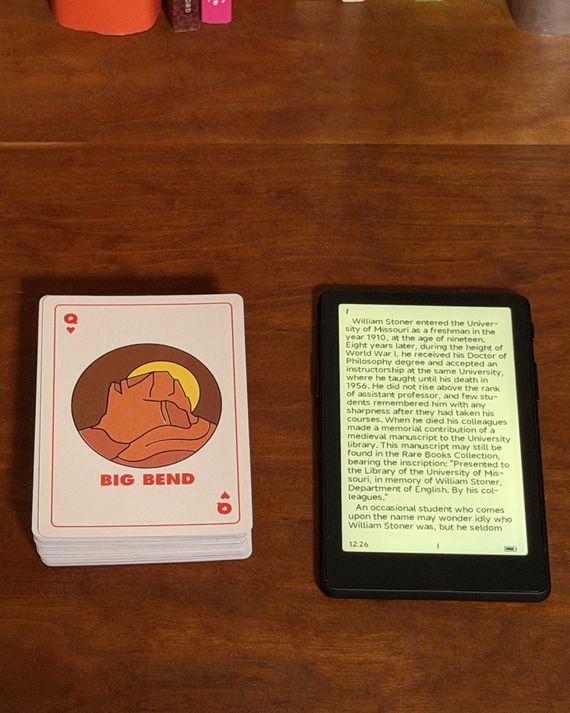
Once that’s done, though, everything else is pretty straightforward. You turn the display on using the power button, select the book you’d like to read, and start tapping through the pages. There aren’t any alternative fonts preinstalled (and adding new ones is a massive hassle — you have to install custom firmware to do it) and you can’t highlight text, but you can adjust the size and spacing of the text. And since there’s a front light (a remarkable feat for a reader this small and inexpensive), you can adjust both the brightness and the color temperature of the screen. Text doesn’t look nearly as sharp as on the other e-readers we recommend, but since this device is so small, that’s acceptable.
While given those limitations I might not want to devour a book in one sitting on the X4 Pro, I found that it works great for reading in the short moments you have between other tasks (where you might otherwise scroll Instagram Reels or check your emails). There’s even a magnet on the back so you can slap it on the back of your iPhone if you so choose, though it’s a bit too large to sit flush on the regular-size iPhone 18 Pro. Some people have even slapped a magnetic ring in their small notebooks to keep their X4 Pros inside, allowing them to take notes as they read. Such portability may seem like a gimmick at first, but reading a few minutes at a time adds up: In my week of testing the X4 Pro, I managed to finish a full book and get through half a second one, all just by reading whenever I had a spare minute or two.
The Strategist is designed to surface the most useful, expert recommendations for things to buy across the vast e-commerce landscape. Some of our latest conquests include the best acne treatments, rolling luggage, pillows for side sleepers, natural anxiety remedies, and bath towels. We update links when possible, but note that deals can expire and all prices are subject to change.