I’ve Tested More Than 20 Robot Vacuums. These Are the Best.

In this article
Robot vacuums can clean up your house or apartment, even when you’re not at home — no effort necessary on your part, unless you count pushing a button (and since they can work on a schedule, you don’t really even need to do that).
Using motion sensors, lasers, a camera, or some combination of the three, the latest robot vacuums can navigate your household and clean thoroughly without running into furniture or falling down the stairs. Most create maps to remember the layout of your home, some can recognize stray objects like toys and socks, while others use more basic systems that don’t store any data about your home. As with regular vacuums, these robots can get quite noisy while working, so you probably shouldn’t schedule them to run any time you wouldn’t vacuum by hand. And if you’re particularly sensitive to noise, be sure you are in another room or away from home when it’s cleaning (or have a good pair of noise-canceling headphones).
You can find many robot vacuum brands offering models with similar-sounding specs, but this is a category in which it’s best to stick to reputable makers. I focused on vacuums from Eufy, Roborock, Dyson, Ecovacs, Matic, and Narwal, as they’re some of the most established brands in the space and make an array of vacuums that suit the needs of both small and large homes.
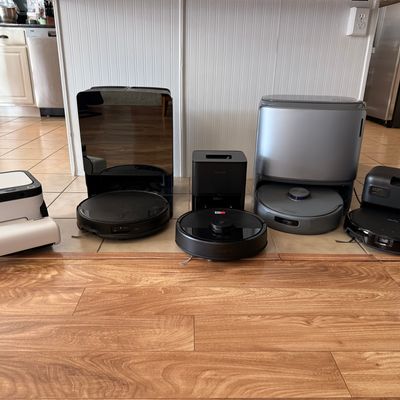
To find the best robot vacuum for every type of home and lifestyle, I tested more than 20 robot vacuums in my home, which I share with two other people and five dogs, on short-pile carpet, hardwood, and tile, assessing how well they clean, how effectively they navigated my home, and how much hands-on work they required.
If you’re looking for a robot vacuum for handling pet hair and messes, we have a separate guide for those, but just know that all our picks below are up to the task.
One final note: Earlier this year the FCC announced a ban on imported foreign-manufactured “advanced robotic devices,” which includes robot vacuums. While the future of robot vacuums remains uncertain as manufacturers adapt to the new terms, every robot vacuum we recommend has already been approved and will remain available despite the ban, which only applies to new models.
Updated on October 29, 2026
I’ve added the Narwal Flow 2 as our new best robot vacuum for deep-pile carpets. I’ve also removed the Eufy C10 as our best less-expensive robot vacuum, as it’s no longer available — I’ll be testing more budget-friendly options soon. Everything else is still available and the prices are up-to-date.
New! You can now save this product for later.
The best robot vacuum overall is also very affordable.
New! You can now save this product for later.
Matic’s robot vacuum has some of the smartest software of any robot we’ve tested.
New! You can now save this product for later.
A robot vacuum with enough suction power to yank everything out of your carpet.
What we’re looking for
Brushes
Although suction power is the primary metric flaunted by vacuum manufacturers, the vacuum’s brushes are just as important when it comes to picking up debris that’s deeply embedded in your tile and carpet. A good robot vacuum will have a brush (or multiple brushes) that can create enough agitation to break up particles that weaker vacuums might miss, like dried-up mud. Weak brushes will simply sweep over the top of your carpets and rugs, while a more thorough brush will dig deep into the fibers and kick up anything that’s stuck below the surface. Many robot vacuum cleaners even have side brushes that can help clear up corners and other tough-to-reach spots.
Better brushes don’t just make it easier to clean the floors, either; they make your vacuum last longer on each charge. The more work the brush does to scrape things off your surfaces, the less suction power (and energy) a vacuum has to use to completely remove it. A motor running at maximum will have enough suction power to yank things out of your carpet, but it may take longer to complete a cleaning job as it’ll have to recharge more often. Meanwhile, a vacuum with slightly weaker suction power but more effective brushes will clean up more debris and require fewer trips back to the charging station.
Suction power
Although it’s true that suction power isn’t as important for the performance of a robot vacuum as the brushes it uses, it still matters. Since I first started working on this guide three years ago, robot vacuums have gotten more powerful, making them more effective at pulling dirt and hair out of carpets. Suction is commonly measured in Pascals (Pa) to indicate the amount of air pressure the vacuum is applying. Generally, the higher the pressure, the more suction power, and the better a vacuum will be at picking things out of carpets and rugs. But keep in mind that that number shows how much it’s capable of applying at maximum settings, which you have to enable.
Battery run time
If a vacuum cleaner doesn’t have enough juice to clean your entire home on a single charge, it will need to run back to its base station to replenish itself before finishing the job. Most robot vacuums have batteries capable of cleaning long enough to cover a decent-size home, but larger homes may require multiple charges. Some robot vacuum cleaners have software that calculates how much juice a robot vac needs to complete the job and only charges enough to cover that and return to the base, which will help it get back to cleaning and wrap things up sooner.
Smart navigation
Despite what the name implies, these gadgets should be judged as vacuums first and robots second. No software feature can make up for a subpar job picking up debris off your floors. Part of effectively replacing a manual cleaning system is being able to trust that your robot vacuum won’t miss any spots in its cleaning cycles, and that your floors will be at least as clean as if you’d done the job yourself.
Some robot vacuums accomplish this by creating a map of your home, complete with obstacle identification and no-go zones, so you can program it to only clean specific areas on a given day. More basic robot vacuums use an infrared sensor to identify obstacles and other objects to avoid, but fancier models take it a step further with a built-in camera you can use to pinpoint items that might only be there for one cleaning cycle, like a stray toy one of your kids left out. Some newer models create live updates of your home’s map and store it all locally, so nothing gets sent back to the company’s servers.
Disposal
If you’re splurging on a robot vacuum, you want one that offers the most convenience possible. Given how small the robots themselves are, they typically have pretty small chambers for holding dirt and debris, so you’ll have to clean them out more often than you may be used to with a more traditional vacuum cleaner.
Some companies offer models that have self-emptying bases where the robot will dispose of all of the dirt once it’s finished a cleaning job (or its chamber is full and it needs to be emptied before resuming cleaning). They’re more expensive, but you’ll also spend less time clearing things out of your vacuum, and emptying the containers inside the base is easier than cleaning the robot itself. Fair warning, though: Those bases are often louder than the vacuums themselves. You may want to run it when no one is home, or just make sure you don’t schedule a cleaning during a work call.
Filtration
Filtration is key to an effective vacuum cleaner. Without good filtration, you’ll end up with a lot of dust blown right back into the air and, ultimately, landing back on your floors to be cleaned up and tossed back out during your next cleaning cycle.
Most companies don’t list a ton of details about their filtration systems, but you should avoid any vacuum that doesn’t mention having filters at all. Usually, you can check by looking at the “What’s included in the box” section of the product listing.
Repairability
Whatever robot you buy, it should last more than a few years: Even the cheapest options are still costly. The more parts you can replace on your own, the less likely you are to need to buy a whole new vacuum when things go wrong. In the best cases, you can replace everything from the brushes and filters to the wheels and batteries.
Mopping
Robot vacuumswith mopping capabilities have been around for quite a while now, but they’ve only gotten particularly good over the last couple years. Newer models have features like rotating mop pads (often two), hot-water cleaning built into the docks, and in some cases mopping pads that swivel out to reach corners and other spots that are tough to reach. Others come with a mopping brush that can self-clean as it’s mopping your floors, so it doesn’t have to return to a docking station repeatedly while cleaning.
While robots with mopping functions may not be as effective as a dedicated wet floor cleaner, they get about 90 percent of the way there, so you won’t notice unless you’re particular about the cleanliness of your floors. Of course, it’ll also depend on how dirty your floors tend to get and how frequently they require cleaning. Every robot I’ve tested has the ability to customize cleaning routines, so you can use light or heavy water settings as needed.
If you do opt for a vacuum-mop combo, you’ll have to use a cleaning solution to achieve maximum cleanliness. Many companies offer proprietary fluids that you dispense into the robot, but there are also third-party options available. Just be sure to get one that’s compatible with your robot, information you’ll usually be able to find on the front of the bottle. You can also use the robot’s mopping function with plain water, and even that does a decent job of keeping your floors clean.
Voice assistant
Robot vacuums typically come with their own apps; while some also have integrations with smart assistants like Alexa, Google Home, and, in a few cases, Siri, you’ll probably find yourself sticking to the manufacturer’s app anyway. These smart home assistants do make triggering the robot’s core cleaning functions easy, you won’t be able to use them to fine-tune your settings, like adjusting the number of cleaning cycles or how much water your robot’s mopping function uses — you’ll have to do all that in the app.
Child lock
If you have kids (or curious pets) in your house, you’ll want to ensure your robot has a child-lock feature. With this mode enabled,no one can trigger a cleaning job by pressing the robot’s on-device buttons. You’ll usually need to go to the app to enable this mode, but some robots also let you turn it on right from the device’s buttons.
Best robot vacuum overall
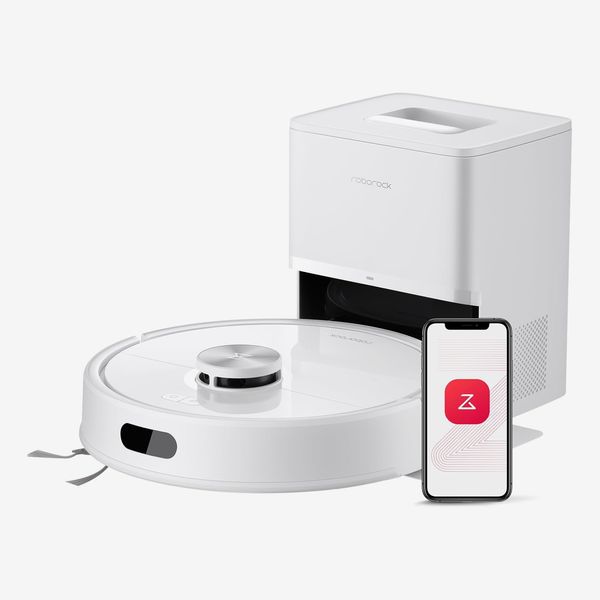

New! You can now save this product for later.
Brushes: Single rubber brush | Suction power: 10,000 Pa | Battery run time: 150 minutes | Smart navigation: Infrared sensors | Disposal: Self-emptying base station | Filtration: Yes | Repairability: Replaceable brush, dustbins, filters, and disposal bags | Mopping: Yes | Voice assistant: Alexa, Google Home | Child lock: Yes
Roborock’s vacuums have earned spots in several iterations of this guide thanks to their excellent mapping software and ability to thoroughly suck up tons of dirt and gunk. That’s especially true of the Q7 M5+, which has high suction power and is packed with features to ensure it can successfully avoid obstacles and clean up all the tough-to-reach spots in your house. In a home with five dogs, this vacuum managed to pick up a week’s worth of dirt and hair without any issues.
The Q7’s software makes mapping your home a breeze. It took about half an hour to map my home, while some robots, like those from Ecovacs, took about 15 minutes longer. And even with a floor covered in pet toys and dog bowls, plus several tables and chairs, this robot never got stuck or required saving.
You can customize your robot’s cleaning cycles by setting it to clean only designated rooms, or set a specific zone inside a room for a quick cleaning job like a spill. I mostly rely on the 2-D map created by the vacuum, but there’s also a 3-D map you can view, which is handy for sending your vacuum to clean hard-to-reach spots like under your bed. The app lets you add your own boundaries within rooms and place furniture onto the map. You can also build custom routines that clean up rooms at specified times. To ensure you stay current on your robot’s maintenance, the app gives an estimate of how long each component — brushes, filters, etc. — will last before needing to be replaced.
For tough-to-clean floors, there’s a Turbo mode that increases the vacuum’s suction. That mode drains the battery faster and makes the vacuum louder, but it also works great and has kept my rugs clean from crumbs and other specks of dirt. The more suction power you use, the shorter the battery will last, but Roborock’s software allows the robot to go back and recharge without losing its place in the cleaning process.
Unlike previous picks for the best robot vacuum overall, the Q7 M5+ also functions as a mop. It’s not as good at mopping as more fully featured vacuum-mop combos like the Matic or Narwal Flow 2, but the feature is nice to have. The mopping pad doesn’t come installed, and the dock doesn’t have a mop-cleaning function, so you have to do it yourself (by hand or in the washing machine). Additionally, it can’t apply as much pressure as the Matic or Narwal, so it isn’t as effective at scrubbing floors. If you need a robot that can frequently mop your floors without needing you to do a weekly mopping job yourself, get the Matic.
The biggest omission in this robot is its lack of Siri integration. Other Roborock vacuums support it, so I wish it were included here.

Best robot vacuum-mop combo
New! You can now save this product for later.
Matic Floor Cleaning Robot
Brushes: Single brush | Suction power: 3,200 Pa | Battery run time: 180 minutes| Smart navigation: Infrared sensors, camera | Disposal: Manually emptied bag with diaper salts | Filtration: Yes | Repairability: Replaceable water tank, brushes, HEPA bag, mopping pads | Mopping: Yes | Voice assistant: None | Child lock: Yes
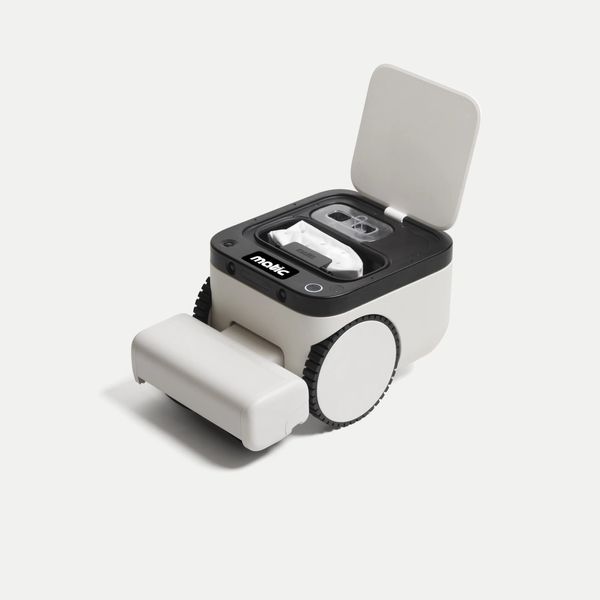
In my three years of testing robot vacuum-mop combos, none has impressed me as quickly as Matic’s. Its charming design — sort of like a robotic turtle — is more fun to look at than the typical puck shape of other robot vacuums. The dock, which doesn’t have a dirty-water tank or dustbin, is quite small compared to other vacuum-mop combos such as the Narwhal. Instead, everything gets done on the robot itself.
Compared to other robot vacuums I’ve tested, its mapping is quite fast. Where many other robots tend to move slowly and take their time scanning each room, the Matic whizzed across the floor to create an equally accurate map in under 20 minutes.
Like its mapping process, cleaning is surprisingly quick. It managed to clean two bedrooms, plus a common area and one bathroom, in about 45 minutes. In all that time, it only got caught on one thing: A loose thread on my carpet that I had to clip with scissors to prevent the Matic from getting stuck on it again. Other than that, it managed to avoid stray cables and cords, and my floors are nice and shiny after every cleaning job.
That’s a result of Matic’s unique smarts. Most robot vacuums depend on the initial map it creates to navigate your home, which means they have to rely on the company’s servers for object recognition. Most of that data comes from customers, so it’s not the ideal route if you’re privacy conscious. The Matic, on the other hand, constantly updates its map based on what it sees; none of that data gets sent back to Matic. To ensure it gets all the dirtiest messes — juice spills, dropped cereal, stray pet food — the Matic can automatically tweak its settings based on what its cameras see.
It’s even great at getting to spots that other robot vacuums might miss. Thanks to its taller body, which gives the Matic’s cameras a higher placement than other robot vacuums, it can see more of your house. The company’s app allows you to get a live view of what the Matic sees, and if you can find a way to get to a spot that the robot is struggling with, you can tap “Go here” and help it find its way. That doesn’t happen often, as the Matic is quite good at navigating on its own, but when it does happen, it makes using a robot vacuum feel almost like playing a video game.
Another thing I love about this robot: It doesn’t get stinky like other vacuums can. A colleague once mentioned that they’d stopped using their robot vacuum because the dirty water tank is easy to forget about and smells absolutely horrible after sitting for more than a week. The Matic, which has a single HEPA bag that stores dirty water as well as dirt and debris it’s picked up, fights odors with diaper salts embedded in the bag. That way, you won’t have to plug your nose when you empty it, which should be every couple weeks.
The Matic does struggle with three things. First, its height prevents it from reaching places traditional puck-shaped vacuums can reach, like underneath the couch. Additionally, it can’t clean edges as well as those robots, so you may need to do some manual vacuuming or dusting near your baseboards. Finally, its suction power is notably weaker than that of vacuums like the Narwal Flow 2, making it less effective for deeper-pile rugs.

Best robot vacuum-mop combo for deep-pile carpets
New! You can now save this product for later.
Brushes: Single brush | Suction power: 31,000 Pa | Batteryrun time: 210 minutes | Smart navigation: Infrared sensors, camera | Disposal method: Self-emptying base station for dirt and liquid | Filtration: Yes | Repairability: Replaceable brush, dust bin, filter, mopping pads | Mopping: Yes; hot-water cleaning | Voice assistant: Alexa, Siri | Child lock: Yes
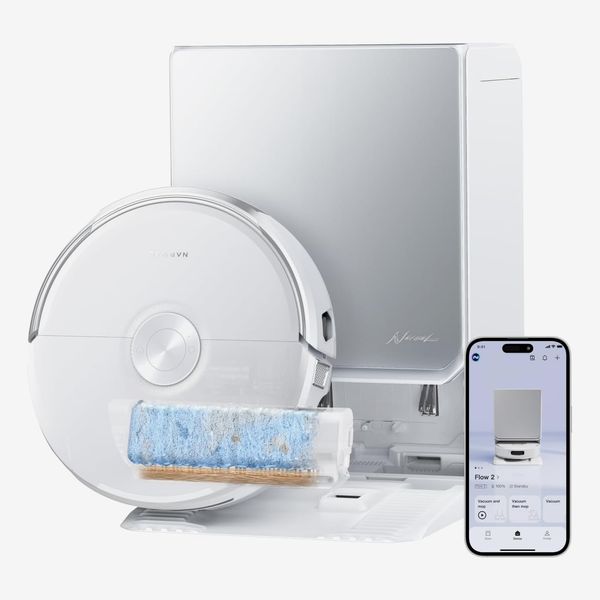
If you have deep-pile carpets, you’ll need something with more suction power. Narwal’s Flow 2 is a powerful, efficient vacuum that does an excellent job at yanking out dirt and other nasty stuff that’s been caked into the fibers of your carpet. I tested this by pouring a handful of coffee grounds on my rug and having the Flow run a quick spot-cleaning job — barely anything was left behind for me to clean up by hand. That’s largely in part thanks to the Flow 2’s high suction power, which also works better for sucking pet hair out of rugs and carpets.
Like Roborock, Narwal makes setup and maintenance pretty straightforward. The robot will automatically start mapping your home after you finish connecting it to your network, and you can easily have it cleaning in about 30 minutes. While not on par with Matic’s, the Flow 2’s software is also quite smart: It’s able to detect stains and particularly messy areas so it can adjust its settings and ensure every mess gets cleaned accordingly. For instance, if it sees some dried-up soda you spilled earlier, the vacuum will go over the area repeatedly with its mopping pad to ensure that spot gets cleaned without having to go over your entire kitchen floor again.
Smarts aside, this is a darn good vacuum and mop. Its suction power is enough to yank all sorts of gunk out of rugs and carpet, and its mopping has been effective enough that I could confidently leave all my floor maintenance to this robot — it’s left my floors squeaky clean. And you can fine-tune the settings of the robot to clean your floors as thoroughly as you’d wish. It can vacuum and mop simultaneously or one after the other, up to three times, and you’re able to control how much suction and water the vacuum uses while cleaning.
Unlike the Matic, the Narwal has clean and dirty water tanks on its self-emptying dock, so maintenance is relatively hands off. After every cleaning job, the vacuum will return to its station and clean its mopping pads, leaving them as good as new. And while many robot vacuums feature docks that stick out among typical room décor, the Flow 2’s design is subtle enough as to not draw unwanted attention. It’s also quite slim and I was able to easily wedge it into a narrow space between a table and bookshelf with room to spare.
The Strategist is designed to surface the most useful, expert recommendations for things to buy across the vast e-commerce landscape. Some of our latest conquests include the best women’s jeans, rolling luggage, pillows for side sleepers, ultra-flattering pants, and bath towels. We update links when possible, but note that deals can expire and all prices are subject to change.
Every editorial product is independently selected. If you buy something through our links, New York may earn an affiliate commission.