The 7 Very Best Soundbars, According to Home Theater and Tech Experts

In this article
Can’t make out the dialogue on your brand-new TV? There’s a reason for that. Today’s ultraslim LCD and OLED TVs are simply too thin to house adequate speakers, while soundtracks have become increasingly cinematic, with music and sound effects often obscuring the dialogue. To ensure your audio can keep up with the high quality of your television’s picture, there’s one audio upgrade that is effective beyond dispute: adding a soundbar.
Having personally tested many TVs over the past decade, it’s become clear to me that even the most basic soundbar will provide an improvement over the built-in speakers in most new sets — and spending a little more can get you a compact, easy-to-set-up surround system. To find the best soundbar for your needs, I asked a group of reviewers with years of testing experience which soundbar features they consider to be the most important, what benefits can be expected as you step up in cost, and which specific soundbar brands and models they would recommend.
Our top picks
What we’re looking for
Surround channels, Dolby Atmos, and DTS:X
“You can expect to spend just over $100 for the most basic two-channel soundbar with decent performance, but where you go from there depends on many factors,” says Ryan Waniata, an audio-product reviewer who has contributed to eCoustics, Wired, and Digital Trends, among other publications. “If you’re stuck on subtitles and mainly looking for improved dialogue, you’ll want to look into a soundbar system with at least three channels, namely a dedicated center channel speaker for dialogue clarity that stands out from other sound effects,” he adds.
The soundtrack reproduction capability of soundbars generally ranges from two-channel stereo up to 16-channel, 11.1.4 systems. As you move up in complexity (and cost), you’ll find soundbars and soundbar systems with a higher channel count designed to more faithfully convey the surround and overhead effects in Dolby Atmos and DTS:X soundtracks, which are available in shows and movies on streaming services such as Netflix, Prime Video, and Disney+, along with Blu-ray discs.
While some more basic soundbars use virtual processing, employing digital signal-processing techniques to expand the perceived soundfield beyond the physical limits of the soundbar, models that use dedicated side-firing and up-firing speakers, and especially soundbar systems that incorporate a separate wireless subwoofer and rear speakers, will deliver a clearer, more accurate and more immersive presentation.
As for those channel counts, the first number indicates the number of forward-firing speakers, whether in the bar itself or satellite speakers; the second is the number of subwoofer channels, and the third is the number of upward-firing speakers that create those cinematic spatial effects. That 16-channel, 11.1.4 system we talked about just above would include 11 main speakers, a single subwoofer, and four upward-firing speakers.
“If you’re interested in overhead effects for spatial audio formats like Dolby Atmos, you’ll want to make sure your soundbar has at least two dedicated up-firing drivers, not just Dolby Atmos decoding for virtual support,” says Waniata. The shape and surface of your room’s ceiling is also something that needs to be considered when using a soundbar with up-firing speakers: “Keep in mind that these up-firing drivers work best with flat, reflective ceilings at right angles with your walls,” suggests Chris Boylan, a TV & AV editor at eCoustics.
All-in-ones, subwoofers, and rear speakers
Soundbars generally come in three formats: all-in-one soundbar (with every channel handled by a single unit), soundbar plus separate wireless subwoofer, and soundbar plus wireless subwoofer and wireless rear speakers. A subwoofer is a speaker dedicated to conveying the bass frequencies in movie soundtracks and music, while rear speakers convey the soundtrack’s surround sound effects. Which option you choose should depend on your room size, budget, and performance expectations, with a soundbar plus wireless subwoofer and rear speakers package representing a full, uncompromised solution.
Simon Cohen, editor-in-chief of Loudmouth.audio, finds that subwoofers “aren’t a must-have (especially if you’re putting a soundbar in a small room), but can make a huge difference to the impact of movie soundtracks.” Boylan is more insistent about the need for both a subwoofer and surround-sound speakers: “If you want to get the most immersive experience, make sure the soundbar comes with a subwoofer and rear speakers, since there’s only so much bass and surround sound a one-piece bar can create on its own.”
If you opt for a standalone soundbar, our experts emphasize the importance of buying one that offers an upgrade path. “A subwoofer is a great start, but truly immersive home theaters often use surround speakers too,” says Cohen. “If you think you may want to add these later, ensure the soundbar will let you do so.” Brands such as Sonos, Bose, and Klipsch all sell soundbars that can be upgraded with a subwoofer, rear speakers, or both at a later date as your space and budget allow, so if you see yourself potentially wanting to expand your system, stick with those brands.
Size and mounting options
“I think people need to be boring and practical first with soundbars,” says Matt Bolton, managing editor for home-entertainment coverage at TechRadar. “Is the soundbar you’re buying a good size for your TV? You don’t want it to be wider than the TV itself or so small that it doesn’t sound like it fills the whole screen width.” As for other considerations, Bolton adds, “If your TV’s stand is low and the soundbar goes in front of the TV, will it be too tall, blocking the picture? If you plan to wall-mount it, what are the mounting options like?”
While buying a soundbar simply based on how well it matches the width of your TV’s screen, and the height of its stand, is a reasonable strategy, there are good performance-based reasons why some soundbars are wider, deeper, and taller than others. Dolby Atmos models, in particular, require sufficient internal space for up-firing speakers. Also, larger models typically provide powerful built-in woofers for bass — an important consideration if you want to avoid having to add an external subwoofer to the soundbar.
If you’re planning on adding a soundbar to a wall-mounted TV, then wall-mounting hardware is another important consideration. Many soundbars come packaged with the hardware as an accessory, and some also include mounting templates to simplify installation. For models that don’t include wall-mounting hardware, you can find third-party universal mounts that either attach directly to the wall beneath the TV or to the TV’s mounting bracket.
Connections
Most often, you’ll connect your soundbar to your TV using HDMI ARC (Audio Return Channel), a digital port that links the soundbar with the TV’s own HDMI ARC port and passes through the sound from the set’s built-in streaming apps and broadcast TV tuner. (A more advanced version available on newer TVs and soundbars, HDMI eARC, provides support for higher-quality, uncompressed audio formats.) HDMI ARC and eARC connections also allow you to use a single remote control to manage your TV and your soundbar’s volume, using a feature called HDMI-CEC (Consumer Electronics Control).
All soundbars provide at least one HDMI port, but depending on your AV setup, you may want a model with additional HDMI inputs. “Soundbars usually take up one of your TV’s HDMI ports, so if you need that connection for one of your devices, look for soundbars that have their own dedicated HDMI inputs,” says Cohen, editor-in-chief at Loudmouth.audio. “These will play audio through the soundbar while passing through the video portion back to your TV.”
Additional HDMI considerations apply If you’re a gamer. “Keep in mind, not all passthroughs are created equal,” adds Cohen. “If you’ll be connecting a game console, make sure the soundbar’s HDMI ports support the specific gaming features it uses, like VRR, ALLM, 4K/120Hz, and HDR.”
Along with HDMI, optical digital is another common audio input type you’ll find on soundbars. This port is included to support older TVs that lack HDMI connections, and it also lets you connect devices like disc players that have an optical digital output. Less common connection types on soundbars include analog stereo inputs, either RCA or mini-jack, and RCA jack outputs for connecting an external subwoofer.
Wireless capabilities
Along with HDMI and other hardwired connections, today’s soundbars support wireless streaming, which is mainly used for music and podcast listening and for internet radio playback. Even the most basic soundbars will feature Bluetooth for streaming from a phone, tablet, or PC, while more advanced models will also provide a Wi-Fi option.
Although Bluetooth and Wi-Fi on soundbars largely serve the same purpose, if you want the highest-quality audio, look for a model that supports Wi-Fi. “Bluetooth is fine for casual listening from your phone, but you can get much better sound from models that have a Wi-Fi connection,” says Cohen. “These typically enable technologies like Apple AirPlay and Google Cast, plus Spotify Connect, all of which will deliver higher-quality audio than standard Bluetooth.”
Wi-Fi additionally lets you link a soundbar up with other speakers from the same brand (Sonos is the most well-known example) to create a multi-speaker or even multiroom audio system, controlled from an app on your phone. It also allows for voice commands in models that support home control protocols like Google Home and Amazon Alexa, which will let you do everything from adjusting the volume level to dimming your room’s lights hands-free.
Best soundbar overall

New! You can now save this product for later.
Dolby Atmos: Yes | DTS:X: No | Channels: 9.1.4 | Upgradeable: Yes | Connections: HDMI eARC | Wireless capabilities: Wi-Fi, Bluetooth | Dimensions (W x H x D): 46.44” x 3.13” x 4.31” | Remote: No | Wall-mounting kit: Sold separately
Anyone wanting a no compromise all-in-one soundbar will be well-served by the Sonos Arc Ultra. Its 14-driver array, which includes both up-firing and side-firing speakers, provides a level of surround sound immersion that few other standalone soundbars are capable of, and it’s easy to take advantage of all those features. This 9.1.4-channel soundbar’s Trueplay feature can be used to automatically custom-tune the sound to your room’s layout, and its four-preset Speech Enhancement mode uses AI to automatically detect and boost dialogue in movies and TV shows.
Cohen finds this flagship Sonos soundbar to be an “excellent single-speaker solution,” and he appreciates that it’s also “great for music” and “can be expanded with a variety of wireless subs and surrounds” from the company’s wireless speaker lineup.
Another benefit to the Arc Ultra is its Wi-Fi support, which lets you stream to and control the soundbar using the Sonos app (no dedicated remote control is provided) and lets it function as the center of a full-blown audio entertainment system when you’re not watching TV. AirPlay, Spotify Connect, and Tidal Connect are all supported for lossless-quality music streaming, and the Arc Ultra, which comes in black or white color options, can also be linked to a multiroom Sonos music system using the Sonos control app.
There are a couple of caveats. The Arc Ultra provides only a single HDMI eARC port for connecting a TV. While this will be fine for most people, and is in keeping with Sonos’ wireless-first “make it simple and streamlined” design philosophy, it also creates limitations for users with multiple disc players and gaming consoles who may require additional connection options. The Arc Ultra also doesn’t support the less common DTS:X surround format, which may not matter if you mostly watch streaming movies and shows.
Best less-expensive soundbar

New! You can now save this product for later.
Dolby Atmos: Yes | DTS:X: Yes | Channels: 3.1 | Upgradeable: No | Connections: HDMI eARC, optical digital input, USB | Wireless capabilities: Bluetooth | Dimensions (W x H x D): 37” x 2.5” x 5.2” | Remote: yes | Wall-mounting kit: Yes
You can spend lots of money on a soundbar, or you can just buy the Amazon Fire TV Soundbar Plus. Unlike many other budget soundbars, this three-channel all-in-one uses a dedicated center-channel speaker, a feature that goes far toward enhancing dialogue clarity when watching TV shows and movies. Both Dolby Atmos and DTS:X formats are supported, although the Fire TV Soundbar Plus lacks the up-firing speakers found in pricier models, using virtual processing instead to convey effects.
Also typical for a budget soundbar is the limited input connection array on the Fire TV Soundbar Plus — it has HDMI eARC and optical digital, but no additional HDMI inputs. Wireless support is limited to Bluetooth, which is another thing to be expected at this price point.
Amazon sells the Fire TV Soundbar Plus at a fairly steep discount during its sales events, with the price regularly dipping to $150 or less. Pro tip: Such events would be a good time to consider buying one of the company’s Fire TV Soundbar Plus bundles, which add a wireless subwoofer and rear speakers for an attractive price. (Amazon doesn’t sell either of those items separately.)
Best less-expensive soundbar with subwoofer
New! You can now save this product for later.
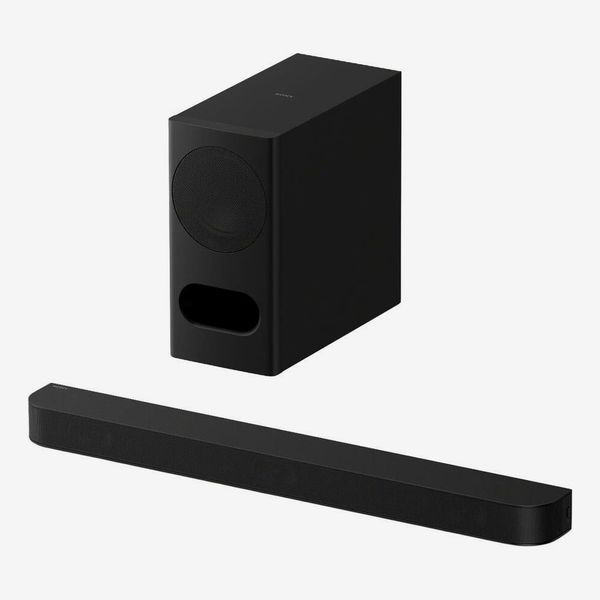
Dolby Atmos: Yes | DTS:X: Yes | Channels: 3.1 | Upgradeable: No | Connections: HDMI eARC, optical digital input | Wireless capabilities: Bluetooth | Soundbar dimensions (W x H x D): 35.5” x 2.5” x 4.38” | Remote: yes | Wall-mounting kit: No
TechRadar’s Bolton finds Sony soundbars to be “generally a good bet at the more affordable end of things, and they usually offer a far more immersive experience than you’d expect.” The Sony Bravia Theater Bar 5 is one such model that exemplifies the company’s high bang-for-buck ethos, bundling a separate wireless subwoofer with a three-channel soundbar for a low price.
As a budget model, the Bravia Theater Bar 5’s connections are limited to HDMI eARC and optical digital, wireless streaming is Bluetooth-only, and virtual processing is used to convey Dolby Atmos and DTS:X soundtracks. But the soundbar’s dedicated center channel enhances dialogue clarity, and the separate subwoofer adds a level of bass impact that you typically don’t get with a standalone soundbar. Sony soundbars also provide AI-powered features such as Voice Zoom (which lets you adjust the volume of dialogue independent of the rest of a movie or show soundtrack) that work in tandem with the company TVs, so Sony TV owners will get that added benefit.
Best less-expensive soundbar with subwoofer and rear speakers

New! You can now save this product for later.
Dolby Atmos: Yes | DTS:X: Yes | Channels: 5.1.4 | Upgradeable: NA | Connections: HDMI eARC | Wireless capabilities: Bluetooth | Soundbar dimensions (W x H x D): 36” x 2.6” x 4.73” | Remote: No | Wall-mounting kit: Yes
Our experts recommend Vizio as a solid budget choice. The brand offers models at all price points offering good performance for the money, inducing the high-value Elevate. “At the budget end, I still haven’t found a brand that gives you more for your money than Vizio, even though those models can be harder to find outside of specialized stores like Sam’s Club,” says Waniata. Cohen echoes this, and specifically recommends the company’s flagship soundbar system: “For the best bang for the buck, it’s very hard to beat Vizio. If you’re looking for the Samsung Q990H experience on a budget, check out the Vizio Elevate 5.1.4 Pro. It’s less than half the price, but definitely not half the performance.”
With the Elevate 5.1.4 Pro system, you most notably get a soundbar with “adaptive height speakers” that automatically rotate upwards when Dolby Atmos and DTS:X soundtracks are detected, and then rotate back down to provide enhanced soundstage width when playing regular stereo content. It comes with a separate wireless subwoofer, and the system’s rear speakers also feature up-firing drivers for a 5.1.4-channel presentation.
Connectivity is where the Vizio system cuts corners, with only one HDMI eARC port for a TV, and wireless streaming is limited to Bluetooth. But at just $399, the Elevate 5.1.4 Pro is undeniably an impressive Dolby Atmos/DTS:X package for the money.
Best less-expensive Atmos all-in-one soundbar
New! You can now save this product for later.
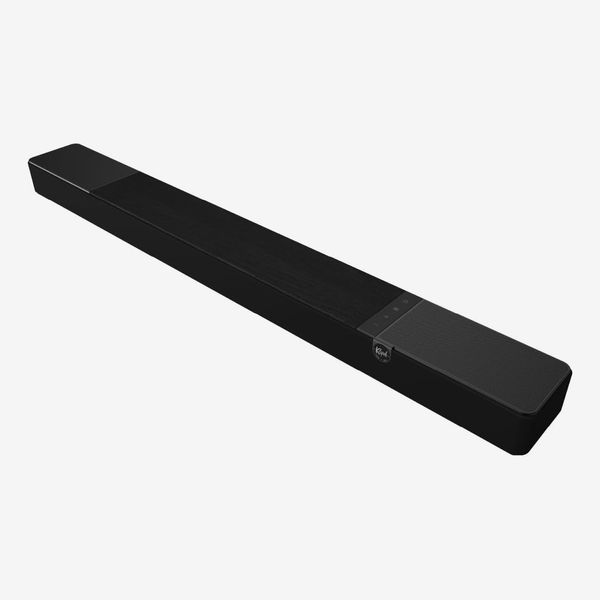
Dolby Atmos: Yes | DTS:X: No | Channels: 3.1.2 | Upgradeable: Yes | Connections: HDMI eARC, optical digital input, subwoofer output | Wireless capabilities: Bluetooth | Dimensions (W x H x D): 43.94” x 3.06” x 4.94” | Remote: yes | Wall-mounting kit: Yes
If you want an affordable Dolby Atmos soundbar that uses actual up-firing speakers instead of virtual Atmos processing, look no further than the Klipsch Flexus Core 200. I’ve used the Core 200 as my main soundbar for over a year, and I’m consistently impressed with the performance it delivers for the money. Dialogue in movies is reliably clear, while Dolby Atmos height effects are conveyed with a powerful sense of scale. There’s no onboard Wi-Fi for streaming, but Klipsch’s control app, which operates using Bluetooth, lets you create a custom EQ setting and also provides dialogue enhancement presets.
On the usability front, the Core 200 comes with a dedicated remote, and there’s a large front panel LED display that provides visual feedback when making adjustments — a useful feature that many soundbars, even pricey ones, lack. The Core 200 sounds great as a standalone soundbar, but it can also be upgraded by adding an optional Klipsch subwoofer and surround speakers for a 5.1.4-channel Atmos system. I use both with the Core 200, and they greatly help to extend the system’s bass impact and the level of surround sound immersion.
At $575, the Klipsch Flexus Core 200 is also an excellent value for a 3.1.2-channel Dolby Atmos soundbar that offers an upgrade path for full surround sound. The bottom line is that it’s easy to set up and use, looks great (black and walnut finish options are available), and delivers full, clear sound on its own, and even better performance when it’s upgraded with Klipsch’s optional Flexus Sub 200 subwoofer and Flexus Surr 200 rear speakers.
A less-expensive Sonos soundbar

New! You can now save this product for later.
Sonos Beam Gen 2
Dolby Atmos: Yes | DTS:X: No | Channels: 3 | Upgradeable: Yes | Connections: HDMI eARC | Wireless capabilities: Wi-Fi |Dimensions (W x H x D): 25.63” x 2.75” x 4” | Remote: No | b: No
If you find the Sonos Arc Ultra’s upgradeability and Wi-Fi streaming features appealing but are put off by its high price, then instead consider the Sonos Beam Gen 2, the company’s mid-range soundbar. Like the Arc Ultra, the Beam Gen 2 is a standalone Dolby Atmos soundbar that can be augmented with the company’s optional subwoofers and rear speakers. Wi-Fi support enables lossless music streaming, and it can be linked up with any Sonos speakers you own in a multiroom music system.
What do you give up versus the Arc Ultra? The Beam Gen 2 uses virtual processing for Atmos delivery rather than directional speakers, and it lacks the Ultra’s side-mounted speakers for surround sound. Otherwise, it gives you most of the flagship Sonos soundbar’s features such as Trueplay and Speech Enhancement for a lot less, and it also comes in black or white color options.
Best luxury soundbar with Atmos surround and subwoofer

New! You can now save this product for later.
Dolby Atmos: Yes | DTS:X: Yes | Channels: 11.1.4 | Upgradeable: NA | Connections: 3 x HDMI, optical digital input | Wireless capabilities: Wi-Fi, Bluetooth | Soundbar dimensions (W x H x D): 48.5” x 2.88” x 5.5” | Remote: Yes | Wall-mounting kit: Yes
The Samsung HW-Q990H was a unanimous top pick among our experts, with Waniata calling it the “best one-box, multipiece surround system I’ve tested for the money,” and Cohen stating, “I can’t think of an all-in-one system that outperforms it.” As a complete home theater package, Boylan praises its “compact cube subwoofer that provides surprisingly good low bass” and comments that “the soundbar itself and the rear speakers include upward-firing drivers for great results with Dolby Atmos and DTS:X.”
Like the Sonos Arc Ultra, the Samsung HW-Q990H’s soundbar features both up-firing and side-firing speakers for enhanced height and surround immersion. And the system’s rear speakers extend that immersion to the back of your viewing room by including both up-firing and side-firing speakers as well for a staggering 11.1.4-channel presentation.
The HW-Q990H’s built-in Wi-Fi enables music streaming via Apple AirPlay, Google Cast, Spotify Connect, Tidal Connect, and other services. It also has room correction to tune the system’s sound to your living space, and comes with a measurement microphone for system calibration. With multiple HDMI inputs featuring 4K/120Hz and VRR support, the HW-Q990H is a perfect soundbar system for gaming, giving games the same level of sonic immersion and impact as movies.
Our experts
- Matt Bolton, managing editor, home entertainment, TechRadar
- Ryan Waniata, audio product reviewer for eCoustics, Wired, and USA Today
- Simon Cohen, editor-in-chief, Loudmouth.audio
- Chris Boylan, TV & AV editor, eCoustics
The Strategist is designed to surface the most useful, expert recommendations for things to buy across the vast e-commerce landscape. Some of our latest conquests include the best acne treatments, rolling luggage, pillows for side sleepers, natural anxiety remedies, and bath towels. We update links when possible, but note that deals can expire and all prices are subject to change.
Every editorial product is independently selected. If you buy something through our links, New York may earn an affiliate commission.