The Best 3-D Printers
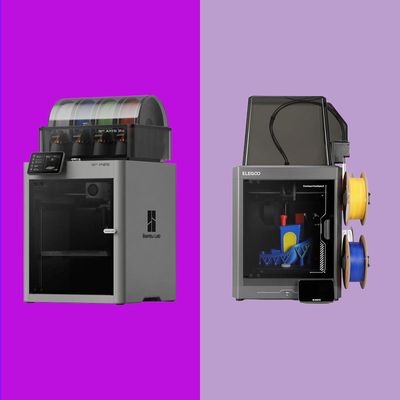
3-D printing has gone from a niche tech hobby to a mainstream pursuit that practically anybody can do — and the printers themselves have gotten easy enough to use that anyone can be a maker. I still get kidlike joy every time I press a couple of buttons and a few hours later have a toy, a replacement part, or some random item for my wall. It’s what makes 3-D printing so appealing, along with the fact that it opens the door to not just custom toys, but all kinds of useful objects like spare parts, accessories, and mounts for the things you already own.
The best 3-D printers I tested for this article took less than an hour to unbox, set up, and finish their first prints — all from my iPhone, and with no advanced knowledge required. Heck, the Snapmaker U1 printed a four-color object directly after setup in just under three hours with practically zero waste. Truly impressive stuff.
In this article
I’ve spent thousands of hours over nearly a decade messing with 3-D printers. I’ve learned a lot along the way, including how to manually level the print bed before every single print (talk about tedious), and I can confidently say that 3-D printing has never been more welcoming to newcomers and veterans alike.
If you’ve been on the fence about getting your first 3-D printer, or you’ve already tried your hand at using older printers and you’re thinking about upgrading to a more modern and capable printer, there’s never been a better time than right now.
Our top picks
New! You can now save this product for later.
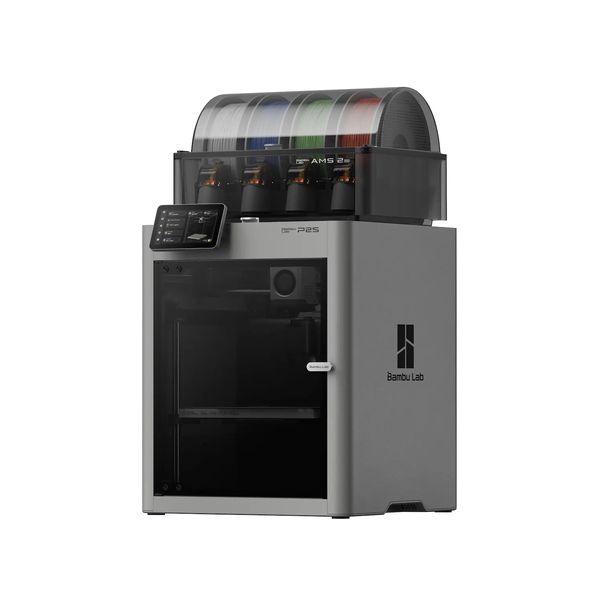
Simple to set up, easy to use, and able to tackle most prints, the P2S is our favorite 3-D printer.
New! You can now save this product for later.
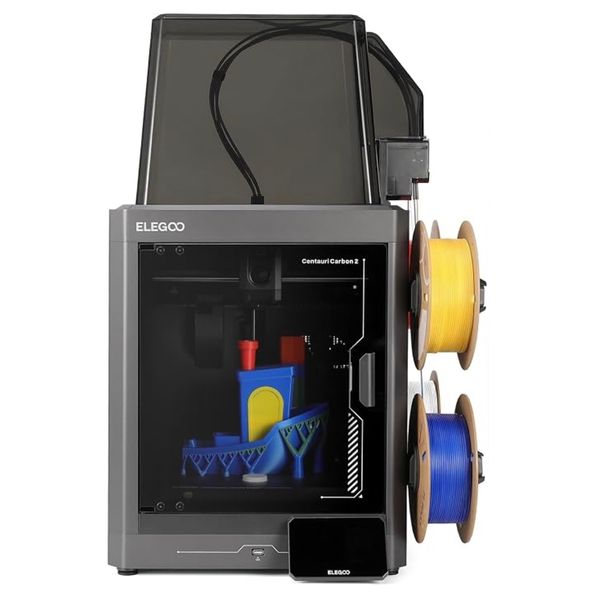
As capable as models costing hundreds more, the Centauri Carbon 2 is a great budget 3-D printer.
New! You can now save this product for later.
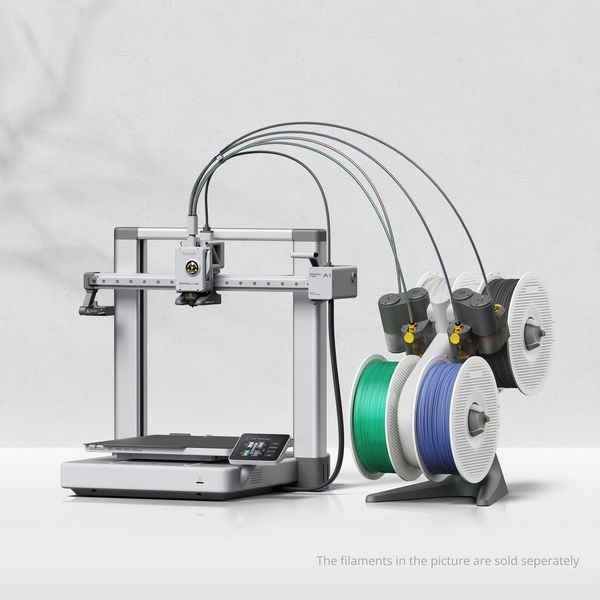
Accessible and easy to use, the A1 is the best 3-D printer for kids — and it can grow with them.
What we’re looking for
Printer design type: CoreXY or bed slinger
Funny names aside, this spec is an important one as it indicates the mechanics of exactly how a 3-D printer moves and prints.
In a CoreXY printer, the build plate (where your model takes shape) moves up and down along the Z-axis, while the printhead (which dispenses the raw media you’re using to build that model) will move forward, backward, left, and right along the X- and Y-axes.
A bed slinger uses a build plate that moves forward and backward, along the Y-axis, while the printhead moves along the X- (left to right) and Z- (up and down) axes.
Overall, CoreXY machines are more accurate and faster, while bed slingers are often more affordable but slower, and they can be more prone to printing imperfections.
Open or closed housing?
An enclosed printer helps eliminate temperature variations during a print — especially if your printer is near a heating or cooling vent. An open-frame printer is more susceptible to room-temp variations, which can cause warping in prints, and is overall louder while printing.
While it’s not a standard rule, the majority of CoreXY printers have an enclosed housing, while bed slingers typically have an open housing.
Additionally, the type of housing your printer has directly impacts the type of materials you can print with. I go into more detail about the various filaments below, but the gist of it is if you ever plan on printing with more than basic materials like PLA, PETG, and TPU, you’ll want to avoid an open-frame printer.
What kind of material can it print?
3-D printers are capable of using many materials to print items, but they fall into two basic categories, and your choice depends on what kind of objects you want to print.
The mainstay materials are PLA and PETG, both types of thermoplastic filaments. PLA is the most affordable and is perfect for toys, plant pots, or decorative items — stuff that won’t be exposed to routine use or high temperatures. PETG costs a few dollars more per roll, but it’s harder to break and can withstand more use and outdoor temperatures. I’d wager the majority of hobbyists use PLA and PETG for all of their prints.
Open and closed printers can handle PLA and PETG with zero issues. And most (though not all) printers of both types are capable of printing with TPU — a really soft, flexible material that can be used for things from phone cases to shoes (yes, people print shoes).
If you need to print more rugged items like shelving brackets or anything that will be subjected to abuse — including direct sunlight — ASA or ABS is what you’ll want to use, and for that, you’ll need an enclosed printer. And if you really want to take it a step further with the best accuracy with those materials, you’ll want a printer with active chamber heating that gives you fine control over the temperature within the chamber as the printer works, which means stepping up to something like the Bambu Lab X2D or H2C.
Build volume
The build volume is a measure of how big or small of a print your printer can handle. The printers I tested ranged from 180 by 180 by 180 mm. to 333 by 320 by 325 mm. — that is width by depth by height. Those differences may not sound like that much, but the smaller printers will struggle with printing something like a flower vase taller than seven inches or one of those cool articulating dragons you see at thrift shows or in local gift shops.
My sage advice from personal experience is to buy a printer you can grow into instead of one that limits what you can print based on size.
Multicolor capability
For years, multicolor printing was just a dream. However, over the last couple of years, it’s become a staple feature for many printers from a wide range of manufacturers. The approach to multicolor printing differs based on the device and its maker. Some printers can hold multiple spools of different-colored media; others require an add-on unit known as an automatic material system (“AMS”), an external feeder that can hold spools of material of different colors.
Since multicolor printing is so useful (and compelling), we’ve recommended models here that support multicolored printing directly or that you can buy in a combo pack with an AMS. Keep in mind that you can always buy any of the printers (save for the Snapmaker U1) in this guide as a stand-alone printer without multicolor printing accessories to save a little bit of money. However, once you experience multicolor printing, it’s hard to give it up.
Bambu Lab offers multiple AMS systems, like the open-air AMS Lite or the enclosed AMS 2 Pro. Both systems hold up to four spools and let the printer switch colors or materials on demand. The AMS 2 Pro prevents moisture exposure and can even be used to dry filament for higher-quality prints.
Some brands let you connect multiple AMS units to increase the number of colors available for any given print. Some printers, like the Bambu Lab H2C, support up to 24 colors. Elegoo and Snapmaker printers are limited to four different colors at a time due to their design and the way their multicolor devices interface with the printer.
As you browse different models on websites like MakerWorld, you’ll want to pay attention to which multicolor models require an AMS and which don’t.
Single or multiple print nozzles
A more recent trend, and one of the best yet, is the addition of more printheads or nozzles to a printer. Instead of printing multiple colors with a single nozzle, which requires the printer to purge and waste filament with every color change, the printer only needs to switch nozzles — vastly decreasing the amount of filament waste and speeding up the entire print process.
Some printers, such as the Bambu Lab X2D, have two nozzles, while the Snapmaker U1 comes with four. Neither of those units can be expanded. Then there’s the Bambu Lab H2C, which comes with two nozzles, but you can add more, and it is capable of switching between a total of seven different nozzles.
Software, ecosystem, and support
A user-friendly app, a website to download models from, and the dedicated printing app for your computer, called a slicer, are some of the most important aspects to consider when shopping for a printer. As 3-D printers mature, the hardware and technology have improved to the point you can get high-quality prints from almost any printer, so one of the biggest differentiators among 3-D printers right now is how easy it is to print something from your phone, the amount of models available in its library, and how intuitive and reliable the desktop software is.
You can’t fully test a mobile app or slicer without a printer, but you can get a good idea of how many designers and developers support a platform just by browsing its corresponding model website. Bambu Lab has MakerWorld, Elegoo has Nexprint, and Prusa has Printables. Right now, Snapmaker has the most limited number of models available in its mobile app, though an expanded library is in the works for later this year, according to the company.
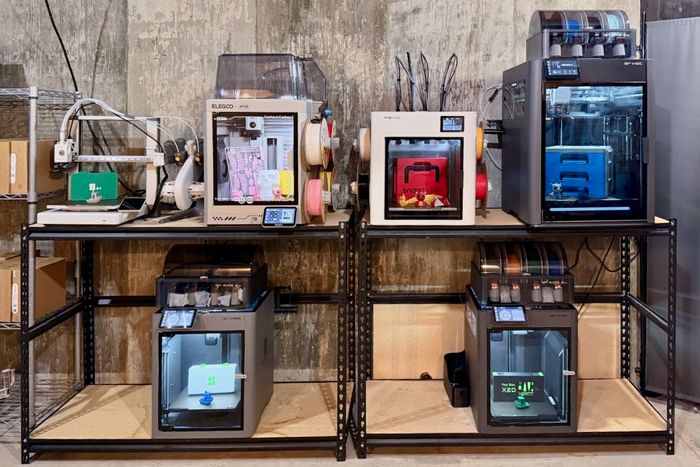
The best 3-D printer overall
New! You can now save this product for later.
Specs: Build volume: 256 by 256 by 256 mm | Design type: CoreXY | Housing: Enclosed | Multi-color capable: Yes | Multi-toolhead: No | Ecosystem: Bambu Handy mobile app, MakerWorld website for designs, Bambu Studio slicer
I bought the Bambu Lab P2S Combo the day it was announced, and I have exactly zero regrets with my purchase. It’s an affordable full-size CoreXY enclosed printer, packaged with Bambu Lab’s AMS 2 Pro for multicolor printing (if you don’t think you’ll want multicolor support, you can also purchase it without the AMS 2 Pro). Its build volume maxes out at 256 by 256 by 256 mm., which is more than enough for virtually any print I’ve ever wanted to run.
Over the course of several hundreds of hours of printing, I’ve yet to have a print fail that wasn’t my fault in some way. The P2S has a five-inch touchscreen that makes it easy to look at the status of your print or browse locally stored files to start a new print. A 1080p camera makes it easy to stream your current print through the mobile app or Bambu Studio and create time-lapses of your prints.
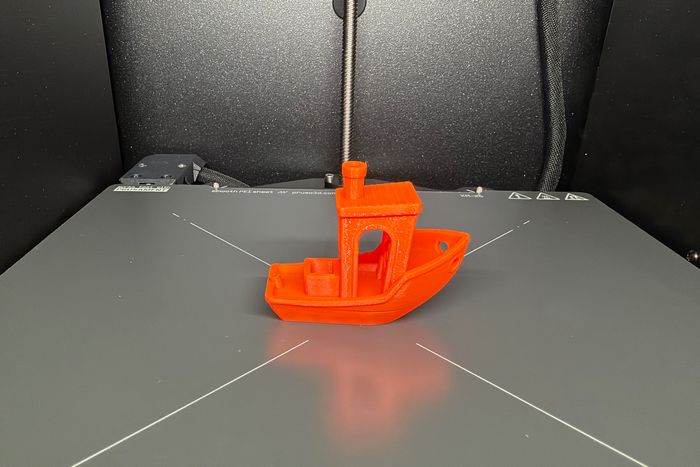
It’s been a few months since I set up the P2S, but I recall being amazed that I went from a boxed-up device to fully set up and holding a Benchy test print in about an hour.
The P2S doesn’t have a heated chamber, but it does self-regulate its temperature with a cooling fan to help improve print quality for materials like PLA and ABS. Not only can you print in up to four colors thanks to the included AMS 2 Pro, but it also doubles as a filament dryer when the printer is sitting idle, or you can opt for an extra power supply to dry filament while printing.
My favorite part about the P2S, and where Bambu Lab is leading the entire industry, is the ease of use via the mobile app. You can browse the entire MakerWorld catalogue right on your phone, find a print you like, then immediately send it to the printer in, literally, just a few seconds. Or, once you get more familiar with 3-D printing as a whole, you can open a model in the Bambu Studio slicer on your computer and tweak print settings.
Indeed, there are other single-nozzle, multicolor printers available at a lower cost — but the P2S is our top pick because it provides the complete package. The hardware is top-notch, the print quality doesn’t miss, and the entire ecosystem of models and overall ease of use that beginners and experts both appreciate is unmatched.
The best less-expensive 3-D printer
New! You can now save this product for later.
Specs: Build volume: 256 by 256 by 256 mm | Design type: CoreXY | Housing: Enclosed | Multi-color capable: Yes | Multi-toolhead: No | Ecosystem: Elegoo Matrix mobile app, Nexprint website for designs, ElegooSlicer
The Elegoo Centauri Carbon 2 Combo, which includes the company’s Canvas multicolor printing accessory, is the printer that surprised me the most during my testing. Not only were prints clean and great-looking, but this setup often goes on sale for far less than its full price, making it a great value.
From past experience, the cheaper a printer, the more work it requires to get a decent print. So my expectations were low going into testing, but within a couple of hours, I was sold.
Initial unboxing and setup took a little longer than the Bambu Lab P2S, simply due to the time it took to mount the Canvas system and route all of the tubes required to get filament to the printhead from the right side of the housing, where you place up to four rolls of filament. I don’t love that the filament sits in open air, without any sort of protection from dust or humidity, but it works.
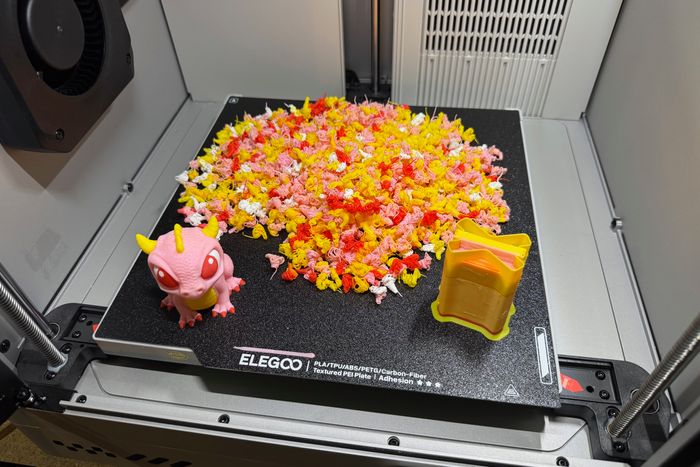
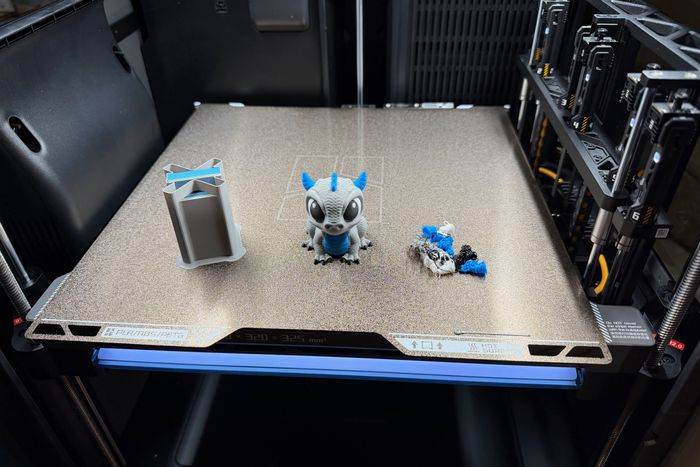
I printed a good amount of items with the Carbon 2, including the same multicolored dragon that’s printed by the Snapmaker U1 during initial setup. I wanted to compare how much filament waste a single-nozzle printer created compared to the quad-nozzle setup of the U1. And, well, it’s a lot. But that comes with the territory. I also printed a Benchy, a candy bowl in the shape of a skull, a dragonfly you have to put together, and some fidget toys. All of them looked good, with some subtle issues in large overhangs (such as under the jaw of the skull), but I imagine I could fine-tune the model settings to get rid of that.
You can browse models, send them to the Carbon 2, and monitor the progress directly from the mobile or desktop apps. In many ways, the Elegoo app and desktop slicer experience mirrors Bambu’s (I wouldn’t be surprised if you told me the same developer made both company’s mobile apps — they’re that similar), though the Elegoo app is missing the polish and refined experience of Bambu’s version.
All this combines to make the Elegoo Centauri Carbon 2 our top pick for the best budget 3-D printer. It feels almost like it shouldn’t even exist at this price point — but luckily, it does!
The best 3-D printer for kids
New! You can now save this product for later.
Specs: Build volume: 256 by 256 by 256 mm | Design type: Bed Slinger | Housing: Open | Multi-color capable: Yes | Multi-toolhead: No | Ecosystem: Bambu Handy mobile app, MakerWorld website for designs, Bambu Studio slicer
The Bambu Lab A1 combo includes Bambu’s flagship bed-slinger open-frame printer and an AMS Lite. Its overall build volume measures 56 by 256 by 256 mm., matching that of the P2S and Carbon 2.
Initial setup required more manual effort than any of the enclosed printers I tested, as the print bed’s housing isn’t attached to anything, and the AMS Lite also requires assembly. In total, it took me just over 45 minutes to get it put together, followed by a self-run calibration, and then I was off to printing a Benchy. I also printed a toolbox for the tool included with the printer (something I did for every printer I received) and some accessories for collecting filament waste and holding the PTFE tubes that feed the nozzle in place.
While with the P2S and Carbon 2, you can perch the multicolor accessory on top of the housing, the AMS Lite is designed to be placed to one side of the printer, which doubles its footprint. You can, however, print a mount that puts the AMS Lite on the top bar of the A1 — freeing up some extra space.
It never ceases to amaze me how quickly I can open the Bambu Handy app on my iPhone, pull up a model, select a color available on the AMS Lite, and send it to the printer. Pretty cool stuff.
The A1 is louder than its enclosed counterparts, but not disturbingly so. You get accustomed to the noise, or at least that’s what I kept telling my kids while testing.
The Bambu Lab A1 Mini is even more affordable but just as capable as the A1, save for the overall build volume. But the overall print volume of the Mini doesn’t leave any room to grow into. Once you and your child realize how much fun 3-D printing is, you’ll be glad you went with the slightly more expensive, and larger, Bambu Lab A1. All of that combined is why the Bambu Lab A1 is our top pick as the best 3-D printer for kids.
The best premium 3-D printer
New! You can now save this product for later.
Specs: Build volume: Varies based on nozzle, but total for both nozzles is 330 by 320 by 325 mm | Design type: CoreXY| Enclosed or open: Enclosed | Multi-color capable: Yes | Multi-toolhead: Yes, up to 7 printheads | Ecosystem: Bambu Handy mobile app, MakerWorld website for designs, Bambu Studio slicer
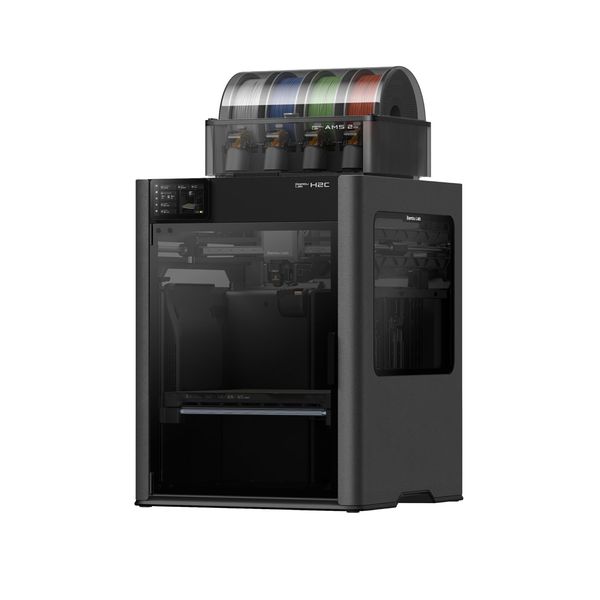
The Bambu Lab H2C Combo is the biggest and most expensive printer I tested, but it checks nearly every box of what a 3-D printer is capable of in 2026. It’s a CoreXY enclosed design that supports up to seven printheads and 24 colors and has a total build volume of 330 by 320 by 325 mm. If you want to expand the H2C into a full maker station, you can even add on a laser-cutting accessory or a cutting tool for making stickers and decals.
Inside the H2C, the printer uses cameras (you can add up to four) to monitor print quality or let you remotely view the current print status. The enclosure actively adjusts its internal temperature based on the material you’re printing. Speaking of watching it print, at one point during testing, my kids started making fun of me for remotely watching the H2C for 20 minutes. I was totally mesmerized by the printer switching nozzles, a process that takes about ten seconds. It’s fascinating to see in action.
The box the H2C arrived in weighed 100 pounds, so initial setup is a two-person job. But once I got it onto a solid surface, I was able to do the rest of the process myself. After removing all of the protective materials and unboxing the included tools and accessories, I was walked through installing the extra nozzles it included with it. All told, it took about an hour to set up and calibrate.
Since then, I’ve printed a bunch of stuff for my daughter to take to her college dorm room — things like big organizers for her vanity and desk and a jewelry stand. I also printed the same four-color dragon as I did on the Elegoo Carbon 2 and the Snapmaker U1. As with the U1, the H2C had minimal waste, especially when you compare it to the Carbon 2.
The biggest drawback (pun intended) to the H2C is its size. Bambu Labs suggests placing it at a location that can accommodate its overall footprint of 27.56 by 27.26 by 43.31 inches.
But for someone who wants a 3-D printer that offers ample amount of build volume, limits the amount of waste with multiple nozzles, and consistently turns out high-quality prints — the H2C is worth the investment of space and money, and that’s why it’s earned our top pick for best premium 3-D printer.
The best multicolor 3-D printer
New! You can now save this product for later.
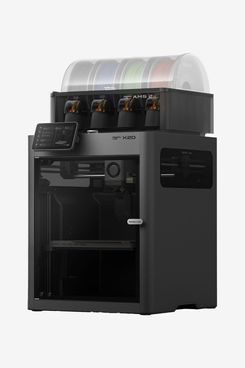
Specs: Build volume: 256 by 256 by 260 mm | Design type: CoreXY | Enclosed or open: Enclosed | Multi-color capable: Yes | Multi-toolhead: Yes. 2 printheads | Ecosystem: Bambu Handy mobile app, MakerWorld website for designs, Bambu Studio slicer
The Bambu Lab X2D Combo checks a lot of the same boxes as the H2C, but in a more affordable and compact package. Its CoreXY enclosed design has a heated chamber for print materials that require it, and it has two nozzles you can use for either multicolor prints or for printing multiple materials at the same time.
Its total build volume is ever so slightly taller than the rest of the test bed at 256 by 256 by 260 mm. There’s a left and right nozzle, either of which you can assign to an AMS or a dedicated external roll of filament. What I found myself doing during testing is using the left nozzle for the main color of the print to remove the bulk of color changes, and then let the right nozzle handle the color swaps. Keep in mind that each time a nozzle has to change colors, it purges filament to clear the old color and ensure the new color is properly flowing.
I’ve been using the X2D for the last four months, maybe longer. Like the P2S, I’ve yet to have a single failed print that wasn’t my fault. It just prints. I’ve done the staple test prints like Benchy and a toolbox, but I’ve also printed countless items: a toy, a toolbox, parts for the X2D, a whistle, even a Meccha Chameleon figurine to hide around the house with my kids.
Most of that printing has been done directly from my iPhone because I didn’t feel like tweaking any settings. It’s a quality-of-life feature I absolutely love.
With its total feature set — dual nozzles, heated chamber, and the Bambu Lab ecosystem, to name a few — at this price point, the X2D is an easy pick as the best multicolor 3-D printer.
The best multi-head 3-D printer
New! You can now save this product for later.
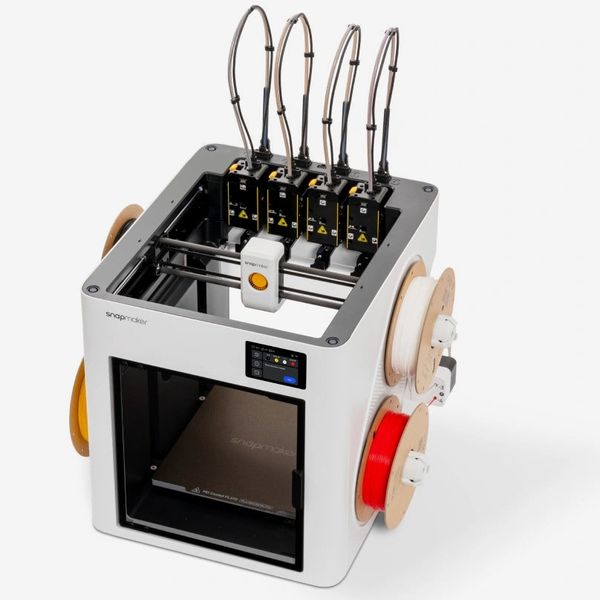
Specs: Build volume: 270 by 270 by 270 mm| Design type: | Enclosed or open: Partially enclosed, optional lid available | Multi-color capable: Yes | Multi-toolhead: Yes, 4 printheads | Ecosystem: Snapmaker mobile app, third-party websites for designs, Snapmaker Orca slicer
Heading into testing for this article, I was the least familiar with the Snapmaker U1. I’d started to see it show up quite a bit in my social feeds, but I hadn’t looked into it too much. The printer has four nozzles built into the housing, along with support for four independent colors, all of which are stored on both sides of the printer’s housing.
It’s a CoreXY printer with a partially enclosed housing (the U1 doesn’t come with a lid). All cabling and PTFE tubes route up from the back of the printer in a tall loop, then back down into each individual printhead. So while you gain some benefits of an enclosed printer, the open-air top is going to give you some of the drawbacks of an open-frame design. That said, Snapmaker has started taking preorders for a $150 top cover as an optional accessory for the U1. I didn’t have access to it during my testing.
The U1 took the longest to unbox and set up. The first few steps were similar to the rest of my unboxings. Take the printer out, remove protective materials, connect a few cables, and power it up. After I did that, I was walked through installing each one of the nozzles, then helping the machine calibrate the nozzles. The latter part was something I hadn’t been tasked with doing before, so I started the calibration process before bed and walked away. When I returned in the morning, I realized the process had stalled because I wasn’t there to do my part.
As I’ve already mentioned above, during the setup process, the U1 prompts you to test a multicolor dragon as your first print. I obliged and watched as the printer switched printheads. It’s a pretty unique idea, and one that produces very little filament waste. It even beat out the H2C in lack of waste produced. Pretty impressive.
Snapmaker’s current weaknesses are its app, model availability, and overall ease of use. From the mobile app, I can view a very limited set of models (the company promises to roll out a more complete model library later this year) and send them to the printer, but it lacks nice-to-have features like prompting me to print the next plate in a multi-plate print once the previous plate has finished. Instead, I’d have to scroll through the app to find the model again, remind myself what plate I was on, and then send it to the printer. That workflow I just mentioned is where Bambu Lab really shines — it knows where I’m at in a print with multiple plates and prompts me as soon as a print is finished.
Qualms with the mobile-app experience aside, there’s a lot to like about the Snapmaker U1. Prints look great, filament waste all but disappears with multicolor prints, and it’s been a consistent 3-D printer during my testing. For those reasons, it’s the best multi-printhead 3-D printer.
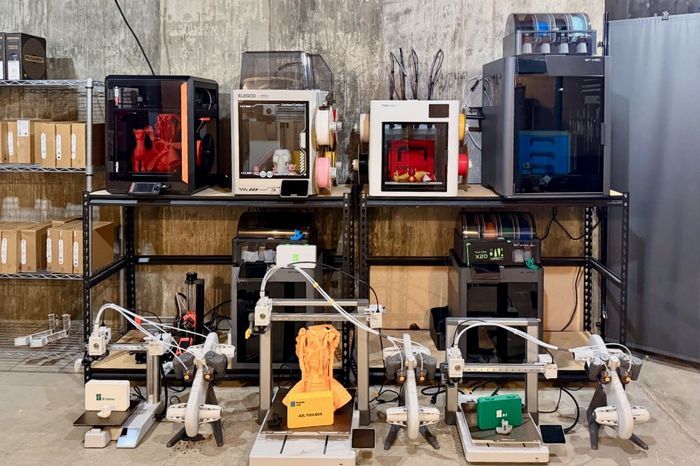
Other 3-D printers we tested
New! You can now save this product for later.
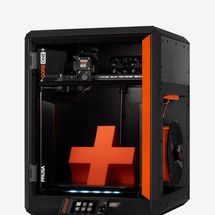
Prusa CORE One+ 3D Printer
I like to think of Prusa printers as the Linux machines of the 3-D printing world. You can do some really cool stuff with them, but it’s going to take some tinkering to get everything set up properly. The Prusa CORE One+ took some effort to get dialed in, but once I did, it was a workhorse, with a fully enclosed CoreXY design and reliable performance. At its relatively high price point, however, it lacks multicolor or multi-printhead support without an additional INDX conversion kit; there are more affordable and capable options available.
New! You can now save this product for later.
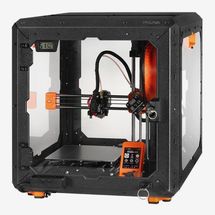
I’ve owned a Prusa Mini+ since shortly after it was released in late 2020. I’ve printed thousands of hours on it, but the rest of the industry has caught up to and passed the Mini+ in design, ease of use, and price. It lacks multicolor and multi-printhead support, and it has a very small print bed (180 by 180 by 180 mm.). At current prices, it’s hard to recommend the Mini+.
New! You can now save this product for later.
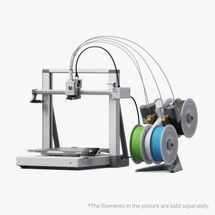
The Bambu Lab A2L looks and works just like the Bambu Lab A1, our top pick for kids, though it’s bigger. Its bed-slinger design has a build volume of 333 by 320 by 325 mm., the largest out of all the printers we tested. I maxed out the print bed by supersizing the Prusa rocket-engine model, which took 36 hours to print and used nearly a full roll of filament — and it came out beautifully. The A2L is a smart purchase for someone who needs the extra print size with multicolor support — it’s just more printer than most people will ever need.
New! You can now save this product for later.
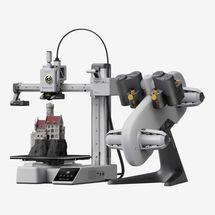
The Bambu Lab A1 Mini is the cutest 3-D printer I tested. Its bed-slinger design has a build volume of 180 by 180 by 180 mm. — the same as the Prusa Mini+. The combo package includes the printer and Bambu’s AMS Lite for multicolor support. Print quality was on par with every other printer I tested, but the print bed is small enough that it makes projects with medium- or large-size items difficult to complete. It’d make a good first printer for a classroom or a young child, but with the standard A1 Combo only slightly more expensive, it’s worth futureproofing your investment and getting a printer that can handle larger prints.
More From The Strategist
- Hark, the Advent Calendars Arrived (Very) Early This Year
- The Best Things Strategist Editors Have Bought This Year (So Far)
- 63 Things You Should Never Buy Full Price
- The Strategist Fall 100
The Strategist is designed to surface useful, expert recommendations for things to buy across the vast e-commerce landscape. Every product is independently selected by our team of editors, whom you can read about here. We update links when possible, but note that deals can expire and all prices are subject to change.