The Clicks Power Keyboard Makes Typing on an iPhone Fun Again

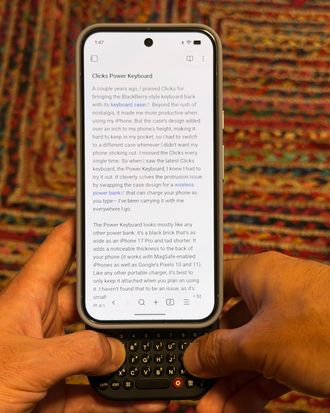
A couple years ago, I praised Clicks for bringing the BlackBerry-style keyboard back with its keyboard phone case. Beyond the rush of nostalgia, it actually made me more productive when using my iPhone. But the case’s design added just over an inch to my phone’s already tall 6.4-inch height, making it hard to fit in my pocket. That meant I had to switch to a different case whenever I didn’t want my phone sticking out. I missed the Clicks every single time. So when I saw the company’s latest gadget, the Power Keyboard, I had to try it out. It cleverly solves the protrusion issue by swapping the case design for a wireless power bank that can charge your phone as you type and put away when you’re not using it — I’ve been carrying it with me everywhere I go.
New! You can now save this product for later.
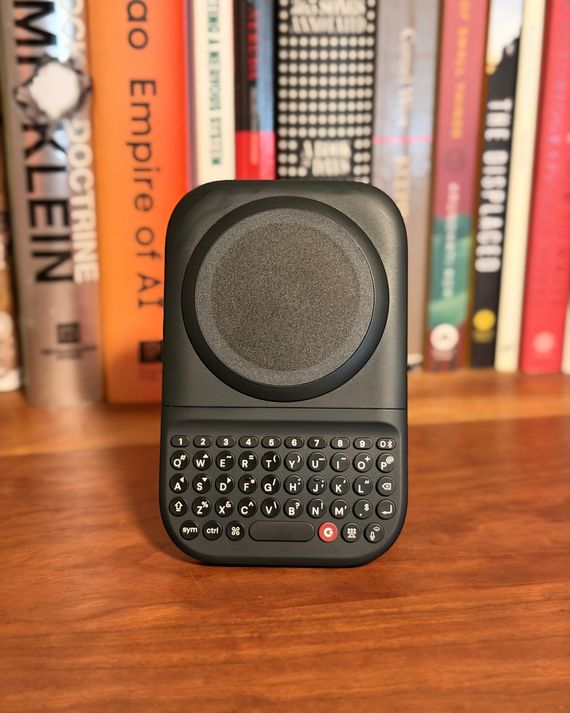
The Power Keyboard looks mostly like any other magnetic power bank: It’s a black brick that’s as wide as an iPhone 17 Pro and a bit shorter. When attached, it adds a noticeable thickness to the back of your phone (it works with MagSafe-enabled iPhones as well as Google’s Pixels 10 and 11). Like any other portable charger, it’s best to keep it attached only when you plan on using it. The keyboard sits just below the wireless-charging magnet and hides behind the phone until you’re ready to use it. At that point, you slide it out and get to typing. It’s as close as anything’s gotten to feeling like the old T-Mobile Sidekick, and I love it.
True to the company’s name, the Power Keyboard’s keys are nice and clicky, though not stiff. They may be a tad small for those with particularly large thumbs — mine barely made the cut — but it only took a couple days to adapt. I can’t type as quickly on the Power Keyboard as I can on iOS’s software keyboard, but the tactile response more than makes up for that. Every keystroke feels more intentional. By the time I slide the keyboard back behind my phone, I feel like I’ve actually gotten something done.
What’s kept me using the Clicks, though, is its utilization of keyboard shortcuts. In addition to traditional shortcuts such as Command + T in Safari to open a new tab, or Command + C or V for copy and paste, you can also map custom keyboard combos to run iOS Shortcuts of your choosing. I’ve set up a few to open particular notes in my Notes app. For example, if I’m at a bar fine-tuning a stand-up bit before going onstage, I can pull my phone out and open my “Stand-up” note in Obsidian without having to tap my screen at all.
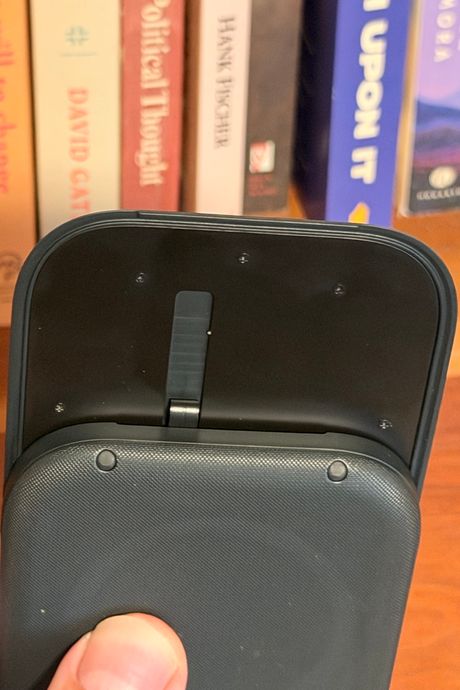
Admittedly, I wish the Power Keyboard felt more refined. The top portion that holds your iPhone in place when in keyboard mode is a bit wobbly, and the ribbon that connects the keyboard to the power bank’s internals sticks out a bit, making it easy to brush against and potentially more susceptible to damage. That’s not enough to keep me from using it, though: I still enjoy typing on it more than I ever have iOS’s native keyboard.
More From The Strategist
- Hark, the Advent Calendars Arrived (Very) Early This Year
- The Best Things Strategist Editors Have Bought This Year (So Far)
- 63 Things You Should Never Buy Full Price
- The Strategist Fall 100
The Strategist is designed to surface useful, expert recommendations for things to buy across the vast e-commerce landscape. Every product is independently selected by our team of editors, whom you can read about here. We update links when possible, but note that deals can expire and all prices are subject to change.