Apple’s $600 MacBook Is Probably All You Need


For the last five years, Apple’s M-Series MacBook Air has been my default recommendation for anyone who needs a new laptop. No other computer has a better balance of portability and computing power at a digestible price (the entry-level Air starts at $1,099). It features a top-notch display, all-day battery life, and specs that effortlessly handle everything in a typical workflow, from browsers with dozens of tabs to batch photo editing.
That’s changed now that there’s the MacBook Neo, the cheapest laptop Apple has released to date. It starts at $599 for the 256 GB model and has enough power to handle day-to-day tasks with ease. It’s more expensive than many budget Windows laptops but feels and performs far better than its price tag suggests. Hitting that price point requires a few compromises, but for most people, they’re well worth it for the best budget-friendly laptop you can get.

New! You can now save this product for later.
MacBook Neo
It has nearly everything that makes MacBooks great
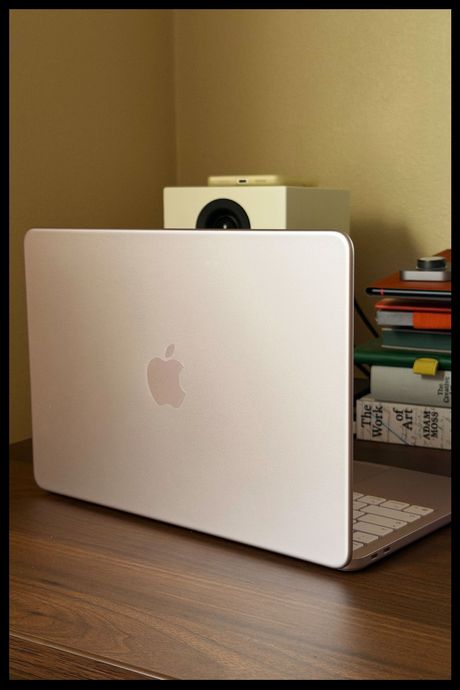
Despite its relatively low price, the Neo feels as premium as you would expect of an Apple laptop, with a bit of a playful spin. It looks like a slightly thicker MacBook Air and comes in more fun colors — a vibrant yellow, light pink, indigo, and the standard silver — than the Air’s more neutral options. Apple even went for a trendy tonal effect with its keyboard: The keys are a lighter hue of the laptop’s shell. The software is set to match too: The menus and wallpaper of the light-pink model I tested had a soft pink tint to them that makes the hardware and software feel refreshingly cohesive.
The Neo’s 13-inch display, which has a 2,408-by-1,506 resolution, is also nice to look at. It’s easy to see, even outside on a sunny day. Images look nearly as crisp on it as on the MacBook Air, despite having slightly fewer pixels per inch (219 compared to the Air’s 224). It does not, however, have True Tone, an Apple feature that allows displays to automatically adjust to match ambient light, making images look more natural. Although I like the feature on devices that offer it, I haven’t missed it while testing the Neo.
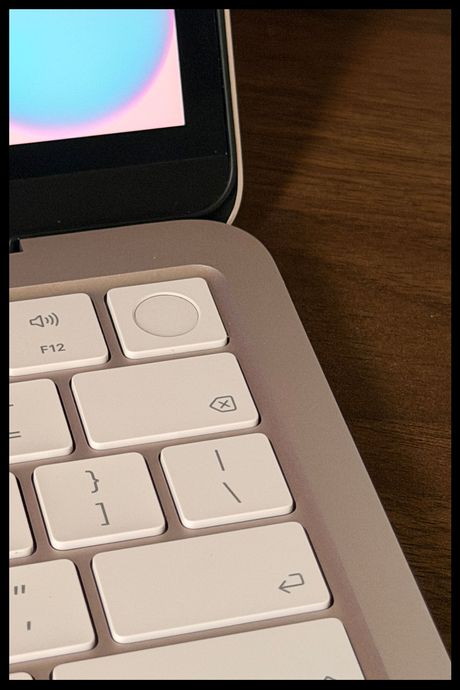
What I have missed, though, is the backlit keys that come with the MacBook Air and MacBook Pro. The Neo’s keys are just as pleasant to type on, but that lack of lighting makes them harder to see in the dark. This may be a problem if you’re not a touch typist and plan on using it to take notes in a dimly lit classroom or coffee shop. Additionally, you’ll only get a keyboard with TouchID if you splurge for the pricier $699 model, which is the one I tested; the entry-level model requires you to type in your password for everything. The TouchID model is worth it for the convenience and because it also comes with double the storage.
I spent some time with TouchID disabled to replicate the experience of the cheaper model, and it quickly became frustrating, as I rely on TouchID to quickly get through my company’s authorization app every time it decides to log me out of everything. Apple had to cut corners somewhere, but every time I had to login to my work email or make a payment using Apple Pay, I deeply missed being able to tap my finger to the corner of my laptop and get on with my day.
Similarly, the track pad — though still one of the best of any laptop I’ve tried — is lacking some polish found on that of the MacBook Air. It’s just as spacious and precise but lacks the Force Touch feature that provides a haptic vibration when you press on the track pad, instead using a mechanical switch that you have to actually press down. That means you’ll hear an audible click every time you select something on macOS. It’s mildly bothersome at first, but I got used to it quickly.
The A18 Pro chip is powerful enough for most tasks
More impressive than the Neo’s reasonable price is the fact that it runs on the same chip as the iPhone 16 Pro’s, the nearly two-year-old A18 Pro. Between that and its relatively low amount of RAM — 8 GB, which is the bare minimum I’d recommend anyone get — the specs don’t appear to facilitate a serious workload.
It didn’t take long for the Neo to prove me wrong. During a typical workday, I’m usually running Slack, my note-taking app, a dozen tabs in the Brave browser, an RSS reader, Qobuz for music, and maybe a YouTube video or two. Even at my busiest, the Neo didn’t slow down until I pushed it to some absurd limits by opening a large batch of photos in the app Darkroom while running Slack, playing a few YouTube videos in the background, and opening over 25 tabs in my browser. That’s more than most people will be doing at any given time, but it does mean that you’re more limited than you would be on an Air. Additionally, as future software updates will likely require more resources, the Neo will start to show its age sooner than more powerful Macs.
Similarly, transferring files from external drives takes notably longer than on my Mac Mini or work-provided MacBook Pro. I tried transferring a folder with about 7.5 GB worth of files to my M4 Mac Mini, and it took just under a minute. Transferring that same folder to the Neo took exactly two and a half minutes. That’s negligible if you only do it from time to time. But for those who frequently use external drives for storing things like photos and other long-term files, I’d recommend the Air, as it has faster ports.
Like every other MacBook powered by an Apple chip, you can easily get through a day’s worth of work and still have some battery to spare. I was able to squeeze a couple extra hours out of the Neo to get some post-work writing done. I’d recommend charging it every night if you plan on using this as your primary work machine, but you should be fine if you step out to work from the library or outside for a couple hours.
You won’t find a better laptop for this price
Despite its shortcomings, the MacBook Neo is the best laptop you can get for $600. It’s as well designed and crafted as its far more expensive siblings and more than capable of handling a typical workload of web browsing, Slack, media playback, and document editing. For many people, that will be more than enough to make up for a slightly less feature-packed and powerful laptop. After all, it still feels like a Mac in all the ways that matter.
More From The Strategist
- Hark, the Advent Calendars Arrived (Very) Early This Year
- The Best Things Strategist Editors Have Bought This Year (So Far)
- 63 Things You Should Never Buy Full Price
- The Strategist Fall 100
The Strategist is designed to surface useful, expert recommendations for things to buy across the vast e-commerce landscape. Every product is independently selected by our team of editors, whom you can read about here. We update links when possible, but note that deals can expire and all prices are subject to change.