Get Yourself a Smartphone Without the Distractions


I’ve been on a yearslong journey to reduce my screen time. I’ve tried charging my phone in another room overnight, keeping my phone out of my office while I work, and apps that block out all distractions on a schedule. Nothing has worked as well as ditching my smartphone for a bit and switching to a minimalist phone. Sure, I’ve missed things like being able to send voice notes to friends and managing my tasks from my phone, but every time I’ve tried one of these phones, I’ve been able to fill that space with more fruitful activities like writing in my journal, taking up kickboxing and voice lessons, and spending more time going out to make new friends.
Most minimalist phones offer some smartphone functionality but either don’t allow you to use or don’t play well with apps that capture your focus like social media and email. There are some minimalist phones that run an unrestricted version of Android, including one we recommend, but I focused on those with e-ink screens as those enticing apps don’t look great on them and aren’t worth installing.
A flip phone can accomplish many of the same things as some of these minimalist phones, but their screens are usually smaller and it’s harder to navigate an interface with a directional pad than it is a touch screen, so I focused on touch-based minimalist phones.
While all the minimalist phones I looked at had a multiday battery life, apps for calling, texting, and alarms, and all but one had a camera, they each take a different approach to what your relationship to your phone should be. I’ve been testing several of the most popular phones in this space over the last six months. I’ve noted the standout features and various drawbacks of the models below.
The most premium-feeling minimalist phone

New! You can now save this product for later.
Light Phone III
Display: 3.92” OLED
Excluded apps : Email, web browser, music streaming
App store: No
Navigation: Yes
Camera: Front and back
Hotspot: Yes
The Light Phone III strikes the best balance of limiting distractions while providing the core functionalities of a smartphone. It has a 3.92-inch OLED display with a mostly black-and-white interface — pictures and videos show up in color — with a limited number of apps you can run.
The Light Phone III has all the same basic apps as the other phones on this list, but they’re not all enabled by default. You’ll need a computer to do that, but that’s sort of the point: Your phone is just a phone, and anything else should require a couple extra steps. You can’t install a browser, email app, or news reader, and there isn’t an app store for things like games and social media. It does have a hotspot feature, though, so you can access the internet from a tablet or laptop if needed.
Not all of those apps work as well as smartphone equivalents. For instance, the music app requires you to side-load your own MP3s from your computer — no Spotify or Apple Music. And the podcast app requires you to subscribe to each podcast manually (you can’t import your list from another app, which is a basic function of most podcast apps). Some apps surprised me, though. The calendar app has the most important features from Google Calendar or iCloud, as it allows you to create events and view a full-month calendar or just see your events for that day. You cannot, however, sync the calendar app with Google Calendar, iCloud, or Outlook.
On the bottom corner of the phone’s right side, there’s a camera button that will launch you right into the camera app, and it also serves as a shutter button. Compared to the Minimal Phone and Mudita Kompakt, the Light Phone III’s pictures are noticeably more detailed and have better exposure. The photos aren’t quite as good as a recent iPhone’s, but they’re on par with an iPhone 12 and more than fine for posting on Instagram.
Of all the minimalist phones I’ve tested, the Light Phone III’s hardware is the most premium-feeling. It’s mostly made of aluminum, but it’s not as slippery as the aluminum on recent iPhone models. And unlike smartphones, its display has a matte finish so it’s less vibrant and distracting. But since it’s OLED, it’s more responsive than the screens on the Kompakt or Minimal Phone and better for typing.
In my time using the Light Phone as my primary device, it was the most successful at reducing my screen time without making too many compromises thanks to its pre-installed apps and hard limits on third-party apps. Its camera also allows me to snap pictures in the moment in a way that no other minimalist phone I tried can thanks to its dedicated camera button.
If you want an even more limited phone, the company still sells the Light Phone II, which has an even-less-distracting e-ink screen and lacks a camera.
A more flexible minimalist phone
New! You can now save this product for later.
Mudita Kompakt
Display: 4.3-inch e-ink
Excluded apps: Music streaming, email, web browser
App store: Not pre-installed, but you can add one
Navigation: Yes
Camera: Back
Hotspot: Yes
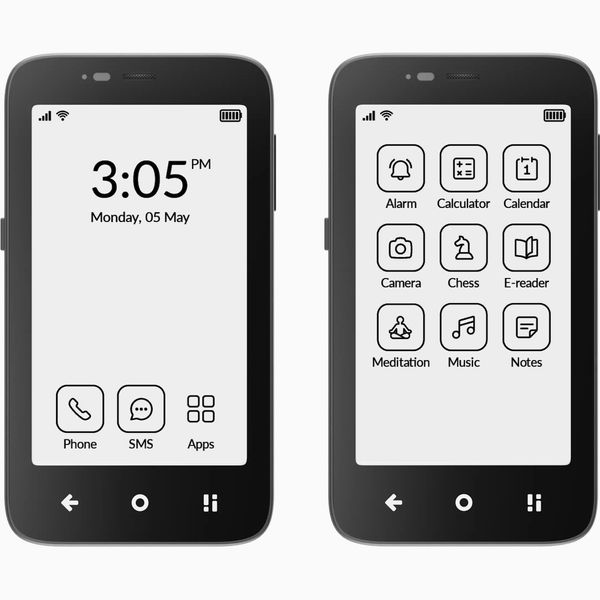
While the Light Phone III feels like a barebones iPhone, the Mudita Kompakt is more like a tiny Kindle with cellular connectivity. It has a 4.3-inch e-ink screen and it runs Android, so unlike the Light Phone you can actually install apps on it. As with other e-ink devices, the screen will periodically refresh and remove any leftover ink.
In addition to the usual apps these minimalist phones have, the Kompakt has an e-reader. There’s no browser or news app, but you can side-load one if you’d like. The calendar app works similarly to the Light Phone III’s, as you can view the monthly calendar or utilize the today view (but also similarly, you can’t sync it with Google Calendar, iCloud, or Outlook). That said, installing apps onto the Kompakt isn’t as easy as on other Android devices (like the Minimal Phone, for example). It can’t access the Google Play store, so you have to install a third-party App Store; but once you do that, it’s easier to add apps than. But not all apps look good on an e-ink display; Spotify’s interface looks particularly atrocious.
The left side of the Kompakt has an “offline” switch that turns off the phone’s cellular radios. It’s a bit more extreme than a Do Not Disturb feature, but because it’s triggered by an actual switch — instead of needing to be accessed through a menu you have to pull up — I toggled it more than I do DND on my iPhone.
While the Kompakt has a camera, its e-ink screen makes it difficult to judge the quality of the image, so I only used this for taking pictures of things I needed to remember later.
An Android phone in a Blackberry body

New! You can now save this product for later.
Minimal Phone
Display: 4.3-inch e-ink
Excluded apps: None, all Play Store apps can be installed
App store: Google Play
Navigation: Yes
Camera: Front and back
Hotspot: Yes
This phone is what you’d get if you mixed a Kindle with a BlackBerry; it has an e-ink screen and a QWERTY keyboard that’s far easier to type on than a touch keyboard on an e-ink screen.
The Minimal Phone runs a custom version of Android, but unlike the Kompakt’s version, this one has the Google Play store installed so you can download all your essential apps. Graphics-heavy apps like TikTok or Instagram, and even those with complex interfaces like music and podcast players, may look funky due to artifacts left from previous pages. Like the Kompakt, this phone’s screen needs to be periodically refreshed to get rid of those remnants. It’ll automatically refresh at an interval you can set, but for instances when some artifacts remain between refreshes, there’s a manual refresh button that’ll wipe away anything that the last automatic refresh didn’t clear.
On the other hand, having an e-ink screen makes this phone an excellent alternative to carrying around a dedicated e-reader. I installed a third-party e-book app with a robust set of features, as well as my RSS reader and read-it-later app. Similarly, messaging apps like Signal look good, and the hardware keyboard makes this phone the best for typing long messages. After years of typing on touch screens, it took some time getting used to the Minimal Phone’s keyboard, but it was worth it; typing out long messages felt more satisfying than repeatedly tapping glass. The keys are fairly small, though, so typing may be tricky if you have particularly large thumbs.
While the Light Phone III was the best phone at truly making me spend less time on my phone, the Minimal Phone allowed me to be smarter about my screen time. I couldn’t open Marvel Snap when I got bored, so instead I’d pop into Instapaper and read an article or two while I waited for my appointment to start.
The Minimal Phone comes in two models: one with 6 GB of RAM and 128 GB of storage, and another with 8 GB of RAM and 256 GB of storage. I tested the 6 GB model and its performance was perfectly fine, but the 8 GB model will likely last longer before slowing down. And like the Kompakt, its camera is limited by the e-ink screen.
A barebones minimalist phone

New! You can now save this product for later.
Punkt MP02
Display: 2-inch LCD
Excluded apps: Navigation, music streaming, email, web browser
App store: No
Navigation: No
Camera: No
Hotspot: Yes
While some of the phones here try to mimic some elements of a smartphone, the MP02 ditches all that in favor of the old-school candy-bar-style phone (with some added functionality like being able to serve as an LTE hotspot) with a number pad for making calls and sending messages (complete with T9 texting). It also has up and down arrow buttons, plus shortcut buttons to open your contacts and text messages. The display’s just big enough to read text messages, but it can’t show as much of a message as the other three phones we recommend. The MP02 is shaped like a classic Nokia phone and has an angular design that feels comfortable to hold. The circular buttons add a nice bit of charm, and they’re large enough to type on without any hassle.
You can’t install apps on the MP02, but it has a calendar, alarm, calculator, and notes apps. They’re all extremely pared down versions of these apps, though — even more so than the apps on the Light Phone III. For instance, the calendar app doesn’t let you create or view upcoming events or appointments; it’s just for seeing where the dates line up for the month. The notes app is similarly barebones — there’s no syncing or sharing, all notes stay on the phone — but I sort of liked that it forced me to sit down and figure out which of my stray thoughts were worth transferring to my physical notebook or Notes app on my iPhone.
Because this phone is the most limited of any we recommend, it’ll be the best way to ensure your phone isn’t a source of distraction. But if you need some extra functionality, like navigation or a camera, you might prefer the Light Phone III and Mudita Kompakt.
The Strategist is designed to surface useful, expert recommendations for things to buy across the vast e-commerce landscape. Every product is independently selected by our team of editors, whom you can read about here. We update links when possible, but note that deals can expire and all prices are subject to change.