The Best Smartphones for Kids, According to Parents and Online Safety Experts

If you’re raising a tween or teen, you’ve probably heard the question, “Can I get a smartphone?” more times than you can count. It’s an easy question to brush off at first, but as a new school year kicks into gear, you might find yourself considering the request. Still, it’s a big step, and it’s completely normal to have a million questions.
Once you feel your kids are old enough and you’re ready to take the plunge, you may wonder which smartphone is right for your kids and what parental controls are the most reliable to keep them safe. You’ll find a ton of options out there now, ranging from feature-limited basic devices to customized operating systems that give you fine-grained control of exactly what your kids have access to online. To help you figure out what’s right for you and your family, whether you’re an Android or Apple household, I spoke to a nationwide group of parents and digital-safety experts to find out which smartphones and parental controls they recommend.
Our top picks
New! You can now save this product for later.
Runs on any carrier, with a locked-down version of Android that cuts of social media entirely.
New! You can now save this product for later.
Requires Bark Wireless, but adds real-time alerts and flexible enough to grow with your child.

New! You can now save this product for later.
The best parental control solution for Apple households is still a basic iPhone.
How to shop for the best smartphone for kids
What about the parental controls built into Android and iOS?
Today’s iOS and Android smartphones offer parental controls out of the box: Google offers Family Link; Apple has Family Sharing and Screen Time. Both provide app-store controls, screen time/time allowances, custom screen-time schedules, settings for approved contacts only, and website filtering. Plus, these family plans let you share content, app purchases, and calendars with your kids — one argument for sticking to the platform that you use already.
Both services are limited to a maximum of six participants, so if you have a large family or share a plan with other family members, they may not work for you.
Should a kid have a phone in the first place?
“The most important question to ask about a teen or child’s phone readiness is whether the caregiver and parent are ready and in a good space to provide support and supervision,” says Dr. Tiffany Munzer, a developmental behavioral pediatrician and digital-media researcher at University of Michigan, whose work includes translation of scientific findings to clinical guidance for families through the American Academy of Pediatrics. “Set up parental controls,” continues Munzer, “and provide the open communication with your child that is helpful for youth success.”
Jill Murphy, chief content officer at Common Sense Media, an organization that works with families, educators, and policymakers to protect kids’ online safety, agrees with Dr. Munzer. “Starting slowly, with more parental support and supervision,” says Murphy, “can ensure your child or teen is developmentally ready before they become more independent in their responsibility.”
How much parental control do you need?
The built-in controls in Android and iOS may not have the flexibility to address every need, they can end up being too easy for tweens and teens to circumvent, or more restrictive than either parent or child wants (or will accept), and for those dealing with bullying or other serious online challenges they may not provide the level of oversight needed. So many are looking for more fine-grained or more tamperproof controls, and that’s where kid-specific smartphones come in.
Olga V. Mack, CEO of TermScout and mother of two, feels that a problem with many parental-control products is that they “force families into a false choice: Give a child unrestricted access or monitor nearly everything they do,” says Mack. “A well-designed phone should create a path between those extremes. The controls should change as the child grows, and the child should understand what is being monitored and why.”
Kid-specific smartphones look to solve this problem with customized versions of Android, adding more (and more flexible) parental-control tools than Google provides on its own. We’ve picked out a couple of examples below that the experts and users we talked to feel offer tools that allow for a better experience than the services built into Android itself. Apple’s privacy restrictions mean that there aren’t any similar customized iPhones, so if you’re set on giving your kids Apple phones so you can share content and calendars, you’ll want to stick with Family Sharing.
But even these customized kid-specific smartphones need to be approached with realistic expectations. “There simply isn’t a one-size-fits-all solution to this problem, and it’s impossible to make a smartphone genuinely tamperproof,” says Murphy. “But really, they’re just another tool, among many, that it takes to protect kids on devices and within platforms,” she says.
Keith Henkell, a director of information security at a large municipal health-care system and father of two, says parental controls in any smartphone are a tool and you still need to be a parent and set nontechnical limits too. “Treat parental controls like a key to more privileges rather than the lock,” says Henkell.
Mack says parental controls coupled with communication is key in helping her kids develop judgment that they can carry into adulthood. “We discuss scams, impersonation, social engineering, location sharing, manipulated images, unexpected links, privacy permissions, and requests for money or personal information.” she says. “The goal should not be to build a perfect surveillance device.”
Management and OS compatibility
Whatever phone you choose, you’ll need to be able to manage those controls from your own device. While all of the Android-based phones below offer parent apps that you can use on both platforms, if you depend on OS-level services (like Google’s Family Link or Apple’s Screen Time) you’ll be able to manage those only from a phone running the same OS.
Wireless plans and subscription costs
While some smartphones for kids let you simply add your child’s new device to your existing cellular plan, others require that you use their networks, so you’ll need to weigh the tradeoffs: the increased control offered by a dedicated plan versus the convenience of using your existing plan.
You can simply add another mainstream iOS or Android phone to your existing plan, and run the OS of your choice’s parental controls. The Bark phone requires that you use the company’s Bark Wireless network, with two available plans, the $29 Starter Plan (which restricts app access entirely) and the $39 Advanced Plan (which allows granular control of which apps and services your kid can access). Pinwheel phones come unlocked and work with either the company’s own Pinwheel Wireless plans for $29.99 per month or with your existing carrier, though in that case you’ll need to pick up a separate subscription to the Pinwheel Caregiver Portal, which will run you an additional $17.99 per month.
The most locked-down option: An Android phone built to block social media
New! You can now save this product for later.
Parental controls: social-media blocking,app-store controls, custom schedules, contact approval, website filtering, location tracking | Wireless plan and subscription costs: Pinwheel Wireless, $299.99/month or unlocked (requires $17.99/month subscription | Management and compatibility: Android or iOS
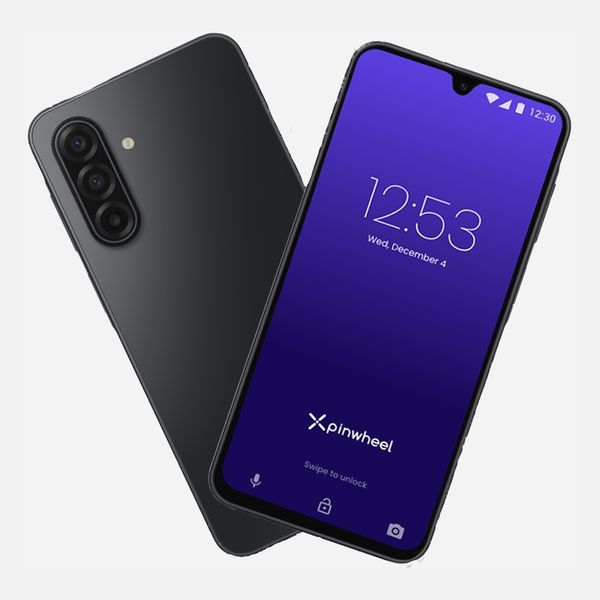
Social-media tops the list of parental concerns these days, and the Pinwheel phone addresses that head-on by blocking access to social media entirely. If you want to give your kids a phone but keep them off the internet and social, the Pinwheel Plus 6 may be for you and your family.
The Pinwheel phone is a Samsung Galaxy A17, running the Pinwheel OS, a heavily locked down, customized version of Android, without a web browser (missing by default; a parent can add it later) or access to social-media apps (which are blocked entirely and cannot be installed). Parents can choose to download any of the over 1,200 approved apps in the Pinwheel App Library, including mainstays like Spotify and DuoLingo, though adult apps, many games, and ad-driven apps are also blocked. There’s also a Pinwheel AI chatbot available, limited to kid-appropriate content.
Parents can schedule phone use, manage contacts and restrict phone and text message access (as your child ages, you can grant them access to group texts and let them manage their own contact lists), and track a child’s location (and get alerts when they leave or arrive). And you can monitor texts and call histories — you don’t get real-time alerts, but messages (even deleted texts) are preserved and you can read them later. Parents can also restrict their kids’ ability to send or receive images in text messages. And parents can grant access to apps from the Google Play Store when they feel their child is ready (though social-media apps will be blocked; there’s no way to lift that restriction).
Jennifer Kelman, a licensed clinical social worker and mother of twins, relies on Pinwheel’s contact restrictions — and appreciates how she’s been able to grant her kids the ability to manage their own lists. “The Pinwheel Plus allowed me to monitor them and then give them more leeway as they got older,” says Kelman.
Benjamin Chan, an industry analyst at ABI Research, likes Pinwheel’s regulated app store, scheduling, and contact management, along with the fact that a child’s phone can be managed by more than one caregiver, “allowing more eyes for approval when something gets flagged in its dashboard.”
The downside, Chan says, is that “without giving parents the option to regulate social-media content,” you can’t let your kids have access when they’re ready — you’ll have to switch to a different phone.
Pinwheel phones work with most major carriers, but to use a carrier other than the company’s own Pinwheel Wireless (which costs $29.99/month), you’ll need a $17.99 per month Pinwheel Caregiver Portal monthly subscription to manage the phone.
A more flexible Android phone with restrictions you can adjust as your kids get older
New! You can now save this product for later.
Bark Phone
Parental controls: app-store controls, time allowances,custom screen-time schedules,contact approval,website filtering,location tracking | Wireless plan and subscription costs: Requires Bark Wireless plan, Starter $29/month, Advanced $39/month | Management and compatibility: Android and iOS
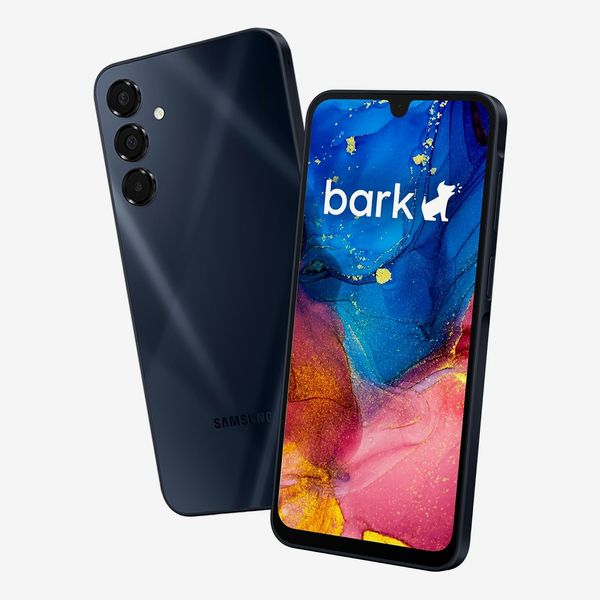
If Pinwheel’s on-or-off approach to social media feels too limiting or you want more insight into your child’s online behavior, Bark offers more alerts, the ability to fine-tune controls to match your child’s maturity, and offers its services in more packages than the competition.
Bark offers a wide range of parental-control products: There’s the Bark app, which runs on most iOS and Android phones; a Bark smartwatch with parental controls; and even a version of the Bark software that supervises your home network. The company’s main product these days is a line of phones (like Pinwheel’s offerings, these operate on a custom version of Android) that runs on its Bark Wireless network (the phone isn’t compatible with plans from other carriers, though there’s no contract required for the Bark plan). Parents can manage their child’s Bark phone from an Android or iOS device (they don’t need to use Bark’s plan; you can stay with your current carrier) using the the Bark Parent app.
You can choose from two Bark Wireless plans: The $29 per month Starter plan is talk and text only — no apps, no browser, and no social media. For more responsible or mature kids, the $39 per month Advanced plan allows parent-approved app installation and screen-time scheduling, with more granular control than you get from manufacturer parental-control features like Google’s Family Link or Apple’s Screen Time. Both plans include standard features like location tracking and content monitoring and the ability to disable the phone when it’s in a moving vehicle, plus alerts about concerning content or communications.
Billy Roach, an asset-protection specialist and father of two, takes advantage of the service’s ability to monitor text messages and social media. “It alerts me when it detects something concerning without requiring me to constantly read every conversation,” he says. “My goal is not to invade his privacy but to keep him safe, encourage responsible phone use, and allow him to have age-appropriate independence with reasonable parental supervision.”
Marc Berkman, co-founder and CEO of the Organization for Social Media Safety, likes that Bark issues “alerts for the social-media apps that teens actually use, especially TikTok and Snapchat.” And Dr. Matthew Leahy, a licensed psychologist who has worked with over 6,000 children and families for over 13 years as director of group programming at Momentous Institute, likes the granular control it gives parents to set limits on individual apps. “I think that is much more useful than simply saying, ‘You only get two hours on your phone.’ Not all screen time is equal,” he explains. “Twenty minutes texting a friend is different from two hours endlessly doomscrolling TikTok at midnight,” and that strict limits can be loosened as kids mature: “I think that’s how parenting should work. To me, that is the bigger psychological benefit.”
But if you’re an Apple household, your best bet is an entry-level iPhone
New! You can now save this product for later.
Parental controls: app-store controls, custom scheduling, contact approval, website filtering, location tracking | Wireless plan and subscription costs: No carrier restrictions; no subscription cost for parental controls | Management and compatibility: iOS only, no Android options
If you and your family are already iPhone users, an entry-level iPhone like the iPhone 17e offers surprisingly flexible parental controls via Screen Time out of the box at no additional cost, easy integration with the rest of the services you already use through Family Sharing (letting you sync calendars and reminders, photos, and Apple Music and TV), plus you can stay with the mobile plan you already use.
Built into iOS you will find a full suite of parental controls, so there’s no new app to learn or subscription to sign up for. Parents can manage who kids can communicate with and the apps they can access (including social media), limit the time their kids can spend online on an app-by-app basis or globally, and manage and limit contacts and filter websites. And Family Sharing lets you share content with anyone in your Family group and limit access for any child. Find My enables location tracking for the whole family, and age-appropriate settings are automatically enabled on the child’s smartphone by default when you create their Apple accounts.
D. Hughes, a business owner and father of three, says he uses the app-monitoring and the contact-management settings. “I set the phones up so only certain people can call them,” says Hughes. “Only relatives: me, their mother, their brother, aunts, uncles. They can receive calls or call them. That’s it.”
Henkell, who bought iPhones for both his teenage daughters, says the Ask to Buy function, which requires kids to ask permission to download apps, is particularly helpful. “It’s taught our girls to ask for and advocate for apps and not just randomly add everything,” he says.
Olga V. Mack uses Family Sharing and Screen Time controls and appreciates the ability to tailor settings to her kids’ changing needs. She does not configure every available control at its most restrictive setting. “We adjust the controls based on age, maturity, and the particular risk,” she explains. “Our 17-year-old has more independence than our 15-year-old, and both know which settings are active and why.”
According to Mack, the most useful feature about the iPhone 17e may be the visibility the system provides. “Screen Time reports can reveal patterns that are difficult to notice otherwise, such as late-night use or an unusual amount of time in one app,” says Mack. “We use that information as the beginning of a conversation, not as automatic proof that something is wrong.”
Our experts
- Marc Berkman, co-founder and CEO of consumer protection organization Organization for Social Media Safety
- Benjamin Chan, industry analyst at ABI Research
- Keith Henkell, director of information security at a large municipal health-care system and father of two
- D. Hughes, business owner and father of three
- Jennifer Kelman, licensed clinical social worker, parenting expert at JustAnswer, and mother of twins
- Dr. Matthew Leahy, licensed psychologist and director of group programming at Momentous Institute
- Olga V. Mack, CEO of TermScout and mother of two
- Dr. Tiffany Munzer, developmental behavioral pediatrician and digital-media researcher at University of Michigan
- Jill Murphy, chief content officer at Common Sense Media
- Billy Roach, asset-protection specialist and father of two
More From The Strategist
- Hark, the Advent Calendars Arrived (Very) Early This Year
- The Best Things Strategist Editors Have Bought This Year (So Far)
- 63 Things You Should Never Buy Full Price
- The Strategist Fall 100
The Strategist is designed to surface useful, expert recommendations for things to buy across the vast e-commerce landscape. Every product is independently selected by our team of editors, whom you can read about here. We update links when possible, but note that deals can expire and all prices are subject to change.