The Best Tablets for Kids
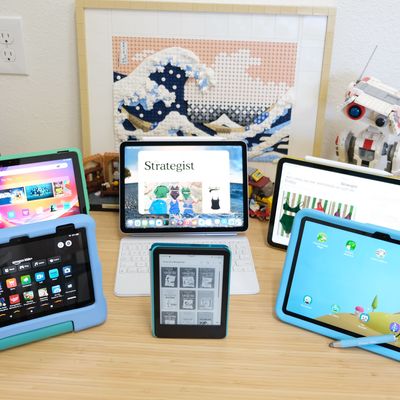
Shopping for a tablet for your kid can be confusing and downright stressful if you don’t know what you’re looking for. Who’s got the best content for children and the best parental controls? Do you go with Apple’s iPad just because it’s an iPad and that’s what you’re using? Or are Amazon’s Fire tablets more than enough to do the job? What if you’re an Android user and want nothing to do with Apple? Or vice versa?
In this article
For over 15 years now, I’ve used and tested dozens of tablets — spanning all of the major operating systems, content ecosystems, and parental-control setups — while raising my own three kids. And let’s be honest: The experience hasn’t all been good.
And so, for the last month, I drew on those years of real-life experience to put a select group of tablets through their paces to find the absolute best options for kids.
What we’re looking for
Operating system
The operating system on a tablet naturally dictates the overall experience for you and your child. Among mainstream tablets (meaning not dedicated toy tablets for kids), you have the choice between Apple’s iPadOS, Google’s Android, and Amazon’s Fire OS. All three have their own respective parental-control systems baked into the OS, making it easier for you to manage which apps can be installed and set time limits. (I’ll get more into parental controls in a minute.)
Apple’s iPadOS doesn’t offer a dedicated mode for kids. Google includes a Kids Space on its own Pixel Tablet (as well as other models), while Samsung’s tablets feature customized tools that transform the interface into a kid-friendly experience. The same can be said about Amazon’s Fire OS, which comes complete with curated content based on your kid’s age.
The type of phone you own will also be a factor in narrowing down your options based on the operating system, though this is more of an issue for those looking to get an iPad for their kids. Apple’s Screen Time tools can only be managed from an Apple device, whereas Android and Fire tablet users can use an app running on either Android or iOS or a dedicated website to adjust settings.
Parental controls
Each operating system has its own parental-control tools. Apple’s Screen Time is set for a big revamp this fall with the release of iPadOS 27, but in its current form, it gives parents near-total control over a child’s device. Time limits, app restrictions, and a bedtime mode that disables the device between set hours — along with more features — are all managed from the parent’s Apple device.
Amazon’s Kids+ service requires a subscription after the initial one-year trial that comes with every Kids edition Fire tablet or Kindle. With Kids+, your child gets a dedicated profile on the Amazon device, complete with curated access to content like books, games, apps, and videos based on their age. You can also set time limits and add or remove access to apps directly from the Parent Dashboard app.
Android’s Family Link service is Google’s parental-control offering for Android devices. Using the mobile app or website, you can pull all of the standard parental-control levers for app restrictions, app time limits, and schedules. Furthermore, Samsung Kids brings its own list of controls, many of which mirror Family Link, along with the added bonus of locking the interface in a kid-friendly design.
Kid-specific content
Google’s Play Store has a dedicated page that lists all teacher-approved apps and games.
Apple’s App Store also has a dedicated section for kids, with arguably the biggest app catalogue for children of all ages. Apple Arcade, a subscription service, gives you and your child unlimited access to hundreds of games with no ads or in-app purchases.
Amazon’s Fire and Kindle platforms include curated apps, videos, games, and books based on the age you select for your child during setup as part of their Kids+ subscription. One thing worth mentioning about Fire tablets and content is that you won’t find an official YouTube app available in Amazon’s Appstore. You can still access it through third-party apps and Amazon’s Silk browser, though.
Screen size
The screen size of a tablet really comes down to the size and weight you think your child can comfortably carry and use. The bigger the display, the bulkier the tablet will be. The screen sizes on our top picks range in size from six inches for a Kindle to 13 inches for the larger models of the iPad Air.
Display quality likely isn’t a factor when shopping for a kid’s tablet — they aren’t counting pixels or old enough to even care if a display panel is AMOLED, as long as the latest episode of Bluey can stream uninterrupted.
Storage
Storage is a major factor when it comes to traveling with kids — having enough space to download content ahead of time means you’ll make it through those flights and road trips without protest, and you won’t have to hunt down Wi-Fi as soon as you reach your destination.
Except for the Fire tablets on our list, all the tablets we selected come with a minimum of 128 GB of storage. The Fire tablets start at 32 GB but feature a microSD slot to expand that space (we recommend it since you can easily fill up that onboard storage with movies). Kindles with 16 GB of storage have more than enough space for thousands of books.
Apple’s iPad lineup forgoes a microSD card slot, but depending on the age of your kid, you can plug an external drive into the USB-C port to play downloaded videos that you own. But keep in mind that you can’t store games or download movies from streaming apps to an external drive.
To avoid constantly managing content and running into frequent “storage is full” messages, opting for a 256 GB model is a wise choice. Future you will definitely thank present you down the road.
Battery life
Battery life for nearly all tablets ranges from 10 to 18 hours, which is typically measured by either watching videos or browsing the web continuously. Longer battery life is something we can all agree is a good thing, but unless your child practically lives on their tablet or you’re taking some very long trips without the opportunity to charge, the current standard is more than likely good enough for most families.
Our top picks
New! You can now save this product for later.
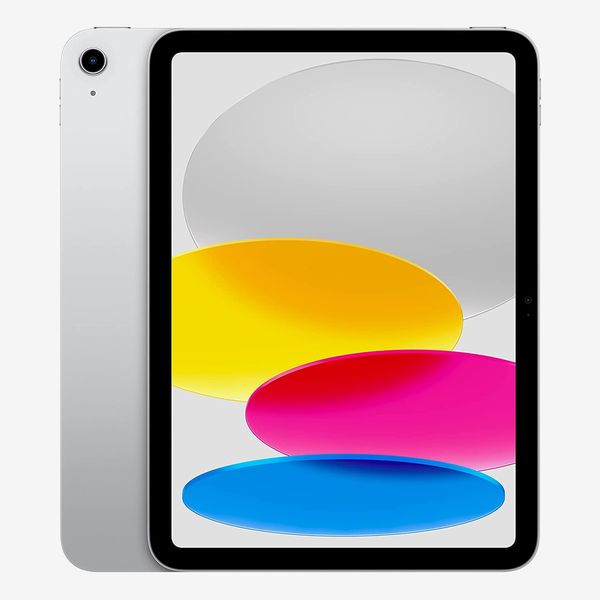
The best iPad for kids is the best kids' tablet overall and can grow with them.
New! You can now save this product for later.
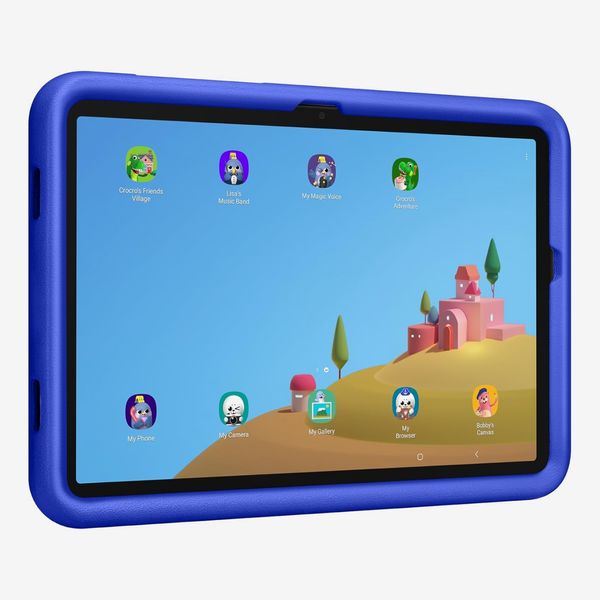
The Samsung's Galaxy Tab A11+ Kids Edition is the best Android tablet for children.
New! You can now save this product for later.
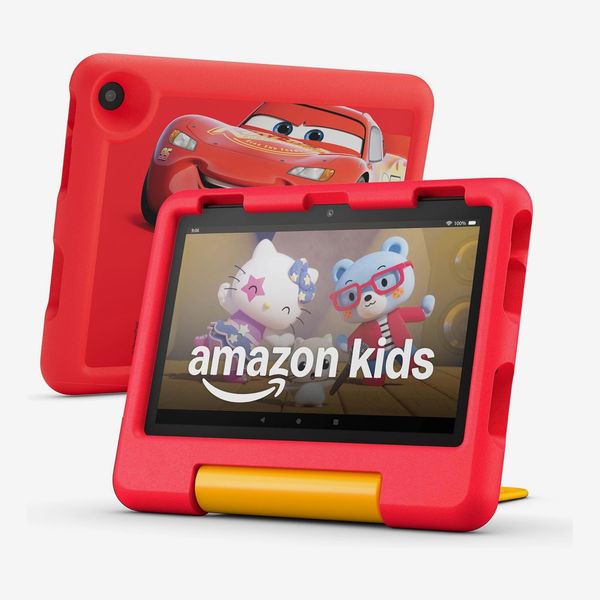
Amazon's Fire HD 8 Kids has everything the youngest kids need in a tablet.
The best tablet for kids overall
New! You can now save this product for later.
Operating system: iPadOS | Dedicated kids mode: No | Parental controls: Screen Time | Display: 11-inch, 2360-by-1640 | Storage: 128GB, 256GB, 512GB| External storage: No | Battery life: 10 hours | Cellular: 5G
We recently selected the base iPad as the best overall tablet because of its refined experience, reliable performance, large app library, and its reasonable price tag. For those very same reasons, along with deep parental controls, it’s also our pick as the best tablet for kids overall.
The 11th-generation iPad comes in four fun colors: silver, blue, pink, and yellow. The color isn’t a big deal if you’re planning on putting the iPad in a case, and you have plenty of great kid-friendly options, like the Speck Products CASE-E-RUN case or Belkin’s Toy Story 5 Lilypad case.
It’s equipped with an 11-inch display and weighs just over a pound before adding a case. In comparison, the Fire HD 10 Kids Pro weighs right at a pound and 1.45 pounds with the included case. Battery life is the lowest of the bunch, at ten hours of constant video playback. Storage options are 128 GB, 256 GB, and 512 GB.
The 128 GB model is likely plenty for a young child, but for older children, especially if you have an Apple Arcade subscription with access to hundreds of games, it’s going to fill up quickly.
If your primary device has an Apple logo on it, it’s a breeze to remotely manage all parental controls via Screen Time in the Settings app. If you’re not an Apple user, you can still use Screen Time to control your child’s usage habits, but you’ll need to do it directly on the tablet — just be sure to set a PIN code they can’t easily guess.
Unlike the Tab A11+ and Fire tablets, the iPad lacks any sort of dedicated child mode or even user profiles, which is one of my biggest gripes about getting an iPad for your child. It’s a frustrating omission, especially since a family tablet shouldn’t have to be locked to a single user profile when kids are young.
The best part about getting the iPad for a kid? It’ll grow alongside them. Not only is the App Store packed with age-appropriate apps, but you can add accessories like Apple’s Magic Keyboard Folio or nearly any Bluetooth keyboard and mouse for a laptop-like experience. The iPad also supports the Apple Pencil for sketching, interactive coloring-book apps, or practicing handwriting.
The best Android tablet for kids
New! You can now save this product for later.
Operating system: Android | Dedicated kids mode: Yes | Parental controls: Samsung Kids | Display: 11-inch (1920 x 1200) | Storage: 128GB | External storage: USB-C, microSD up to 2TB | Battery life: 15 hours | Cellular: No
Samsung’s Galaxy Tab A11+ Kids is a more affordable variant of our top pick for best Android tablet, the Galaxy Tab S11.
At the same price as Apple’s iPad, you get the tablet, a protective case with a handle that doubles as a kickstand, and a stylus that attaches to the case via the included tether.
It has an 11-inch display and weighs 1.1 pounds without the case or 1.6 pounds with the included case.
There’s only one storage option of 128 GB, but you can add a microSD card to increase storage up to 2 TB — and you can install apps, games, or download videos directly to it. Its 15-hour battery life leads the pack among all of the tablets we tested, which is sure to come in handy on long road trips or cross-country flights.
My favorite part of the A11+ Kids is that it’s a full-fledged tablet for parents, but with a single tap of the Kids app, it instantly transforms into an interface built specifically for young kids. There are fun animations and playful characters that randomly appear on the home screen, along with a curated set of apps your kid can download with just a tap. If an app isn’t directly available in Kids mode, you can download it using your Google account and make it available in the kid mode — it’s super easy.
You can set limits and see usage time within the Kids app. When the child is done, you simply enter your passcode or use facial recognition to return to the standard Android tablet experience.
When your child outgrows the playfulness of the Kids app, all of the same apps and content are available in the full-fledged Android experience, which you can control via Google’s Family Link.
The best tablet for young kids
New! You can now save this product for later.
Operating system: Fire OS | Dedicated kids mode: Yes | Parental controls: Kids+ | Display: 8-inch | Storage: 32GB, 64GB | External storage: microSD up to 1TB, USB-C | Battery life: 13 hours | Cellular: No
Amazon’s Fire tablet and Kindle lineups all offer Kids Edition variants, costing more than the standard models in exchange for including a case, a worry-free guarantee, and a subscription to Amazon’s Kids+.
The $149 Fire HD 8 Kids is designed specifically for kids ages 3 to 7. Its eight-inch display and total weight of 1.1 pounds with the included case make it the smallest and lightest of the lot I tested (not including the Kindle e-reader). Battery life is impressive, coming in at 13 hours.
The case has a built-in handle that doubles as a kickstand. It’s sturdy enough to offer ample protection, but in the event (or the inevitable reality) that your kid drops and breaks the screen, Amazon’s two-year Worry-Free Guarantee — which is included with every Kids Edition product — will replace the device free of charge. Amazon promises a no-questions-asked policy about how the damage happened.
You can get the Fire HD 8 Kids with either 32 GB or 64 GB of storage, which can be boosted up to 1 TB through a microSD card slot.
During initial setup of the Fire HD 8 Kids, you’ll sign in with your Amazon account and then create accounts for each child that will be using the tablet. After entering their name and age, Amazon will curate apps, games, videos, books, and even audiobooks for that age group. You can have multiple profiles, including one for yourself — each one with its own unique setup.
There are a couple of downsides to Amazon’s Kids Edition offerings. The biggest applies to all Fire tablets and the number of apps in Amazon’s Appstore. It’s nowhere near on par with the likes of Google and Apple. In fact, you won’t find a single Google app — like YouTube — in the Appstore. While the app selection is limited, there’s still plenty of kid-focused content available to entertain and educate your little one.
The second downside is that Kids+ is a subscription, currently priced at $5.99 a month for Prime members. Each Kids Edition device includes a year of access. That subscription is what gives you access to all curated content. You’ll have to manually add apps and other content you want them to have access to.
You don’t need a Kids+ subscription to access the Parental Dashboard app or website, which is what you’ll use to set time limits and schedules, create goals, and set age filters for apps.
If the Fire HD 8 Kids is too small, you can opt for the Fire HD 10 Kids and get everything included above, just in a bigger package.
The best tablet for older kids

New! You can now save this product for later.
Operating system: Fire OS | Dedicated kids mode: Yes | Parental controls: Kids+ | Display: 10.1-inch | Storage: 32GB | External storage: microSD up to 1TB, USB-C | Battery life: 13 hours | Cellular: No
The Fire HD 10 Kids Pro brings almost all the same features and the overall experience as the HD 8 Kids, but it’s designed with older kids in mind.
Giving an older child a small tablet with a case designed for younger kids won’t always go over well. For older kids, ages 6 to 12, with Amazon’s Kids Pro lineup, you get everything included with a standard Kids Edition model but with a smaller case.
Along with the smaller case, the entire experience has been tweaked with older kids in mind. The small picture-based buttons are replaced with a more standardized interface. The content, of course, is also curated for preteens.
The HD 10, as its name implies, has a 10.1-inch display, weighing 1.45 pounds with the case. I’d personally have zero issues putting a case like the one included with the HD 10 Kids Pro on my own tablet.
You’ll get the same benefits as with any Kids Edition device: a two-year Worry-Free Guarantee, a year of Kids+ included, curated content based on your child’s age, parental controls, and support for multiple profiles on the tablet. The same Appstore limitations also apply.
Battery life is 13 hours, with 32 GB of storage. Like the HD 8, you can use a microSD card to bump that up to 1 TB for apps and video storage.
There’s also a Fire HD 8 Kids Pro, if you or your child wants something more compact. It includes a slimmer case and all the same features as the HD 10 Kids Pro.
It’s hard to beat the deal that is any Fire tablet, be it a Kids or Kids Pro model. They’re great devices to test the waters with when it comes to both how much your child will use a tablet and if they’re responsible enough not to break it.
The best tablet for students

New! You can now save this product for later.
Apple iPad Air 11-inch (M4)
Operating system: iPadOS | Dedicated kids mode: No | Parental controls: Screen Time | Display: 11-inch or 13-inch | Storage: 128GB, 256GB, 512GB, 1TB | External storage: USB-C | Battery life: 10 hours | Cellular: Optional 5G
Apple’s iPad Air makes a big jump in price along with a big jump in performance. That’s not to say the base iPad’s performance is bad, but the iPad Air’s M4 processor is the same chip used in some of Apple’s Mac lineup. In a tablet, it’s impressively smooth and fast.
Storage options start at 128 GB and top out at 1 TB. You can connect an external drive to the USB-C port for easy access to files without taking up extra space on the device itself. Battery life sticks to the same ten hours as the standard iPad.
The iPad Air is available in two sizes — 11- or 13-inch — and comes in space gray, blue, purple, and starlight. It weighs nearly the same as the base iPad, but odds are if you’re getting this for an older kid to use for schoolwork, you’ll be adding a keyboard accessory such as Apple’s Magic Keyboard, which increases the overall weight to be on par with a MacBook.
You can even connect the iPad Air to an external display through the USB-C port, using both screens like you would a laptop in a similar setup — complete with resizable windows you can move between screens. In fact, those resizable windows work even when using the iPad Air sans an extra display, allowing you to multitask even if things get a little cramped on an 11-inch display.
Parental controls through Apple’s Screen Time are available, and the large app selection from the App Store is sure to make it easy for you and your kid to find the apps they want and are allowed to use.
The best e-reader for kids
New! You can now save this product for later.
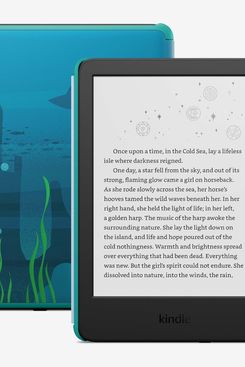
Operating system: Kindle firmware | Dedicated kids mode: Yes | Parental controls: Kids+ | Display: 7-inch (300 ppi) | Storage: 16GB | External storage: None | Battery life: 12 weeks | Cellular: No
For parents who want a device that will foster a love for reading and encourage a child’s imagination, Amazon’s Kindle Kids is a great choice. Unlike Amazon’s Fire tablets, which have a healthy selection of apps, games, videos, and books, the Kindle is limited to just books.
The Kindle Kids’ edition hardware is the base-model Kindle. It has a six-inch display, 16 GB of storage, and a battery life that lasts up to six weeks. That’s more than enough storage for thousands of books, and you’ll rarely have to worry about plugging it in.
Turning pages and browsing the included book library are a little slower compared to using the Kindle Paperwhite, but it gets the job done.
Because it’s a Kids’ Edition device, the same perks apply to the Kindle. It comes with your choice of three different cases and Amazon’s two-year worry-free guarantee to replace the device if it’s ever broken, no questions asked. You’ll also get access to books specifically selected for your child’s age.
The Parental Dashboard app lets you set time limits, give access to more books, and view your kid’s Kindle usage and reading habits.
The Kindle Kids is a no-fuss alternative to a standard entertainment-focused tablet while retaining the ability to keep your kid entertained. Need color? Amazon also has a Kindle Colorsoft Kids that features a seven-inch color display, a longer battery life, and better performance, though it costs about twice as much.
More From The Strategist
- Hark, the Advent Calendars Arrived (Very) Early This Year
- The Best Things Strategist Editors Have Bought This Year (So Far)
- 63 Things You Should Never Buy Full Price
- The Strategist Fall 100
The Strategist is designed to surface useful, expert recommendations for things to buy across the vast e-commerce landscape. Every product is independently selected by our team of editors, whom you can read about here. We update links when possible, but note that deals can expire and all prices are subject to change.